

When we started our business online, we felt the need to send regular email updates to our subscribers to keep them engaged and returning to our website. At that time, Mailchimp was the most talked-about application we came across, and it became our starting point. Alongside it, we also began to build a master list of Mailchimp alternatives, knowing that the landscape was broader and worth exploring.
Understanding the importance of proper email list management software, something that could handle subscriber updates, tips, and promotional content, we started evaluating tools that would allow us to design professional campaigns and enable automation. Mailchimp was front and center in those early conversations, but I have since seen how much the platform itself has shifted. Intuit, Mailchimp parent company, has admitted that usability and retention are pressing challenges, and they have moved automation behind paid plans while retiring their Classic Automation Builder. For me, this signaled that Mailchimp is in the middle of a reset rather than simply adding polish.

On the flip side, I do recognize some positive product moves, like stronger popup forms for lead capture and new integrations to unlock customer data. Still, as I compare my options today, I find myself looking at Mailchimp side by side with alternatives that feel more agile and more consistent in their product direction. For a growing business like ours, the choice is not just about brand familiarity, it is about usability, predictable automation, and a clear path forward. That’s why I have continued to evaluate Mailchimp alongside alternatives such as Klaviyo, ActiveCampaign, and Kit to determine which platform truly fits our engagement goals.
When I evaluate alternatives, I am essentially looking for three things that Mailchimp is struggling with right now:
- Smoother usability: I want workflows that just work without legacy friction.
- Predictable automation access: I do not want core lifecycle tools suddenly moving behind higher paywalls.
- Stable product direction: I’d rather bet on a platform with clear momentum instead of one that’s course correcting under the pressure of its parent company’s earnings calls.
All Alternatives in a Chart
Top 12 Best Mailchimp Alternatives to Use in 2026
I did a detailed analysis of each (read the details to the end), that led me to discover some cool in-built features coupled with promising price models. These tools seemed like the solution we were looking for, and we decided to try many of these at our end. Little did I know that it was going to be a long road. Based on my overall experience for a small business team, I have rated the alternative tools on a scale from 1 to 5 stars below:
| Tool | Ease of Use | Email Automation Features | Design and Customization | Integration Capabilities | Deliverability | List Management | Reporting and Analytics | Customer Support | Pricing and Scalability | Compliance and Security |
|---|---|---|---|---|---|---|---|---|---|---|
| MailerLite | ⭐⭐⭐⭐⭐ | ⭐⭐⭐⭐ | ⭐⭐⭐⭐⭐ | ⭐⭐⭐ | ⭐⭐⭐⭐⭐ | ⭐⭐⭐⭐⭐ | ⭐⭐⭐ | ⭐⭐⭐⭐⭐ | ⭐⭐⭐ | ⭐⭐⭐ |
| AWeber | ⭐⭐⭐⭐ | ⭐⭐⭐ | ⭐⭐ | ⭐⭐ | ⭐⭐⭐⭐⭐ | ⭐⭐ | ⭐⭐⭐ | ⭐⭐ | ⭐⭐⭐⭐ | ⭐⭐⭐⭐⭐ |
| HubSpot | ⭐⭐ | ⭐⭐⭐⭐⭐ | ⭐⭐⭐ | ⭐⭐⭐⭐ | ⭐⭐ | ⭐⭐⭐⭐ | ⭐⭐⭐⭐ | ⭐ | ⭐⭐ | ⭐⭐⭐⭐ |
| Moosend | ⭐⭐ | ⭐ | ⭐⭐⭐⭐ | ⭐⭐ | ⭐⭐⭐⭐⭐ | ⭐⭐⭐⭐ | ⭐⭐ | ⭐⭐ | ⭐⭐⭐ | ⭐⭐⭐ |
| Kit | ⭐⭐⭐⭐⭐ | ⭐⭐ | ⭐⭐⭐⭐ | ⭐⭐⭐⭐ | ⭐⭐⭐ | ⭐⭐⭐⭐ | ⭐⭐⭐⭐ | ⭐⭐ | ⭐⭐⭐ | ⭐⭐⭐⭐⭐ |
| GetResponse | ⭐⭐⭐⭐⭐ | ⭐⭐⭐ | ⭐⭐ | ⭐⭐⭐⭐⭐ | ⭐⭐ | ⭐⭐⭐⭐ | ⭐⭐⭐⭐⭐ | ⭐⭐⭐ | ⭐⭐⭐⭐ | ⭐⭐⭐⭐⭐ |
| Brevo | ⭐⭐⭐⭐ | ⭐⭐⭐ | ⭐ | ⭐⭐⭐ | ⭐⭐⭐⭐⭐ | ⭐ | ⭐⭐ | ⭐ | ⭐⭐⭐ | ⭐⭐⭐⭐⭐ |
| Omnisend | ⭐⭐⭐⭐ | ⭐⭐⭐⭐ | ⭐⭐⭐⭐⭐ | ⭐⭐⭐ | ⭐⭐⭐⭐ | ⭐⭐⭐⭐ | ⭐⭐⭐⭐ | ⭐⭐⭐⭐ | ⭐⭐⭐ | ⭐⭐⭐⭐ |
| Campayn | ⭐⭐ | ⭐⭐ | ⭐⭐ | ⭐⭐⭐⭐⭐ | ⭐⭐⭐ | ⭐⭐⭐⭐⭐ | ⭐⭐⭐ | ⭐⭐⭐⭐⭐ | ⭐ | ⭐⭐⭐⭐⭐ |
| Sendlane | ⭐⭐ | ⭐⭐⭐⭐⭐ | ⭐⭐ | ⭐⭐⭐ | ⭐⭐⭐⭐ | ⭐⭐ | ⭐⭐⭐⭐⭐ | ⭐⭐⭐ | ⭐⭐⭐⭐ | ⭐⭐⭐⭐⭐ |
| SendFox | ⭐⭐⭐⭐⭐ | ⭐ | ⭐⭐⭐⭐⭐ | ⭐⭐⭐ | ⭐ | ⭐⭐⭐ | ⭐⭐ | ⭐⭐⭐⭐ | ⭐⭐⭐⭐ | ⭐⭐⭐ |
| Constant Contact | ⭐⭐ | ⭐⭐⭐ | ⭐ | ⭐⭐⭐⭐ | ⭐⭐⭐⭐⭐ | ⭐ | ⭐⭐⭐⭐ | ⭐⭐⭐ | ⭐⭐ | ⭐⭐ |
| ActiveCampaign | ⭐⭐ | ⭐ | ⭐⭐⭐⭐ | ⭐⭐ | ⭐⭐⭐⭐⭐ | ⭐⭐⭐⭐ | ⭐⭐⭐ | ⭐ | ⭐⭐⭐ | ⭐⭐⭐⭐ |
About MailChimp
MailChimp – A Complete Email Marketing Solution for Newbie
Realizing the need for our own email marketing platform, our first choice was the simplest and most widely known tool: Mailchimp. Any beginner or startup discussion on email marketing often started and ended with Mailchimp because of its user-friendly design, speed, and extensive learning resources. Many praised its free edition, which offers 1,000 emails per month for up to 250 subscribers, covering all the basics.
For new bloggers, freelancers, or small teams, that limit works well. But as our subscriber list grew beyond 250, we upgraded to the Standard plan at $91.53 for 10,000 subscribers and 120,000 emails per month. Within three months our list jumped to 25,000, and costs rose quickly.
We enjoyed Mailchimp easy editors, landing page templates, pre-made emails, A/B testing, send-time optimization, mobile app, segmentation tools, and developer support. However, we noticed gaps for e-commerce marketers, especially in template variety and transactional email flexibility. While Mailchimp offered responsive designs, creating highly customized mobile templates still felt tricky compared to some alternatives.
Current Mailchimp Price Plans:
| Plan | Price | Monthly Email Sends | Automated Customer Journeys | Generative AI Features | Admin Users | Audiences | Role-based Access | Services & Support | Integrations | Email Marketing & Segmentation | Forms & Landing Pages | Creative Assistant | Email Scheduling | A/B Testing | Reporting & Analytics |
|---|---|---|---|---|---|---|---|---|---|---|---|---|---|---|---|
| Premium | Starts at $350/month* | 150,000 | Up to 200 journey points | Included | Unlimited | Unlimited | 5 Roles | Phone & Priority Support | 300+ | Yes | Yes | Limited | Yes | Yes | Yes |
| Standard | Free for 1 month, then starts at $20/month* | 6,000 | Up to 200 journey points | Included | 5 Seats | 5 Audiences | 4 Roles | 24/7 Email & Chat Support | Yes | Yes | Yes | Limited | Yes | Yes | Yes |
| Essentials | Free for 1 month, then starts at $13/month* | 5,000 | Up to 4 journey points | Not available | 3 Seats | 3 Audiences | 2 Roles | 24/7 Email & Chat Support | Yes | Limited | Yes | Limited | Yes | Limited | Limited |
| Free | $0/month* | 500 | Beta | Not available | 1 Seat | 1 Audience | Not specified | Email support for first 30 days | Yes | Limited | Limited | Limited | Limited | Not specified | Limited |
Finally, while calculating the ROI of the email campaigns with MailChimp we severely failed to meet expectations and finally stopped using it’s Essentials plan. So, now we had to start looking for a Mailchimp cheaper alternatives.
Beginning February 17, 2026, MailChimp Free plan for existing customers now include updated limits: up to 250 contacts, a maximum of 500 email sends per month, and a daily sending cap of 250 emails.
Beyond Mailchimp
Understanding Mailchimp and Drawbacks
Mailchimp may have started as just an email automation tool, but over time it has grown into a complete all-in-one marketing service with CRM capabilities. For me, this was a boon because the CRM allowed me to pull all my contacts into one place, study their patterns, and plan more personalized outreach. It was not just about email anymore, I could also reached my audience through social media ads and track how different channels tied together. Audience dashboard became central, showing segments by tags, customer lifetime value, and sources of growth, which helped me send the right message at the right time.
Most impressive addition recently has been the Content Optimizer, now powered by ChatGPT technology. It feels almost like having Grammarly inside Mailchimp, but more advanced. It not only checks readability and grammar but also reviews calls to action, visuals, layout, and even compares them with top-performing campaigns in my industry. That level of insight makes it much easier to tweak campaigns before sending them out.

I also noticed how much performance has improved. Mailchimp claims dynamic content emails perform 26% better than static ones, abandoned cart emails recover up to 15% of lost revenue, and overall campaign open rates are now close to 38%. These numbers are hard to ignore and they do reflect in practice, the more I leaned on automation and AI-driven suggestions, the better my campaigns performed.
Still, the one concern that has not gone away is pricing. As our subscriber list grew, the cost of customer engagement rose quickly. We managed it by segmenting carefully and optimizing campaigns, but at a certain point I had to ask myself whether Mailchimp was the most cost-effective choice. That is when I started looking at alternatives that might offer similar intelligence and flexibility without the same price pressure.
This table summarize the disadvantages of using Mailchimp across various parameters, gathered from reviews analysis:
| Parameter | Drawbacks and Disadvantages of Mailchimp |
|---|---|
| Cost | Pricing increases rapidly with contact list size and advanced features; expensive for large lists. |
| Customization | Limited email template customization; restrictive design options compared to competitors. |
| Automation | Automation features are basic in lower-tier plans; advanced automation options are limited and complex. |
| Integration | Limited integration capabilities with certain third-party tools, particularly in lower-tier plans. |
| Scalability | Not well-suited for very large enterprises; can become expensive and cumbersome to scale effectively. |
| Learning Curve | Steep learning curve for advanced features; not always intuitive for beginners. |
| Reporting | Basic analytics and reporting in lower-tier plans; lacks in-depth insights for advanced users. |
| Support | Limited customer support, especially for free and lower-tier plans; premium support is costly. |
| Deliverability | Occasional issues with email deliverability; some users report emails going to spam or not reaching recipients. |
| Template Variety | Limited variety of email templates; outdated designs and lack of flexibility in customization. |
| Data Storage Limits | Storage for contacts and other data can be limited, requiring additional costs for larger databases. |
| Segmentation | Segmentation capabilities are basic; advanced segmentation is complex and requires higher-tier plans. |
| Flexibility | Limited flexibility in managing complex marketing campaigns; rigid workflows for advanced users. |
| Feature Overload | Can be overwhelming for small businesses with too many features that may not be necessary. |
| GDPR Compliance | Some users find GDPR compliance tools within Mailchimp challenging to set up and maintain. |
| Multi-Channel Support | Limited multi-channel marketing support; primarily focused on email with basic options for other channels. |
16 Best Alternatives
Here are Best Mailchimp alternatives in 2026:
1. MailerLite – Best-selling Alternative to Mailchimp
MailChimp vs MailerLite – The 2x Cheaper
When we started looking for a Mailchimp alternative Mailerlite caught our eye. MailerLite free plan allows sending 12,000 emails per month and 1000 subscribers. After we were failing to meet expectations with Mailchimp and kept a check with our email marketing budget until now we had tried many alternatives.
In the first impression when we looked at the price, we were quite surprised as it is one of the best Mailchimp alternatives with lots of features and email tools. We took a look at the Demo of the visual email editor, I assumed that it is cheap because it might have a low email delivery rate.
Below are the pictures of MailChimp Standard and MailerLite Comfort pricing that will help you with price comparisons. We had to select MailChimp Standard plan because, we were using the Dynamic Emails feature and it was available in MailChimp Standard and MailerLite Comfort plans.
| Subscribers | MailChimp Standard vs | Mailerlite Comfort |
|---|---|---|
| Upto 250 | Free | Free |
| Upto 1000 | $46.37 /mo | Free / $10 /mo |
| Upto 5000 | $69.85 /mo | $32 /mo |
| Upto 10000 | $91.35 /mo | $54 /mo |
| Upto 15000 | $146.93 /mo | $87 /mo |
| Upto 20000 | $174.62 /mo | $119 /mo |
| Upto 25000 | $204.73 /mo | $139 /mo |
| Upto 30000 | $234.84 /mo | $159 /mo |
As I explored its features in detail, I got to know the real reason behind the low price – their team said, they have kept the price low because they mostly dealt with large volume email marketing for enterprises and they have not made the product clamped up with features which very few marketers use.
This helped them to keep application affordable and reliable at a cheap price.
After this, I checked the testimonials, where they mention more than 40,000 happy customers. They included some of the best online marketers and they were all real testimonials!
Convinced with the insight, I went ahead and signed up for this Mailchimp alternative- MailerLite Trial Account, which gave me access to send email to 250 subscribed email addresses along with A / B testing, drag and drop web forms, email automation tools, email campaign templates for a small business like us.
After a few hours, I checked the report and the result was jaw-dropping- 55% Open Rate! Usually, this master list of 1,000 email addresses on Mailchimp also had an opening rate of around 60%. So, looking at the number I was completely satisfied and went ahead taking a MailerLite Comfort account for 30,000 Subscribers.
Checkout the below Reddit comment about Mailchimp billing practices.

For these 30,000 subscribers on MailerLite Comfort Plan, I had to shell out $1668 Only for a Year to send out 3,60,000 emails per month! The tool is also a great good for beginners.
Price Check: The price is exactly 2 times cheaper than what we were spending on the Mailchimp Pro account for a month!
Now we are quite satisfied with the features and the services provided by MailerLite. The one best feature which can compete is their visual ‘drag and drop email Newsletter Editor‘, which is quite simple to use, beautiful, and very lightweight perfect if you’re a small business. Overall you get wonderful control over creating your beautiful newsletters. Also, they keep updating their template repository based on the popular categories and searches. Some of their current email templates are:
- E-commerce
- Deals and offers
- Blogs and updates
- Events
- Photography
- Notifications
Along with this, MailerLite also gives default email templates to play within the email builder. The only thing that i didn’t really liked was that you do not get template access for the free plan.
Some more features worth exploring also included drip email Autoresponders, A / B testing, email automation tools, email list segments, unsubscribe page builder, landing pages combined with Webform & popup forms which we regularly use to send email newsletter, step-by-step for every new subscriber that we capture.
File manager feature was also very useful as it helped us to organize our images for our different email campaigns.
In Mailchimp, we were also using Segments Feature under the mailing lists of opt-in email subscribers, which gave us the flexibility to filter those who were not opening our marketing emails. Yes, the same feature is also present in MailerLite, which you can use quite frequently for effective subscriber list management. You can remove inactive subscribers through MailerLite segments.
You can add videos and gifs to your email templates, add more account users and teammates in your own MailerLite account. Add GDPR consent forms and checkboxes for permission compliant subscriber acquisition.
At any point when you are done with the email marketing campaign you can also use Email Campaign Report to Track everything including opens, clicks, unsubscribes, spam complaints, bounces, link activity, reading environment and much more.

We started using RSS campaign feature of the tool which enables us to send automated RSS feed campaigns for our blog posts to our opt-in subscribers automatically. No doubt this feature again is very simple to use, user friendly and have very setup to complete and get started. This is an alternative feature comparison from MailChimp which takes a big leap in favour of MailerLite. You can always connect with customer support if you are stuck.
Hope, this guide will help you get the right software that provides you with impressive Email campaign templates at an Affordable price.
You can check and try out MailerLite – The Mailchimp Cheaper Alternative from here.

MailerLite has also added the ability to create landing pages through a drag and drop editor. Through this, you can easily create E-Course, Invite, Webinar, Coming soon, Lead Generation, Product, E-book landing pages without any coding skill!

Other than these latest updates, MailerLite also added some of the useful features like Auto Resend message, email preference center, Automation workflows, Automation templates, A/B test for automation workflows, multiple trigger for automation campaigns, PrestaShop & BigCommerce integration, A/B test for forms, new features on website and MailerLite landing pages, Click Maps in campaign reports, and RSS email campaigns for ecommerce, D2C business, publishers and bloggers.

Don’t forget to tryout the brand new AI based Email Editor. MailerLite new features are a significant upgrade to their email marketing suite. Here’s a brief:
- Revamped Drag & Drop Editor: The new editor offers a user-friendly, intuitive interface with easy-to-locate blocks. It streamlines the newsletter creation process and is designed to be simple yet effective.
- AI-Powered Writing Assistant: Based on GPT technology from OpenAI, this feature generate relevant and engaging content based on a brief description of the desired topic. It can help with headlines, product descriptions, and even full newsletters, saving time and effort.
- Faster Email Creation: The AI assistant dramatically speed up the email writing process, a boon for large businesses and solo entrepreneurs alike.

- Conversion Rate Boost: With the right prompts, the AI assistant generate personalized and optimized product descriptions that resonate with the target audience, helping to improve conversion rates.
- Multilingual Content Generation: The AI assistant generate content in various languages, which is incredibly useful for businesses entering new markets. It localize the content, accounting for cultural nuances.
- Innovative Content Ideas: The AI assistant provide fresh content ideas and suggestions, enriching the newsletter content and sparking creativity.
Update: MailerLite has announced new prices for the subscriber limit. It can be found here.
So, the existing paid customer can still access the old pricing structure; also, if you plan to upgrade your MailerLite plan to paid one now, then, you will continue to get the existing (reduced) pricing for a lifetime.
Below is a screenshot of the annual pricing plans offered by MailerLite when I select 1000 subscribers.
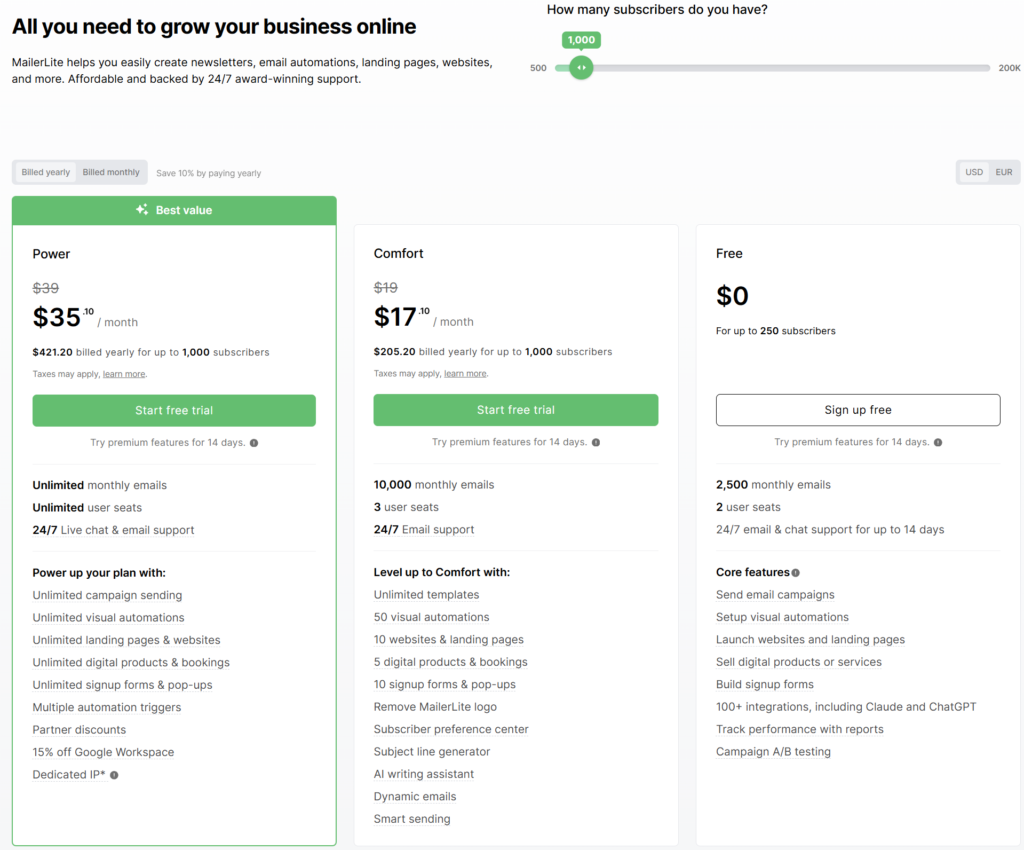
To view the full revised pricing list visit here. You can also join their Facebook social media community from here. Let me do a side to side comparison of the major parameters:
Overall Mailerlite vs Mailchimp feature comparison:
| Limited Parameters | Mailchimp vs | Mailerlite |
|---|---|---|
| Ease of use | While using Mailchimp I found some functions are hard to find. There is a scope of being more intuitive. | Mailerlite is very user-friendly and has overall a better UI. |
| Design and flexibility | 100+ email templates to choose from. You can customize them as needed. Only 8 templates in the free plan. | 62 templates that are really good and easy to customize. No email templates are available in the free plan. |
| List management | List management is not flexible. You cannot add contacts to different lists of the same campaign. As you pay per contact if there are repeated emails in two lists you pay extra. | Mailerlite is super easy to manage lists. You can remove subscribers through automation. One email is always counted as one no matter how many times it appears. |
| Email automation | Wide range of automation triggers but you need to be on their standard or higher paid plans. Scope for complex automation but at a higher price. | Limited range of automations but very simple to use. Automations are available on the free plan. |
| Deliverability | Mailchimp doesn’t score very well in this sector and comes with 86% | Amongst several providers, MailerLite tops the list with 96%. |
| Reporting features | Integrates directly with Google analytics. Social media stats and other details such as opens, clicks, unsubscribes. etc, More in-depth analytics. | Offers basic reporting features such as open, clicks, unsubscribes, etc. Lacks social media statistics. |
| Pricing | MailChimp free plan includes: 1.) 250 contacts 2.) 8 free templates 3.) 500 emails | Mailerlite free plan includes: 1.) 250 contacts 2.) All templates 3.) 2500 emails |
When should you choose Mailchimp?
- Your business is slowly expanding and is not small anymore.
- You need complex automations and in-depth reporting features.
- You also don’t need affiliate marketing.
When should you choose Mailerlite?
- You are not-so big business and are looking for a lightweight email automation tool.
- One biggest point that makes Mailerlite a popular tool is the price. You get a feature packet tool at an affordable price.
- It is the perfect balance between simplicity and efficiency.
Comparative Analysis: MailerLite vs. MailChimp
| Parameters | Mailchimp vs | Mailerlite |
|---|---|---|
| What is good? | Huge template repository | Affordable and easy to use The email templates are more professional |
| What is not good? | No email automation features in the free plan. For complex needs, it is bulky and expensive. No support for affiliate marketing. | Not very powerful for reporting and automation in free plan |
| Best for | New startup and business | E-commerce, agencies, and product-based businesses |
| Pricing | Standard plan starts at $46.37/mo for 500 Subscribers | Comfort plan starts at $17/mo for 2500 Subscribers |
2. Hubspot Marketing Hub
HubSpot Marketing Hub stands out as a robust all-in-one marketing platform designed to align with inbound marketing strategies. Unlike MailChimp, which primarily focuses on email marketing, HubSpot offers a comprehensive suite of tools that enhance every aspect of marketing automation, customer relationship management, and content management.

Unique Features HubSpot Marketing Hub:
- CRM Integration: Seamlessly integrates with HubSpot’s own CRM platform, enabling deeper insights into customer interactions and a unified approach to managing customer journeys.
- Content Optimization: Offers advanced tools for SEO recommendations, content strategy insights, and blog post optimization directly within the platform.
- Automation and Personalization: Beyond email, it automates social media posts, ad campaigns, and even website chatbots, with extensive personalization based on user behavior and data.
Comparative Analysis: HubSpot Marketing Hub vs. MailChimp:
| Parameters | HubSpot Marketing Hub vs | MailChimp |
|---|---|---|
| What is Good? | Extensive tools across marketing channels, deep integration with sales and services tools | User-friendly, great for straightforward email marketing campaigns |
| What is Not Good? | Higher cost, can be complex to fully utilize without training | Limited CRM and automation capabilities outside of email |
| Best For | Businesses looking for comprehensive marketing automation and CRM solutions | Small businesses and marketers focusing primarily on email |
| Pricing | Starts from a free plan to enterprise levels, pricing can be steep as features scale up | Generally more affordable, offers a free tier suitable for startups |
3. AWeber
MailChimp vs AWeber – Offers a free plan with 500 subscribers
AWeber is another robust brand and one of the powerful email marketing platforms that you should know. It offers a free plan for up to 500 subscribers and 3000 emails per month.
The paid annual plan, Aweber Plus starts at $20 per month for 500 contacts where you get all the features in the free plan and several others. The pricing is a pay-as-you-go model above 500 contacts.
Although this plan gave us the independence of sending as many campaigns as we wanted, our increasing list made Aweber an expensive option again.

I should mention here that we used Aweber only because they are robust and well known for their mailing lists management, keeping email lists separate from each other, auto-responder, landing page templates and builder, stock photos, smart email designer, email template library, subscriber lead generation form, contact tagging features, test email campaign.
The one thing that confused me a bit while using Aweber was the different terminology that they have deployed. For instance, I was searching automations and it was called campaigns. Aweber also accept small businesses including internet marketers and affiliate marketers as their user and customer.
Aweber interface is easy to get started within a couple of minutes and the Aweber support team provides great support in onboarding new staff through live chat and phone call in the US markets. If as a marketer your mind is moving towards trying AWeber then it is not a bad option. It also offers building Ecommerce stores under Paid plans.
When should you choose AWeber?
- You need good support
- You run an ecommerce store
- You need a very simple email marketing tool
Comparative Analysis: Aweber vs. MailChimp
| Parameters | Mailchimp vs | Aweber |
|---|---|---|
| What is good? | Huge template repository | Provides Canva integration Caters to the needs of small businesses. |
| What is not good? | Becomes expensive as your subscribers increase | Very basic features for the price |
| Best for | Startup and New Business | Small-sized businesses |
| Pricing | Standard plan starts at $46.37/mo for 2500 Subscribers | Plus plan starts at $30/mo for 2500 Subscribers |
4. Klaviyo – For E-commerce Business
Klaviyo is a powerful email and SMS marketing platform, well-known for its data-driven approach and integration capabilities, especially with e-commerce platforms. It offers distinct advantages over MailChimp, particularly in its ability to harness customer data for highly targeted, personalized marketing campaigns.

Unique Features:
- E-commerce Integration: Exceptionally strong integration with e-commerce systems like Shopify and WooCommerce, enabling users to leverage customer data directly from their online stores.
- Segmentation and Personalization: Advanced segmentation capabilities that allow for highly customized email and SMS campaigns based on detailed customer behaviors and preferences.
- Automated Workflows: Klaviyo excels in automated workflow creation, enabling marketers to craft sophisticated, trigger-based campaigns that respond dynamically to customer interactions.
Comparative Analysis: Klaviyo vs. MailChimp
| Parameters | Klaviyo | MailChimp |
|---|---|---|
| What is Good? | Superior integration with e-commerce, advanced segmentation, and personalization | Intuitive interface, ideal for basic email marketing needs |
| What is Not Good? | Can be pricier, especially as contact lists grow | Less sophisticated automation and segmentation features |
| Best For | E-commerce businesses looking for detailed analytics and targeted marketing strategies | Small businesses or startups needing simple, effective tools |
| Pricing | Based on the number of contacts and messages, tends to be higher than MailChimp | More budget-friendly with a free tier for basic email marketing |
Klaviyo is best suited for businesses that require deep data insights and robust integration with their e-commerce platforms, offering tailored marketing automation that drives conversions.
5. Moosend
Mailchimp vs Moosend – Free Trial Plan for 30 Days

Moosend is easy on the pocket and an ideal email marketing software brand for businesses who are looking for affordable options.
Moosend saw an increase in its popularity in Sept 2021 when it was acquired by Sitecore – an American software company. Now let us see what Moosend offers when compared to Mailchimp. Moosend is a comparatively cheaper mailchimp alternative . Moosend offers a free plan and the paid plan starts at $9 for up to 500 contacts. On the other hand, Mailchimp will cost you $50 for the same number of contacts.
Then pay as you go above the contact subscribers limits.
When it comes to ease of use then it is definitely easy to use but when I was working with the email editor I found it to be slow sometimes. For instance when I was trying to add elements in the drag and drop email builder I encountered delays. The visual automation workflow functionality and well-tailored email builders of Moosend are more advanced and easier to use. The files manager, in-depth email reports, and stats all are well designed.
They also provide pre-built email templates specifically for customer engagement, re-engagement, weather-based automation, and a lot more.

Moosend suit is on an average 30% cheaper than klaviyo, making it easily the most affordable alternative. The Moosend platform has beautiful emails, powerful drag and drop email editors, easy-to-use signup forms, email list segmentation, email list management, landing pages site, real-time analytics, and integrations with developer & API support.
The Moosend customer support has a wide range of knowledge base, tutorials, videos, webinar recordings, and their team support through multiple channels including email/live chat/phone. All of this makes you use this tool easily.
Let us have side by side comparison of these two tools:
| Parameters | Mailchimp vs | Moosend |
|---|---|---|
| Ease of use | Mailchimp is easy to set up. You just need to fill out the form and you are good to go. | Moosend is easy to use but their drag and drop is slightly glitchy. |
| Design and flexibility | 100+ email templates to choose from. You can customize them as needed. Only 8 templates in the free plan. | The marketing automation templates are excellent. They offer 70+ free email templates. |
| List management | List management is not flexible. You cannot add contacts to different lists of the same campaign. Paying for duplicates is another problem that Mailchimp users often face. | Import contacts from Excel , .csv, .txt, copy-paste, and even Google contacts. You can easily delete contacts and segment them based on links clicked, campaigns opened, etc. |
| Email automation | Wide range of automation triggers but you need to be on their standard or higher paid plans. Scope for complex automation but at a higher price. | Create a campaign using criteria such as anniversary, abandoned cart, weather-based, upsell/cross-sell and repeat purchase reminder. You can easily create advanced workflows with its visual automation builder. |
| Deliverability | Mailchimp doesn’t score very well in this sector and comes with 86% | Moosend has an average delivery rate of 88%. |
| Reporting features | a.) In-depth analytics is helpful for small to mid-sized businesses. b.) Google analytics integration is also helpful. c.) Social media stats | a.) Reporting is very well designed and is easy to understand. b.) Provides all the basic performance info such as openers, bounces, and clicks. c.) Also, supports the data from Google Analytics. |
| Pricing | Malchimp free plan includes: 1.) 500 contacts 2.) 8 free templates 3.) 2500 emails | Moosend offers a free trial for 30 days where you can try all their features. |
When should you choose Moosend?
- Very cost-effective for small businesses and entrepreneurs.
- The reporting is very detailed and nothing less than as compared to other expensive tools.
Comparative Analysis: Moosend vs. MailChimp
| Parameters | Mailchimp vs | Moosend |
|---|---|---|
| What is good? | Huge template repository | Caters to small businesses and entrepreneurs. Powerful features at a reasonable price. |
| What is not good? | Becomes expensive as your subscribers increase. | Moosend is not an all in one marketing solution Limited integrations and sign-up forms are basic. |
| Best for | E-commerce and agencies | Small-sized businesses |
| Pricing | Paid plan starts at $9.27/mo | Paid plan starts @ $9/mo |
6. Kit
Mailchimp vs Kit- $79 for 5000 subscribers
Kit offer free plan with 1000 subscribers management.
Kit might come as a little expensive alternative to Mailchimp and not amongst the best Mailchimp competitors, but the wide range of landing page builder features, advanced automation workflows builder, a/b testing, segmentation, personalized emails, email tags, email delivery testing options, lead magnet popups and form features of this tool is better as it helps you capture more lead.

Kit platform is perfect and an excellent value for money option for bloggers, freelancers, affiliates, marketing experts and content creators. It has complete WordPress integration plugin. You can send your targeted content at the right time using this email marketing automation and improve conversions. It also acquired FanBridge email marketing tool and now focus on creating email platform for music creators and musicians.
It doesn’t have a drag and drop editor as it claims that simple emails perform better. It provides you with a lot of landing page templates.
The advanced segmentation, contact tagging system, and subscriber management that Kit offers are fantastic, and the analytics are quite detailed.
Premium paid plans start at $79 for 5000 subscribers tier. Kit social media community to join is available here.
You can also become a part of an affiliate marketing program that Kit offers and earn 30% commission for every new creator you bring on board.
Customer support service is available through email and support tickets.
| Parameters | Mailchimp vs | Kit |
|---|---|---|
| Ease of use | Mailchimp is easy to set up. You just need to fill out the form and you are good to go. | Kit is easy to use given its limited features. Doesn’t offer a drag and drop editor. |
| Design and flexibility | 100+ email templates to choose from. You can customize them as needed. Only 8 templates in the free plan. | Kit isn’t a design-focused platform. Very limited design options that are mainly text-based. |
| List management | List management is not flexible. You cannot add contacts to different lists of the same campaign. Paying for duplicates is another problem that Mailchimp users often face. | Kit doesn’t offer you the option of creating lists. All your contacts go in one place. The method is very straightforward. You have the option to assign them to different tags or create segments if needed. |
| Email automation | Wide range of automation triggers but you need to be on their standard or higher paid plans. Scope for complex automation but at a higher price. | Offers a visual automation feature where you can design the automation workflow. Plenty of automation available similar to Mailchimp. |
| Deliverability | Mailchimp doesn’t score very well in this sector and comes with 86% | Kit has a good delivery rate of 94%. |
| Reporting features | In-depth analytics is helpful for small to mid-sized businesses. Google analytics integration is also helpful. Social media stats | Provides all the basic performance info such as open rates, unsubscribed, and clicks and that’s it. Very very basic reporting options. |
| Pricing | Mailchimp free plan includes: 1.) 500 contacts 2.) 8 free templates 3.) 1000 emails | Kit free plan offers 1000 subscribers and send unlimited emails. |
When should you choose Kit?
- Want to create specific targeted campaigns.
- Sell digital products.
Comparative Analysis: Kit vs. MailChimp
| Parameters | Mailchimp vs | kit |
|---|---|---|
| What is good? | Huge template repository | Kit is known for its powerful automation and segmentation features. |
| What is not good? | Becomes expensive as your subscribers increase. | Reporting and the newsletter services are not as good as other similar tools. |
| Best for | E-commerce and agencies | Small-sized businesses |
| Pricing | Paid plan starts at $13.85/mo | Paid plan starts @ $15/mo |
7. GetResponse
Mailchimp vs GetResponse– $15 for 1000 subscribers
GetResponse is another value for money MailChimp alternative that is all in one marketing platform, it offers email automation, landing page builder, popups form, multiple device friendly emails, webinars integration, advertising, prospect nurturing, built-in CRM and power-packed advanced features for automation, including Getresponse dev APIs and reporting tools.
GetResponse platform list segmentation is intelligent and better than most of the tools in the email marketing industry. When it comes to boasting of advanced features then Getresponse never disappoints and every business can benefit from it.
GetResponse offers conversion funnels and landing page features which is a great plus for ecommerce companies. As it helps to reach your target audience in a better way.

With the help of this interesting feature, you can create automated email sales funnel for a myriad of areas of your business and work on your conversion rates.
The email personalization, integration with website and stores, magento user tracking, cookies based users tracking, SMS and wordpress integrations, access to reports and email stats are useful for the GetResponse subscribers.
Another thing that is highly appreciated for GetResponse platform is its competitive pricing options, making it a great tool for email marketing and automation. You also get to create entire webinars with this tool.
Getresponse does offer a free plan forever now. This free plan includes an email marketing tool, website builder, landing page builder, and forms for subscribers upto 2000.
Nonprofit and enterprise plans are high selling with non-compromising customer service.
GetResponse has recently launched a forever free plan which can help businesses and entrepreneurs to move their business online. Going online is a necessity for businesses in today’s date and for businesses that are just starting out do not have enough capital to invest in expensive paid plans of the software tools and marketing automation platform.
Given that GetResponse has decided to offer a forever free plan instead of paid plans.

Features included in GetResponse Free forever plan :
Free GetResponse Website Builder:
- Build one website with up to 10 page with the help of the AI-creator or choose from the 300 industry template repository.
- 5GB bandwidth per month
- Connect a domain or use a free option
Free GetResponse Lead Generation Software:
- Build and host 1 landing page
- Signup and contact forms to get leads for your business
- Store up to 500 contacts
Free GetResponse Email Marketing Software:
- Unlimited emails for your contacts
- Drag-and-drop creator to build emails
- Access to a rich repository of predesigned email templates
Comparative Analysis: Getresponse vs. MailChimp
| Parameters | Mailchimp vs | Getresponse |
|---|---|---|
| What is good? | Huge template repository | A tool that specializes in advanced segmentation and features. Great for e-commerce. |
| What is not good? | Becomes expensive as your subscribers increase. | The list segmentation is slightly less polished. |
| Best for | E-commerce and agencies | Businesses need advanced segmentation capabilities. |
| Pricing | Paid plan starts at $30.99/mo | The paid plans start at $15/mo |
8. Brevo
Brevo’s free plan offers 300 emails per day and unlimited contacts.
Brevo ( read a detailed review of Brevo ) is one of the smart Mailchimp alternatives, which places itself as an all-in-one email solution for small businesses which provides email and sms messages for email marketing campaigns including transaction and marketing automation. More features offered by Brevo like Sign up Forms, exit intent popups, Landing Pages with drag and drop editor, Facebook Ads, Retargeting, A / B Testing, transactional emails, sales CRM and live chat messenger support make it a great option.

In short, Brevo will allow you to send beautiful emails without a fuss. The best feature about Brevo automation tools is that they charge you based on the number of emails sent and with a free plan you can send 300 emails per day. Brevo also provides access to longer support even for their free plan. Apart from English Brevo application is also available in other languages including Français, Español, Português, Italiano, Deutsch.
Getting started with a free Brevo plan and with the ability to add unlimited contacts you can send 1000 emails/day and 40,000 emails at costs of $25 per month; they are big pros over Mailchimp.
For the transactional emails; Brevo charges based on the emails you sent which doesn’t mean that it is expensive.
On a side note, Brevo is quite popular so you can find plenty of knowledge base and resources to help you get begun with it. It offers plenty of customization options for different types of companies and the pricing model is also good enough. APIs, WordPress plugin, Magento and Prestashop plugins, fast support, reliable esps feature are unique.
Brevo update: Brevo has acquired three e-commerce marketing companies for a total worth of $47 billion that are :
- Chatra – US-based live chat messenger app
- Pushowl – a push notification app for ecommerce stores based out of Bangalore
- Metrilo – Bulgaria based customer analytics and intelligent marketing platform
With the acquisitions of these powerful e-commerce marketing tools, Brevo plans to become a wholesome e-commerce marketing product for SMBs.
In addition, it will help Brevo scale its existing marketing capabilities and help businesses improve their sales and make more sound strategic decisions.
Comparative Analysis: Brevo vs. MailChimp
| Parameters | Mailchimp vs | Brevo |
|---|---|---|
| What is good? | Huge template repository | A tool that specializes in advanced segmentation and features. Great for e-commerce. |
| What is not good? | Becomes expensive as your subscribers increase. | The list segmentation is slightly less polished. |
| Best for | E-commerce and agencies | Businesses needing advanced segmentation capabilities. |
| Pricing | Paid plan starts at $30.99/mo | The paid plans start at $25/mo |
9. Omnisend – For E-commerce Business
Mailchimp vs Omnisend– $20 for 1000 contacts
Omnisend offers a free plan where you can send 500 emails/month. Apart from that, you can use all the platform premium features on the free plan without providing your credit card details.
Omnisend is a seasoned player in this field that offers niche features like push notifications, SMS, and product reviews (if you’re on Shopify) in addition to powerful email marketing automation.

Main USP of Omnisend is that it specializes in omnichannel marketing for eCommerce brands, also a top rated Yotpo email alternative. If you are an established eCommerce business and platforms with generic marketing automation are not enough for your needs, Omnisend is a great Mailchimp alternative. It allows you to personalize messages, which is a primary requirement for every eCommerce business. The user experience of using this tool is also good. Its has ready-made Zapier integration and offers one-click integration with multiple eCommerce platforms.
Omnisend offers several features specifically targeted to help you grow your online business, including a library of email templates, unique discount codes, A/B testing, customer rewards, marketing automation, web push notifications, content editor, advanced segmentation, automated product recommendations, website tracking tools, and integrations, to name a few.
Omnisend customers spending $400/month, also get a dedicated account manager, who they’ll regularly meet with for performance reviews and to get help with improving their campaign performance. Omnisend’s award-winning 24/7 customer support team is also widely lauded as one of the best in the industry.
Comparative Analysis: Omnisend vs. MailChimp
| Parameters | Mailchimp vs | Omnisend |
|---|---|---|
| What is good? | Huge template repository | A tool that specializes in omnichannel marketing. Both Email and SMS Great for e-commerce |
| What is not good? | Becomes expensive as your subscribers increase No SMS engagement | Doesn’t provide a geolocation report |
| Best for | E-commerce and agencies | E-commerce businesses |
| Pricing | Paid plan starts at $46.37/mo | The cheapest plan starts at $16/mo |
10. Campayn
MailChimp vs Campayn – 19$ plan for 15,000 Free Email for 3000 Contacts
Campayn free forever plan offers 12,500 email and 500 contacts. Trying out various options did not deter our spirits, and we kept on trying new solutions that can help us take our business to next level.
The next in our league was Campayn- A new email service provider and marketing company (in comparison – one more alternative to Mailchimp) that promises to send upto 12,500 emails to 500 contacts per month under the Free Plan. Paid plans fees start at $19 per month only!
Campayn suite is designed mainly for micro-merchants and small businesses- Courtesy, ease of use, and helpful learning material. Also, it has pretty good website tracking tools makes it easy to use as you can manage everything from one place. We used Campayn but still, it was not what we were looking for. Also, Campayn quote was just a few cents lesser than Mailchimp.
Comparative Analysis: Campayn vs. MailChimp
| Parameters | Mailchimp vs | Campayn |
|---|---|---|
| What is good? | Huge template repository | Campayn is designed for micro-merchants and small businesses. It is easy to use and is priced reasonably. |
| What is not good? | Becomes expensive as your subscribers increase. | N/A |
| Best for | E-commerce and agencies | Micro merchants and small businesses |
| Pricing | Paid plan starts at $30.99/mo | The paid plans start at $19/mo |
11. Sendlane
Mailchimp vs Sendlane – 5000 contacts for $99
The ninth alternative on our list when we started looking for a Mailchimp alternative was Sendlane. Sendlane is known for effective mailing lists management, ease of use segmentation options and advanced features of automation tools as compared to Mailchimp. It is an ideal choice for digital marketers, eCommerce platforms, unlike Mailchimp, that solely caters to the needs of small to medium-sized e-commerce businesses. Although Sendlane is a bit expensive it is worth a try.
Comparative Analysis: Sendlane vs. MailChimp
| Parameters | Mailchimp vs | Sendlane |
|---|---|---|
| What is good? | Huge template repository | Advanced automation and smooth landing page editors, |
| What is not good? | Becomes expensive as your subscribers increase. | It is very expensive for sending emails and offers limited integrations. |
| Best for | E-commerce and agencies | Businesses looking for advanced automation. |
| Pricing | Paid plan starts at $30.99/mo | The cheapest plan starts at $79/mo |
12. SendFox
Mailchimp vs SendFox – Lifetime plan at $49 for 5000 contacts

SendFox offer a free forever plan with throttled email newsletter sending i.e. it may take time of about 1 email per minute.
SendFox is an email marketing solution specifically for content creators. It is created by the Sumo family who is also the creator of the famous AppSumo. So, if you are a content creator then SendFox have you covered which also provide affiliate marketing services. The interface of SendFox is super clean to access unlike many other tools and doesn’t feel overwhelming and this was one of the features we focused on when looking for a Mailchimp alternative.
If you want to create simple & beautiful emails without including extra graphics or images, SendFox will fit perfect. Brand creators on Youtube and Instagram don’t usually have a website and in that case, building a subscriber list is tough. But, with SendFox, you can create a landing page sites exclusively for you and get the job done.
Also, SendFox offers affiliate marketing where you can earn some extra bucks by referring this tool to others. It’s a great choice for content publishers and bloggers, starting with a free forever plan.
Comparative Analysis: Sendfox vs. MailChimp
| Parameters | Mailchimp vs | Sendfox |
|---|---|---|
| What is good? | Huge Newsletter template repository | Offers a lifetime deal at $49/mo for unlimited emails. |
| What is not good? | Becomes expensive as your subscribers increase. | Not meant if you want to do a lot of crazy stuff with emailing. |
| Best for | E-commerce and agencies | Small Businesses just starting out building their email list. |
| Pricing | Paid plan starts at $30.99/mo | The cheapest plan starts at $49/mo |
13. SendGrid
SendGrid, known primarily for its robust email delivery services, excels in ensuring high deliverability rates for marketing and transactional emails. It offers specific advantages over MailChimp, particularly in scalability and deliverability aspects for businesses with large volume email needs.

Unique Features:
- Deliverability Focus: Emphasizes optimal deliverability with tools designed to manage sender reputation and reduce spam filter captures.
- Email API: Provides a powerful API for developers, allowing seamless integration into various applications for automated transactional emails.
- Detailed Analytics: Offers comprehensive analytics on email performance, which helps in optimizing campaigns and improving engagement rates.
Comparative Analysis: SendGrid vs. MailChimp
| Parameters | SendGrid | MailChimp |
|---|---|---|
| What is Good? | Exceptional scalability and deliverability, developer-friendly API | User-friendly design, comprehensive email marketing features |
| What is Not Good? | Could be complex for non-developers, less emphasis on marketing automation features | Limited in scalability for very large email volumes |
| Best For | Businesses that need to manage large-scale or critical email communications | SMEs needing a balanced mix of usability and feature-rich options |
| Pricing | Flexible pricing based on email volume, generally cost-effective for high volumes | Competitive pricing with a free tier, suitable for smaller volumes |
SendGrid is particularly valuable for organizations that prioritize email delivery success and need a robust system to manage high volumes of email, with extensive tools for monitoring and enhancing email performance.
14. EmailOctopus
Mailchimp vs EmailOctopus– 5000 subscribers for $24

Like MailChimp, EmailOctupus offer a free plan that allows 10,000 emails per month and 2,500 subscribers; with logo branding inside the emails you send. It is a great tool for startups.
EmailOctopus, among email marketing tools and a really great Mailchimp alternative, allows beginners users, bloggers, affiliate marketing experts to design and send emails using Amazon SES servers, which results in an overall affordable solution. EmailOctopus offers several templates for email marketing that ease out the creation of campaigns. Another plus point of these templates is that they are responsive so one might access them on all the devices.
EmailOctopus features include, simplified & easy to use email list segmentation, intuitive email newsletter builder, simple automation builder, email campaign management and effective campaign reporting for lightweight uses.
Comparative Analysis: Emailoctopus vs. MailChimp
| Parameters | Mailchimp vs | Emailoctopus |
|---|---|---|
| What is good? | Huge template repository | Send emails through Amazon SES making it an affordable solution |
| What is not good? | Becomes expensive as your subscribers increase | N/A |
| Best for | E-commerce and agencies | New businesses |
| Pricing | Paid plan starts at $30.99/mo | Paid plan starts at $24/mo |
15. Constant Contact

Mailchimp vs Constant contact– $20 for 500 contacts
Constant Contact is an email marketing solution launched that caters to the needs of small to medium-sized businesses. Constant Contact is an email service that offers four core features email marketing, website creation, ecommerce solutions, and social media marketing. Store owners of any kind planning to go digital can use Constant Contact, and it can really help optimize and amp up your teams email marketing efforts.
Constant Contact will fulfill all your email marketing needs apart from just email creation. It has now got SharpSpring email automation features after its acquisition in 2021.
With Constant Contact, you get an intuitive UI, powerful email automation features, landing pages, good email deliverability rate, A/b split testing options, email design template library, multi device friendly emails and reporting features. Constant Contact offers you to create your brands ad campaigns with Facebook and Instagram social media ads accounts to which is a bonus.
Constant Contact has released an AI content generator tool that can generate messages for email and SMS communication. This AI generator tool is ideal for small businesses, as it generates message content ideas for small business users automatically after they input a few words related to their idea.
The pricing options or tiers of Constant contact is based on two plans email and email pro.
The email premium subscription plan starts at $20 per month for 500 contacts, and the email plus packages starts at $65 per month for 500 contacts. Constant Contact nonprofits and enterprise plans are high in demand.

You can also try the affiliate marketing program, which pays you $5 for every referral that signs up and $105 if they pay for the account. You can avail the Constant Contact free plan for 60 days. They offer phone and chat support & live messenger support; although the support is very proactive.
Comparative Analysis: Constant Contact vs. MailChimp
| Parameters | Mailchimp vs | Constant Contact |
|---|---|---|
| What is good? | Huge template repository | Event management tools Deliverability rates are pretty good. |
| What is not good? | Becomes expensive as your subscribers increase. | Offers very less advanced features |
| Best for | E-commerce and agencies | Small businesses |
| Pricing | Paid plan starts at $30.99/mo | The paid plan starts at $20/mo |
16. ActiveCampaign

Mailchimp vs ActiveCampaign – $11.25 for 500 contacts
ActiveCampaign is one of the best and friendly all-in-one email marketing solutions launched (and well-known marketing automation platform) with a built-in CRM adopted by more than 90,000 small business customers and brands. It goes beyond simple email creation and offers email automation, lead scoring, segmentation options, prospects & leads nurturing, creating sales funnels, email tags, web site popups, Woocommerce, WordPress stores integration plugin, ab testing, Google remarketing ads, Facebook ads, Instagram ads and versatile email automation.
ActiveCampaign accounts boast a powerful email automation system they are really good at it. This definitely makes it stand out from the rest.
ActiveCampaign offers email marketing services but unfortunately doesn’t have a landing page editor. But still, it allows you to send personalized text conversations with If/Then/Else logic which is pretty impressive.
With this feature, you can manage which content to show to which customer based on their activity on your web site.

Their autoresponders are excellent and accommodate a variety of clear conditions. You can also do the automation within your CRM frequently, build automation workflow on any of your business data through custom objects feature. More unique features of ActiveCampaign apart from their quality autoresponders include offer cms, product recommendations, lead nurturing strategies, sms personalization options so in short, you are also able to do sms marketing automation.
ActiveCampaign integrates with Facebook so you can manage how your Facebook social media ads are displayed to your contacts. The pricing subscription plans start with a free plan and then moved into paid subscribers with limits. The customer service team provide developer support along with well set up training process for complete staff and team onboarding.
The video tutorials and webinars session is useful for any beginner which is a big pros when compared with MailChimp.
Comparative Analysis: ActiveCampaign vs. MailChimp
| Parameters | Mailchimp vs | ActiveCampaign |
|---|---|---|
| What is good? | Huge template repository | ActiveCampaign has one of the best automations at a very reasonable price. Powerful list-building tools. Reporting is thorough and migration is super easy. |
| What is not good? | Becomes expensive as your subscribers increase. | The onboarding takes time. |
| Best for | E-commerce and agencies | Small businesses |
| Pricing | Paid plan starts at $30.99/mo | The paid plan starts at $11.25/mo |
14 More Alternatives
More Mailchimp Alternatives in 2026:
17. iContact
MailChimp vs iContact– $0 for 500 subscribers

Like MailChimp, iContact is one of the oldest email marketing services after Campaign Monitor (offers a world view map) and has a lot of user friendly features to offer on its plate. This tool caters marketing tools explicitly to small businesses as well as professional internet marketers. Like all other tools, iContact offers fundamental marketing features to manage your email marketing campaigns like drag and drop html email editor, reporting tools, email analytics, segmentation tools, to name a few.
iContact also offers good social media integrations as compared to its counterparts.
iContact comes with 30 day free trial probably a good way to check this tool and popularly have two plans ‘base and pro’ that charges you based on the number of subscribers you have.
Now let us discuss the pricing plans of iContact. The starting price tier fees is $36 per month for 500 subscribers and the next plan fee and charges are according to the number of contacts / subscribers.

Customer service provide support through tickets and phone call in supported regions.
Comparative Analysis: iContact vs. MailChimp
| Parameters | Mailchimp vs | iContact |
|---|---|---|
| What is good? | Huge template repository | Personalized support from the customer support team who helps you with your marketing campaigns. Social media integrations |
| What is not good? | Becomes expensive as your subscribers increase | N/A |
| Best for | E-commerce and agencies | Small businesses |
| Pricing | Paid plan starts at $30.99/mo | The paid plans start at $30 for 500 subscribers |
18. Zoho Campaigns
Zoho Campaigns is part of the larger suite of Zoho products designed to support business operations, including CRM, reporting, and customer service tools. Its integration within the Zoho ecosystem enhances its capability as an email marketing tool compared to MailChimp, which operates more standalone.

Unique Features:
- Zoho Integration: Seamless integration with other Zoho apps enhances data synchronization and automation capabilities across business functions.
- Social Media Campaigns: It supports social media marketing along with email campaigns, allowing simultaneous management of multiple channels.
- Pre-built Templates and Automation: Offers a wide variety of pre-built templates and automation features for rapid deployment of marketing campaigns.
Comparative Analysis: Zoho Campaigns vs. MailChimp
| Parameters | Zoho Campaigns vs | MailChimp |
|---|---|---|
| What is Good? | Strong integration with Zoho suite, cost-effective for Zoho suite users | Broad third-party integrations, user-friendly interface |
| What is Not Good? | Limited third-party integrations compared to MailChimp | Can be costly as mailing lists and feature demands grow |
| Best For | Businesses already using Zoho products or needing advanced CRM integration | Startups and small businesses looking for an all-in-one solution |
| Pricing | Offers a pay-as-you-go plan which is budget-friendly for small to medium businesses | Pricing scales with features and contact lists; offers a free tier |
Zoho Campaigns is particularly effective for users already within the Zoho ecosystem, providing a robust email marketing tool that leverages existing business data seamlessly.
19. Flodesk
Flodesk is a visually-oriented email marketing service that distinguishes itself through design-focused features and simplicity, making it highly appealing compared to MailChimp for users prioritizing aesthetics and ease of use.

Unique Features:
- Design-Centric Templates: Offers beautifully designed templates that are highly customizable, catering to users with no prior design experience.
- Unlimited Access: Unlike MailChimp, Flodesk offers unlimited sends and contacts for a flat fee, which can be more economical for businesses with large lists.
- Simple User Interface: Known for its user-friendly interface that simplifies the creation and management of email campaigns.
Comparative Analysis: Flodesk vs. MailChimp
| Parameters | Flodesk vs | MailChimp |
|---|---|---|
| What is Good? | Beautiful templates and easy-to-use design tools, flat-rate pricing | Extensive integration options, advanced analytical tools |
| What is Not Good? | Limited in terms of advanced features like behavioral targeting and detailed analytics | Pricing can become expensive as features and contact lists grow |
| Best For | Creatives and small businesses who value design and simplicity | Businesses looking for a comprehensive, scalable solution |
| Pricing | One simple pricing model, regardless of list size | Variable pricing based on the number of contacts and features |
Flodesk is ideal for marketers, especially in the creative sector, who need an intuitive and beautifully designed email marketing platform without the complexities of advanced automation and analytics.
20. Mailjet
Mailjet stands out as an email marketing solution that balances powerful tools with ease of use, catering especially to developers and marketers alike. It focuses on collaborative features and real-time email performance tracking, providing a competitive edge over MailChimp in these areas.

Unique Features:
- Collaborative Email Design: Enables teams to work together in real-time on email design and content, enhancing workflow efficiency.
- A/B Testing and Segmentation: Offers advanced A/B testing capabilities and segmentation that allow for highly targeted campaigns.
- SMTP Relay and API Access: Provides robust SMTP relay services and API access, making it easy to integrate with existing systems and manage large volumes of email.
Comparative Analysis: Mailjet vs. MailChimp
| Parameters | Mailjet vs | MailChimp |
|---|---|---|
| What is Good? | Strong team collaboration tools, real-time editing and tracking | Comprehensive marketing features, user-friendly interface |
| What is Not Good? | Could be complex for beginners without technical assistance | Higher cost as features and contact lists grow |
| Best For | Teams looking for collaborative tools and developers needing robust integration options | Small businesses or marketers needing an all-in-one platform |
| Pricing | Competitive pricing based on email volumes, offering a free plan for basic needs | Variable pricing; more expensive for high-volume users |
Mailjet is ideal for organizations that value collaboration and need high flexibility in email campaign management, offering significant advantages in these areas compared to MailChimp.
21. Benchmark Email
Benchmark Email focuses on providing user-friendly email marketing solutions with a strong emphasis on simplicity and ease of use, setting it apart from MailChimp with its intuitive design and efficient customer support.

Unique Features:
- Drag-and-Drop Editor: Makes creating professional-looking emails straightforward even for beginners.
- Internationalization: Supports multiple languages and global marketing needs, a feature particularly useful for international businesses.
- Polls and Surveys: Includes unique tools for engaging subscribers through polls and surveys directly within emails.
Comparative Analysis: Benchmark Email vs. MailChimp
| Parameters | Benchmark Email vs | MailChimp |
|---|---|---|
| What is Good? | Extremely easy to use, excellent customer service, supports multiple languages | Wide range of features, great for scaling with business growth |
| What is Not Good? | Limited advanced features compared to more comprehensive platforms | Can become expensive for larger subscriber lists |
| Best For | Small to medium businesses needing straightforward, effective email marketing tools | Businesses looking for an extensive set of marketing tools |
| Pricing | Competitive pricing with a free plan for basic email marketing needs | Pricing tiers increase with additional features and larger lists |
Benchmark Email is particularly beneficial for smaller businesses or those new to email marketing, offering an accessible platform with essential tools and support for diverse linguistic needs.
22. Sender.net
Sender is an email marketing platform known for its high deliverability rates and affordability, making it a strong contender against MailChimp. It offers robust automation features and a user-friendly interface, ideal for small to medium-sized businesses looking to maximize their email marketing efforts.

Unique Features:
- High Deliverability: Prioritizes ensuring emails reach inboxes, reducing bounce rates and improving engagement.
- Advanced Automation: Provides powerful automation tools to create complex workflows easily, enhancing campaign effectiveness.
- Cost-Effective: Offers competitive pricing, often lower than many other email marketing tools, making it accessible for businesses with tighter budgets.
Comparative Analysis: Sender vs. MailChimp
| Parameters | Sender vs | MailChimp |
|---|---|---|
| What is Good? | High deliverability, cost-effective pricing, easy-to-use automation tools | Comprehensive feature set, highly user-friendly interface |
| What is Not Good? | Limited advanced analytics and integrations compared to MailChimp | Can be expensive as contact lists grow |
| Best For | Small to medium businesses looking for affordable, effective email marketing solutions | Businesses needing a wide range of marketing features |
| Pricing | Very competitive pricing with a free tier, excellent for budget-conscious users | Variable pricing with a free tier, more costly at higher tiers |
Sender is particularly effective for businesses that prioritize deliverability and affordability, providing essential tools to create impactful email campaigns without breaking the bank.
23. Drip
Drip is a specialized email marketing tool designed for e-commerce businesses, offering powerful automation and personalization features. It focuses on leveraging customer data to create targeted, behavior-based campaigns that drive engagement and sales.

Unique Features:
- E-commerce Integration: Seamlessly integrates with major e-commerce platforms, enabling deep insights into customer behavior.
- Behavioral Targeting: Advanced tools for creating personalized, trigger-based campaigns based on user actions.
- Revenue Attribution: Tracks the revenue generated from each email campaign, providing clear ROI metrics.
Comparative Analysis: Drip vs. MailChimp
| Parameters | Drip vs | MailChimp |
|---|---|---|
| What is Good? | Strong e-commerce focus, excellent automation and personalization capabilities | User-friendly, broad feature set |
| What is Not Good? | Higher learning curve for non-technical users | Limited advanced automation features |
| Best For | E-commerce businesses looking for in-depth customer insights and advanced targeting | Small to medium businesses needing versatile marketing tools |
| Pricing | Higher pricing tiers based on the number of subscribers | Competitive pricing with free and variable paid plans |
24. Adobe Marketo Engage
Adobe Marketo Engage is a comprehensive marketing automation platform designed for large enterprises. It offers advanced features for lead management, email marketing, and analytics, providing robust tools for complex marketing needs.

Unique Features:
- Lead Management: Advanced tools for nurturing and scoring leads, integrating seamlessly with CRM systems.
- AI-Powered Analytics: Utilizes artificial intelligence to provide insights and optimize campaigns.
- Cross-Channel Marketing: Manages and automates campaigns across multiple channels, including email, social, and web.
Comparative Analysis: Adobe Marketo Engage vs. MailChimp
| Parameters | Adobe Marketo Engage vs | MailChimp |
|---|---|---|
| What is Good? | Comprehensive enterprise-level features, AI-driven analytics | User-friendly, cost-effective for smaller businesses |
| What is Not Good? | High cost and complexity, requires significant resources to implement | Limited in enterprise-level features |
| Best For | Large enterprises with complex marketing automation needs | Small to medium businesses looking for straightforward tools |
| Pricing | Premium pricing, tailored for large-scale operations | More affordable with tiered pricing options |
25. MoEngage Customer Engagement Platform
MoEngage is a customer engagement platform that specializes in multi-channel marketing automation, providing personalized experiences across email, mobile, web, and social channels.

Unique Features:
- Multi-Channel Automation: Allows for seamless campaign management across multiple channels, enhancing customer reach.
- Behavioral Analytics: Provides detailed insights into customer behavior, enabling highly personalized campaigns.
- Push Notifications: Strong capabilities for mobile engagement, including in-app messaging and push notifications.
Comparative Analysis: MoEngage vs. MailChimp
| Parameters | MoEngage vs | MailChimp |
|---|---|---|
| What is Good? | Excellent multi-channel capabilities, strong mobile engagement tools | Broad feature set for email marketing, easy to use |
| What is Not Good? | Can be complex to set up and manage for smaller businesses | Limited multi-channel engagement features |
| Best For | Medium to large businesses seeking comprehensive multi-channel marketing | Small businesses focusing primarily on email marketing |
| Pricing | Custom pricing based on business needs | Variable pricing with a free tier |
26. Campaign Monitor
Campaign Monitor is an email marketing tool known for its ease of use and professional-looking email templates. It caters to businesses that value design and simplicity in their email marketing efforts.

Unique Features:
- Drag-and-Drop Builder: Intuitive email builder with a focus on creating visually appealing campaigns.
- Analytics and Reporting: Provides detailed analytics to measure campaign performance and engagement. vs
- Personalization: Offers tools to personalize email content based on subscriber data.
Comparative Analysis: Campaign Monitor vs. MailChimp
27. Elastic Email
Elastic Email offers a flexible and cost-effective solution for email marketing, known for its robust email API and scalability. It is particularly suitable for businesses that need to send a large volume of emails.

Unique Features:
- Email API: Provides a powerful API for developers to integrate email capabilities into their applications.
- High Deliverability: Focuses on ensuring high deliverability rates for large-scale email campaigns.
- Cost-Effective: Offers competitive pricing, especially advantageous for high-volume email senders.
Comparative Analysis: Elastic Email vs. MailChimp
| Parameters | Elastic Email vs | MailChimp |
|---|---|---|
| What is Good? | Highly scalable, cost-effective for large volumes, powerful API | User-friendly, versatile feature set |
| What is Not Good? | Can be complex for non-developers, fewer marketing automation features | Higher cost at larger scales, limited advanced API capabilities |
| Best For | Businesses needing high-volume email sending and integration capabilities | Small to medium businesses looking for a comprehensive tool |
| Pricing | Highly competitive, particularly for high-volume senders | Variable pricing with a free plan |
28. VerticalResponse
VerticalResponse is an email marketing platform tailored for small businesses and non-profits, offering straightforward tools for creating and managing email campaigns.

Unique Features:
- Easy-to-Use Editor: Simple, intuitive email editor designed for users without technical expertise.
- Social Media Integration: Integrates with social media platforms to extend the reach of email campaigns.
- Survey Tools: Includes tools for creating surveys to gather feedback and engage with subscribers.
Comparative Analysis: VerticalResponse vs. MailChimp
| Parameters | VerticalResponse vs | MailChimp |
|---|---|---|
| What is Good? | Simple to use, good for beginners, integrates with social media | Comprehensive feature set, highly customizable |
| What is Not Good? | Limited advanced features and scalability | Can be expensive as feature needs grow |
| Best For | Small businesses and non-profits needing straightforward email marketing tools | Businesses needing a broad range of marketing tools |
| Pricing | Competitive pricing with a free tier for basic needs | Tiered pricing with a free plan |
These overviews and comparative analyses provide a detailed look at how these tools stack up against MailChimp, highlighting their unique features and ideal use cases.
29. Engagebay

EngageBay not a long term player in this field but is an affordable and friendly solution available that offers features like sales, marketing, crm, and service tools all in one.
From one single dashboard, you will have the ability to manage and understand a lot of operations from email marketing automation to automating your key processes.
With CRM you can build stronger customer relationships.

It offers plenty of landing page templates that attract customers and convert them into leads. You can also engage with your customers in real-time with the live chat feature that is free and helps you become a reliable partner. It is a great way to keep others updated about your new launches or services.
With SMS and email campaigns you can stick with and nurture your leads and are able to send them personalized emails based on their behavior. Segment leads based on their lead score and also find the best-qualified leads that improve your conversions.
The starting price of this software for its all-in-one plan is $8.99/user/month where you get 1000 contacts and 3000 branded emails.
This price is for its biennial plan that is 40% off. The monthly plan otherwise starts at $14.99/user/month.
30. SendX
Mailchimp vs SendX– $7.49 for 1000 contacts or subscribers.

The last tool on our list is SendX. It is a relatively new player and not said to be as popular as email marketing giants like MailChimp. But still, this flexible tool is worth a try for its simple and easy to use features. SendX doesn’t try to do a lot of things, so its primary focus is to provide well-rounded email marketing features. All of this is available at a lower price and offers a large number of features.
Business owners and ecommerce websites around the world who do not want advanced segmentation options but want straightforward and well designed email newsletter templates and email designs this tool is a great pick. SendX account has plenty of list building tools for contact management and other tools with ability to manage your customer data effortlessly. It is all well suited for people who are running small businesses.
SendX also offers a range of web forms such as sign up forms, opt in forms, landing pages, conversion tracking, zapier integration, and pop-ups that you can use to expand your contact base. The customer support experience is also good and friendly where you get an email and live chat support as well as phone support.
So it helps you via several sources of communication.
| Parameters | Mailchimp vs | SendX |
|---|---|---|
| What is good? | Huge template repository | A simple email marketing tool that doesn’t confuse users with complex features Easy to create email campaigns. |
| What is not good? | Becomes expensive as your subscribers increase. | A relatively new player in the market. |
| Best for | E-commerce and agencies | Small and new businesses |
| Pricing | Paid plan starts at $30.99/mo | The paid plans start at $7.49/mo for 1000 contacts. |
Overview of Top Alternatives
An overview of top tools discussed in this guide
| Mailchimp Alternatives | Pricing | Feature Summary |
|---|---|---|
| Mailerlite | Paid plans start at $15/mo | What is good? Affordable , easy to use and one of the cheapest best Mailchimp alternatives available. Basic level of email marketing features that suit small-sized businesses. What is not good? Not very powerful for reporting and automation. |
| Getresponse | The paid plans start at $15/mo | What is good? An all in one package that offers email automation with a landing page builder and webinar creation tools. One of the most affordable and powerful tool. What is not good? The list segmentation is slightly less polished as compared to other similar tools. |
| Kit | The paid plans start at $9/mo | What is good? Kit is known for its powerful automation and segmentation features. What is not good? Reporting and the newsletter services it not as good as other similar tools. |
| Sendlane | The cheapest plan starts at $99/mo | What is good? With advanced automation and smooth landing page editors, sendlane makes itself one of the Mailchimp alternatives for 2026. What is not good? Sendlane is very expensive for sending emails and offers limited integrations. |
| Constant Contact | The paid plans start at $20 per month for 500 subscribers | What is good? A great solution if you’re a small business. Offered event management tools that is a unique feature. Deliverability rates are pretty good. What is not good? Offers very less advanced features at a high price point. |
| Moosend | The cheapest plan starts at $8/mo for 1000 subscribers | What is good? Caters to small businesses and entrepreneurs. Powerful features at a reasonable price . What is not good? Moosend is not an all in one marketing solution Limited integrations and sign up forms are basic. |
| Omnisend | The cheapest plan starts at $16/mo for 500 subscribers | What is good? A tool that specializes in omnichannel marketing and is a great Mailchimp alternative. Great for e-commerce businesses that need Shopify integration. With features like personalization, product recommender, and beautiful email templates it does it all and can help with lead generation. |
| Campayn | The paid plans start at $19/mo | What is good? Campayn is is designed for micro-merchants and small businesses. It is easy to use and is priced reasonably. |
| ActiveCampaign | The cheapest plan starts at $11.25/mo | What is good? ActiveCampaign has one of the best automations at a very reasonable price. Powerful list building tools. Reporting is thorough and migration is super easy. What is not good? To get started with you will need to spend a bit of time on the number of features it offers. |
| EmailOctopus | The paid plan starts at $24/mo | What is good? Send emails through Amazon SES making it an affordable solution. Total emails that you can send per month are 10000 which is great for new businesses. |
| AWeber | The paid plans start at $19 for 500 subscribers | What is good? Caters to the needs of small businesses and has a generous free plan. It has a lot of features and most of them are above average. The support is great where you get live chat as well as phone support. What is not good? It is very basic and the price that it offers is on par with its competitors that offer much more. |
| iContact | The paid plans start at $20/mo | What is good? Personalized support from the customer support team who helps you with your marketing campaigns. It offers social media integrations. |
| SendX | The paid plans start at $7.49 for 1000 contacts | What is good? A simple email marketing tool t that doesn’t confuse users with complex features Easy to create email campaigns. |
10 Latest Alternatives
Latest MailChimp Alternative Tools
31. ZagoMail
With its top-notch automation features, Zagomail truly shines. Think of it like a digital postman, delivering the right messages at just the right time. Isn’t it amazing to effortlessly manage email campaigns?
It’s as if you’re the maestro of your own symphony, syncing each note perfectly. Plus, the analytics tool – a veritable Sherlock Holmes – unveils the mysteries of your audience behavior. For a flawless emailing experience, Zagomail is your go-to alternative to Mailchimp!
32. Gumbamail
Imagine an email marketing platform that’s as intuitive as a friendly chat over coffee. This tool isn’t just powerful, it’s like having a digital marketing assistant in your pocket. With ultra-responsive templates, killer automation, and insightful analytics, Gumbamail turns the email marketing world into a walk in the park.
Bursting with functionality, Gumbamail really hits the sweet spot as a new Mailchimp alternative!
33. Mailmodo
Through Mailmodo you can send interactive AMP emails that enable your customers to engage, click, and purchase right within the email. No more redirection to websites, just seamless user experience. It’s like transforming your traditional mail into a versatile Swiss Army knife, multi-functional and efficient. Mailmodo is definitely turning the tables on Mailchimp similar toolss list.
34. Acumbamail
Acumbamail, like a fresh contender in the boxing ring, delivers punchy versatility compared to the reigning champ, Mailchimp. It provides a more intuitive interface that feels like a friendly chat rather than a formal meeting.
Offering robust email marketing services, Acumbamail matches Mailchimp, yet surprises with its affordable pricing and multilingual support.
35. Mailercloud
MailerCloud is a refreshing alternative to Mailchimp, acting like your personal email marketing sidekick. With its user-friendly interface, robust analytics, and affordable pricing, it’s as if you’ve hit a goldmine in a land often dominated by pricier giants. Picture Mailchimp, but simplified and optimized, like swapping a complicated coffee machine for a barista who knows just how you like your brew!
36. SendingBee
SendingBee shines as an intuitive email marketing solution, presenting an ease-of-use that outshines Mailchimp. It’s like having a personal digital marketing assistant, minus the steep learning curve. With its fluid interface and customizable features, SendingBee delivers on personalization, marrying simplicity with versatility in a way that feels uniquely human and accessible.
37. SendgoMail
Unlike Mailchimp, SendgoMail takes simplicity and versatility to the next level. Ever feel like you’re juggling chainsaws managing email campaigns?
With SendgoMail, it’s more like juggling feathers!
Offering intuitive design tools, smart analytics, and exceptional deliverability rates, SendgoMail is the perfect partner for your email marketing journey. Now, doesn’t that sound like a breath of fresh air?
38. ActiveTrail
A Robust Contender in the Email Marketing Arena When it comes to email marketing solutions, ActiveTrail stands out as one of the most efficient and user-friendly Mailchimp alternatives in 2026. With its intuitive interface and a plethora of features, ActiveTrail is not just another name in the list; it’s a game-changer.
Open Source Alternatives
More Open Source Alternatives to Mailchimp:
Mailtrain, Keila and Listmonk are the most popular alternative to Mailchimp, which you can install on your server start setting up email marketing campaigns. Other legacy alternatives include, phpList, SendPortal, OpenEMM, Lightmeter, Mailcoach, Mautic and Sympa.
This comparison table should help you in choosing the right open source alternative tool based on specific needs, such as campaign management, automation, analytics, ease of use, and integration capabilities.
| Tool | Main Features | Usability | Installation | Support Options |
|---|---|---|---|---|
| Mailtrain | List management, segmentation, automation | Web-based, user-friendly | Self-hosted, requires Node.js, Redis | Community support, GitHub |
| Keila | Email campaigns, automation, analytics | Web-based, intuitive UI | Self-hosted, Docker support | Community support, GitHub |
| Listmonk | High performance, surveys, quizzes | Web-based, modern UI | Self-hosted, binary or Docker | Community support, GitHub |
| phpList | Campaign management, analytics, bounce handling | Web-based, traditional UI | Self-hosted, PHP | Community, Paid support |
| SendPortal | Campaigns, subscribers management, analytics | Web-based, sleek design | Self-hosted, Laravel (PHP) | Community support, GitHub |
| OpenEMM | Email marketing, automation, bounce management | Web-based, comprehensive | Self-hosted, Java & Python | Community, Paid support |
| Lightmeter | Deliverability monitoring, insight dashboard | Web-based, focus on monitoring | Self-hosted, Go-based | Community support, GitHub |
| Mailcoach | Newsletter management, automated campaigns | Integrates with Laravel | Laravel package or standalone app | Paid support |
| Mautic | Marketing automation, campaigns, landing pages | Web-based, extensive features | Self-hosted, PHP | Community, Paid support |
| Sympa | Mailing list management, scalability | Web and email interfaces | Self-hosted, Perl | Community support |
In the above table, “Installation” column indicates the technical requirements to get the tool running, which is crucial for those with limited IT resources. “Support Options” show the available help channels, ranging from community-driven forums and GitHub issues to professional paid support. Choosing the right alternative tool depends on your specific requirements, technical capabilities, and the level of support you might need.
You can also setup email marketing and email newsletter plugins inside your WordPress CMS, which is an open source project. Some of these plugins include, OptinMonster, Bloom by Elegant Themes, Newsletter, MailPoet, Icegram, Thrive Leads, MailOptin, Jackmail, Ninja Popups, PopUp Domination, WP Subscribe Pro, etc.
Alternatives for Small Business
Selecting MailChimp Alternatives for Small Business
When it comes to email marketing, every business has different priorities and considerations. For small businesses, finding an email marketing platform that offers the right set of features at an affordable price point is crucial, several factors come into play. These factors range from the specific needs of your email marketing campaigns to the size of your subscriber list and your budget.
Below is a table that outlines key considerations for selecting an alternative tool, drawn from the wealth of information I have gathered:
| Factor | Description | Why It Matters? |
|---|---|---|
| Ease of Use | How intuitive and user-friendly the platform is. | A platform with a steep learning curve can hinder your ability to launch campaigns quickly. |
| Pricing | Cost of the service based on your list size and desired features. | Budget constraints can significantly influence your choice, especially for a small business. |
| Features | The range of features offered, such as automation, segmentation, and analytics. | Specific features may be necessary for the unique needs of your campaigns, such as advanced automation for nurturing leads. |
| Integration | Compatibility with other tools and services you use. | Seamless integration with your CRM, e-commerce platform, or other marketing tools is crucial for streamlined operations. |
| Deliverability | The ability of the service to successfully deliver emails to your subscribers’ inboxes. | High deliverability rates ensure that your messages reach your audience, impacting your campaign’s success. |
| Customer Support | Availability and quality of customer service and resources. | Good support can be a lifesaver for troubleshooting or when you need guidance on best practices. |
| Scalability | The platform’s ability to grow with your business. | As your business and subscriber list grow, your chosen tool should be able to accommodate that growth without a hitch. |
This guide explore the top Mailchimp alternatives that are specifically tailored to meet the needs of small businesses. These alternatives provide the necessary alternatives to optimize your email marketing efforts while staying within your budget.
Alternatives for Non-Profit
Selecting MailChimp Alternatives for Non-Profit Organization
While email marketing is an essential strategy for non-profit organizations to engage with their supporters, donors, and volunteers. Mailchimp is widely used, there are numerous alternatives that might better fit the specific needs and budgets of non-profits.
Key Features to Consider for Non-Profit Organization:
- Cost: Affordable pricing and non-profit discounts.
- Ease of Use: Intuitive and user-friendly interface.
- Automation: Advanced automation capabilities.
- Analytics: Comprehensive reporting and analytics.
- Support: Quality customer service and support.
- Integration: Compatibility with other tools and platforms.
Comparison Table of Mailchimp Alternatives for Non-Profit Organization:
| Tool Name | Cost (Non-Profit Discounts) | Ease of Use | Automation Features | Analytics & Reporting | Support Options | Integrations |
|---|---|---|---|---|---|---|
| MailerLite | Free plan available, paid plans start at $10/month | High | Advanced | Basic to advanced | Email, Live Chat | CRM, API, Plugins |
| AWeber | Free plan available, paid plans start at $19/month | High | Basic to advanced | Basic to detailed | Email, Phone | CRM, Landing Pages, E-commerce |
| Hubspot Marketing Hub | Free plan available, paid plans start at $50/month | Medium | Highly advanced | Detailed reporting | Email, Chat, Phone | CRM, Social Media, Analytics |
| GetResponse | Starts at $15/month (Non-profit discounts) | Medium | Advanced | Comprehensive analytics | Email, Live Chat | CRM, Webinar, E-commerce |
| Kit | Free plan available, paid plans start at $29/month | Medium | Advanced | Detailed analytics | CRM, E-commerce, API | |
| Omnisend | Free plan available, paid plans start at $16/month | Medium | Highly advanced | Comprehensive analytics | Email, Chat | E-commerce, Social Media, CRM |
| Sendgrid | Free plan available, paid plans start at $15/month | Medium | Advanced | Detailed analytics | Email, Chat | CRM, API, Plugins |
| Constant Contact | Starts at $20/month (Discounts available) | High | Advanced | Detailed reports | Phone, Email, Live Chat | CRM, Social Media, Eventbrite |
| ActiveCampaign | Starts at $9/month (Discounts for non-profits) | Medium | Highly advanced | Detailed reporting | Email, Chat, Phone | CRM, E-commerce, APIs |
| Brevo | Free plan available, paid plans start at $25/month | High | Advanced | In-depth analytics | Email, Chat, Phone (paid plans) | CRM, SMS, API, Plugins |
| Campaign Monitor | Starts at $9/month (Non-profit discounts) | High | Advanced | Comprehensive reporting | Email, Chat, Phone | CRM, Analytics, E-commerce |
| Zoho Campaigns | Starts at $3/month (Discounts available) | Medium | Advanced | Detailed analytics | Email, Chat | CRM, Social Media, API |
Selecting the right email marketing tool depends on your non-profit campaign specific needs, budget, and technical capabilities. Each of the alternatives listed above offers unique features and benefits, making them worthy contenders to Mailchimp. Evaluate your requirements against the features offered by each tool to make an informed decision.
Affordable Alternatives
Selecting Affordable MailChimp Alternatives
Affordability is another major factor that businesses must consider in the rapidly evolving landscape of email marketing. Below is a table that outlines six critical pricing parameters to consider while choosing a Mailchimp alternative. This approach will ensures you’re not just looking at the price tag but also understanding what bang you’re getting for your buck.
| Pricing Parameter | Description | Why It Matters? |
|---|---|---|
| Free Plan Availability | Some tools offer free plans with basic features. | Ideal for small businesses or startups testing the email marketing waters without initial investment. |
| Cost Per Subscriber | Pricing often depends on the number of subscribers in your list. | Helps in scaling costs as your subscriber list grows; crucial for budgeting. |
| Emails Per Month | The number of emails you can send per month can vary by plan. | Important for businesses with high email sending frequency to avoid additional costs. |
| Feature Set Across Plans | The availability of features like automation, segmentation, and analytics across different pricing tiers. | Ensures you’re paying for the functionalities you need to drive your marketing strategy. |
| Scalability | How well the tool can grow with your business needs. | A tool that scales efficiently can save you the hassle of migrating to another platform later on. |
| Additional Costs | Extra charges for features like advanced reporting, additional users, or API access. | Avoids surprise expenses, ensuring a more accurate budget forecast. |
Choosing a Mailchimp alternative that aligns with your business needs and budget requires a thoughtful approach. By considering these parameters, you can ensure that you’re investing in an alternative tool that not only meets your current requirements but is also capable of supporting your growth over time. This guide provide the most cost-effective Mailchimp alternatives available. These alternatives are analyzed based on their pricing structures, including any free plans or trial periods, to help you maximize your return on investment without compromising on quality.
E-commerce businesses have unique email marketing requirements, often involving advanced automation and personalized customer journeys. This guide present a selection of powerful Mailchimp alternatives that are specifically designed to address the needs of e-commerce businesses. These alternatives empower you with features such as automated product recommendations, cart abandonment recovery, and seamless integration with popular e-commerce platforms.
Alternatives for WordPress
Selecting Mailchimp Alternatives for WordPress
Popular Mailchimp alternative tools that are commonly used with WordPress CMS, are compared here in this table below. These tools offer various features for email marketing, automation, and subscriber management, providing alternatives depending on your specific needs, such as integration capabilities, ease of use, pricing, and feature sets.
| Tool | Main Features | Integration with WordPress | Pricing |
|---|---|---|---|
| Constant Contact | User-friendly, email templates, marketing automation, contact segmentation | Yes, via plugin | Starts at $20/month |
| Brevo | Email campaigns, SMS messages, automation, transactional emails | Yes, via plugin | Free plan available; paid plans start at $25/month |
| MailerLite | Intuitive editor, automation, landing pages, pop-ups | Yes, via plugin | Free plan for up to 250 subscribers; paid plans start at $10/month |
| Kit | Designed for creators, automation, email sequences, landing pages | Yes, via plugin | Free plan for up to 1,000 subscribers; paid plans start at $29/month |
| AWeber | Autoresponders, newsletters, landing pages, list segmentation | Yes, via plugin | Free plan for up to 500 subscribers; paid plans start at $19.99/month |
| GetResponse | Email marketing, automation, webinars, landing pages | Yes, via plugin | Starts at $15/month |
| Campaign Monitor | Customizable templates, segmentation, automation, transactional emails | Yes, via plugin | Starts at $9/month |
| Drip | Ecommerce CRM, automation, email personalization, analytics | Yes, via plugin | Starts at $19/month |
| ActiveCampaign | Advanced automation, CRM features, email segmenting, site tracking | Yes, via plugin | Starts at $9/month |
| Benchmark Email | Drag-and-drop editor, automation, surveys, polls | Yes, via plugin | Free plan available; paid plans start at $13/month |
Each of these tools offers a range of features designed to meet different marketing strategies and business sizes. It’s essential to consider your specific needs, including your audience size, the complexity of your email marketing campaigns, and your budget when choosing an email marketing tool to replace or complement Mailchimp in your WordPress site.
Country-Specific Alternatives
Country-Specific Best Mailchimp Alternatives
To assist your email marketing engagement globally, we have introduced detailed selection guides tailored to the UK, Australia, India, and China. These guides consider unique regional factors such as local market dynamics, regulations, and popular email marketing platforms.
- UK Guide: Focuses on GDPR compliance and popular UK-based tools.
- Australia Guide: Highlights tools that excel in the Australian market, considering local data privacy laws.
- India Guide: Emphasizes cost-effective solutions and local support options.
- China Guide: Addresses tools compatible with Chinese regulations and integration with local platforms.
These selection guides provide comprehensive comparisons and recommendations, helping your business in each region find the best email marketing alternatives to enhance their outreach and impact. Explore these guides to find the perfect fit for your organization based on your specific regional needs and preferences.
Our Experience
Our Experience – Bottomline conclusion and takeaway
Mailchimp marketing service has really great features and is good for small businesses. So not only big businesses can definitely find this tool of great advantage. There will be something that is missing but you will have to consider what features suits your business needs the most.
For example, Kit and Aweber offer affiliate marketing which you do not get with other tools.
I would consider MailerLite and Brevo after a lot of research as the best Mailchimp alternatives as it’s easy to use landing pages, drag-and-drop html email builder, cms, multiple store integrations also includes built-in photo editor.

Most importantly its pricing plan is very attractive and you don’t need to spend a lot as it’s 2x cheaper and also improves your marketing efforts.
- For a Tight Budget: Look for tools that offer a robust free plan or competitive pricing for small lists. Examples might include Brevo or MailerLite, known for their affordability and feature-rich free plans.
- For Advanced Features: If your campaigns rely on sophisticated segmentation and automation, platforms like ActiveCampaign or Omnisend might offer the advanced capabilities you need.
- For E-commerce: If you’re running an e-commerce business, consider tools like Klaviyo or Omnisend, which offer specialized features for online stores, such as cart abandonment emails and personalized product recommendations.
- For Simplicity: For businesses prioritizing ease of use and simplicity, tools like Kit or Flodesk may provide a more streamlined, user-friendly experience.
Apart from above mentioned platforms in this guide, you can also check another leader in this field that is HubSpot. You can find HubSpot Email marketing much more effective for your campaign. Apart from it, other tools are Klaviyo, Campaign Monitor, Encharge, Newsletter2go, they have great ecommerce integration, plugins, cookies based contact tracking from web site and customer journey builders.
FAQs
Questions asked while looking out for MailChimp Alternatives:
What is better Mailchimp or HubSpot?
Mailchimp excels in straightforward campaigns and user-friendly design, making it ideal for beginners. HubSpot, however, offers more comprehensive marketing automation tools that integrate seamlessly with its CRM system. When it comes to analytics and reporting, HubSpot provides deeper insights and more customizable options. For organizations prioritizing content marketing and inbound strategies, HubSpot is the superior choice. Conversely, for pure email marketing, Mailchimp simplicity and focus can be more beneficial.
How is Klaviyo better than Mailchimp?
Klaviyo takes the lead over Mailchimp for e-commerce integration, particularly with platforms like Shopify. It offers advanced segmentation and targeting options that allow for more personalized and effective email campaigns. Automation workflows in Klaviyo are highly customizable, catering to complex marketing strategies. The platform’s data science-driven approach to analyzing customer behavior gives e-commerce businesses a significant edge. Klaviyo real-time analytics enables immediate insights, unlike Mailchimp periodic reports.
Does Mailchimp go to junk?
Whether Mailchimp emails go to junk often depends on factors like sender reputation, email content, and recipient engagement. Mailchimp adheres to best practices with authentication protocols like SPF and DKIM to reduce spam flagging. However, inconsistent engagement or spammy content can trip filters, leading emails to end up in junk. To minimize this risk, maintain a clean mailing list and craft relevant, engaging content. Continuous monitoring and adjusting based on performance metrics are key to staying out of the junk folder.
What is the difference between MailerLite and Mailchimp?
MailerLite is known for its simplicity and affordability, often appealing to budget-conscious small businesses. Mailchimp offers a more extensive range of features, including complex automation and advanced analytics. MailerLite user interface is more streamlined, whereas Mailchimp can be overwhelming due to its plethora of options. Integration-wise, Mailchimp leads with a wider array of third-party apps and services. In deliverability rates, both platforms perform competitively, ensuring emails reach the inbox.
Is Mailchimp or constant contact better?
Mailchimp shines with its free tier and its intuitive design interface, making it great for startups and small businesses. Constant Contact is recognized for its excellent customer service and support, a boon for those who need extra help. In terms of email deliverability, Constant Contact has a slight edge over Mailchimp. Mailchimp, however, has stronger reporting and analytics features. The choice depends on whether you prioritize support and service (Constant Contact) or innovation and growth potential (Mailchimp).
Is MailChimp still in business?
Absolutely, Mailchimp continues to be a leading figure in the email marketing industry. They consistently innovate their platform, integrating new features to adapt to the digital marketing landscape. In recent years, Mailchimp has expanded its services beyond email to become an all-in-one marketing platform. With a wide array of integrations and tools, Mailchimp supports businesses in reaching their marketing goals. Their longevity and continued growth in the market speak to their stability and success.
Why Klaviyo is better than Mailchimp for ecommerce?
Klaviyo superior integration with e-commerce platforms like Shopify and WooCommerce gives it an edge over Mailchimp. Its segmentation capabilities allow for highly targeted and personalized customer communication. E-commerce businesses benefit from Klaviyo focus on automated workflows triggered by customer behavior. The platform detailed analytics are tailored to track e-commerce metrics effectively. For an e-commerce business, Klaviyo specialized tools and features can lead to higher conversion rates.
What is the oldest email marketing platform?
AWeber prides itself on being one of the oldest email marketing platforms in the industry, founded in 1998. It pioneered the automation of email marketing processes for small and medium-sized businesses. With decades of experience, AWeber has built a reputation for reliability and a strong feature set. The platform has adapted over time, adding new features while maintaining a user-friendly experience. Its longevity reflects a consistent ability to meet the evolving needs of marketers.
How do I keep Mailchimp for free?
To keep using Mailchimp for free, stay within the limits of the free plan, which includes a maximum number of contacts and a cap on monthly email sends. Regularly clean your subscriber list to remove inactive users and ensure you don’t exceed the free tier thresholds. Take advantage of Mailchimp tools to optimize your campaigns for higher engagement. Stay informed about any changes to the free plan’s terms and adjust your strategy accordingly. As your business grows, consider if the trade-offs in staying with the free plan outweigh the benefits of upgrading.
Who is cheaper than Mailchimp?
MailerLite stands out as a more budget-friendly alternative to Mailchimp, with competitive pricing and a robust free tier. Brevo also offers aggressive pricing, particularly for businesses with a high volume of emails. Moosend and SendPulse are other affordable solutions with free plans and low-cost subscriptions. These platforms provide cost-effective solutions without sacrificing core email marketing capabilities. When seeking a cheaper alternative, always compare the feature sets to ensure they meet your needs.
What is the difference between free and paid Mailchimp?
Mailchimp free tier provides essential features like email campaigns, basic templates, and a marketing CRM. Paid plans unlock advanced functionalities, including A/B testing, multi-step journeys, and more detailed analytics. With a paid subscription, you gain access to 24/7 support and more integrations. As you scale up, paid tiers offer increased sending limits and more sophisticated audience segmentation. Essentially, as your marketing efforts mature, paid plans offer the necessary tools to elevate your strategy.
Which platform is more cost effective Klaviyo or Mailchimp?
Determining cost-effectiveness between Klaviyo and Mailchimp depends on your specific e-commerce needs. Klaviyo pricing is structured to support high ROI for e-commerce stores with its advanced automation and segmentation. Mailchimp may be more cost-effective for broader marketing efforts beyond targeted e-commerce campaigns. The best approach is to analyze the returns each platform generates relative to their costs. For targeted e-commerce engagement, Klaviyo often delivers greater value for the investment.
Is MailChimp no longer free?
Mailchimp still offers a free plan, but it comes with limitations on the number of contacts and monthly email sends. This plan is suitable for small businesses with modest needs. However, as businesses grow, they often need to upgrade to access additional features. Keep an eye on Mailchimp evolving service offerings, as they frequently update their plans and features. Remember that u0022freeu0022 doesn’t mean all-inclusive, and scaling up will generally incur costs.
Why is Mailchimp so good?
Mailchimp stands out for its ease of use, making it accessible for those new to email marketing. It offers a robust set of features even at its free tier, including basic CRM capabilities and integrations. The platform continually innovates, recently expanding to become a more comprehensive marketing solution. Its analytics and reporting tools provide valuable insights into campaign performance. Additionally, Mailchimp wide array of templates and customization options facilitate creative and effective email designs.
Why should I use Mailchimp instead of Gmail?
Mailchimp offers tools specifically designed for email marketing, like automation, subscriber segmentation, and detailed analytics. Gmail is primarily for personal or business communication, not for managing email campaigns. Using Mailchimp, you can design visually appealing newsletters with ease, track performance, and manage subscribers. It also helps ensure compliance with email marketing laws, which is crucial for bulk mailing. Gmail lacks these marketing-oriented features and is not suitable for sending mass emails.
How do I make Gmail look like MailChimp?
To emulate Mailchimp design in Gmail, you’d use HTML templates that replicate the aesthetics of a newsletter. Use Gmail ‘Send in HTML’ add-ons or extensions that allow the import of HTML content. Craft your email in a design tool that exports to HTML, and then insert it into Gmail. Remember, though, that Gmail has limitations on sending bulk emails, unlike MailChimp. To fully mimic Mailchimp functionality, a dedicated email marketing service is required.
Are SurveyMonkey and MailChimp the same company?
SurveyMonkey and MailChimp are separate entities, each specializing in different online services. SurveyMonkey is a survey service platform, providing tools to create, distribute, and analyze surveys. MailChimp, on the other hand, specializes in email marketing services. There may be integrations between the two for marketing purposes, but they are independently operated companies. Each platform excels in its niche – surveys for SurveyMonkey and email marketing for MailChimp.
Is Mailchimp similar to HubSpot?
Mailchimp and HubSpot both offer marketing automation, but HubSpot is more expansive, serving as a full inbound marketing and sales platform. HubSpot includes CRM, sales, service hubs, and a broader suite of marketing tools. Mailchimp is primarily focused on email marketing and has recently expanded to offer additional marketing tools. While there is some overlap, HubSpot is typically suited for larger businesses seeking an all-encompassing solution. Mailchimp is a fit for those specifically looking for email marketing and a starting point for additional marketing services.
What type of CRM is Mailchimp?
Mailchimp CRM features are designed for small businesses to organize, track, and nurture their contacts. It’s a lightweight CRM, integrated within Mailchimp marketing platform, offering basic functionalities like tagging, segmentation, and tracking customer interactions. Mailchimp CRM is ideal for those who want to combine their email marketing efforts with simple contact management. For more advanced CRM needs, businesses might integrate Mailchimp with dedicated CRM systems. It provides a stepping stone for small businesses to begin consolidating customer data without the complexity of a full CRM system.
- 03 Dec 2025 – Added warmup plan templates
- 05 Oct 2025 – Added deliverability badge
How do we evaluate email marketing tool?
Manual testing is the process that goes beyond just ticking boxes. Our team start by defining clear testing objectives based on the intended use of email marketing tools and platforms. Each tools undergoes a rigorous user experience analysis, where we simulate real-world scenarios to gauge performance, usability, and reliability.
We pay special attention to the integration capabilities, data security, and compliance standards of the MarTech vendor. This hands-on 25 test-point approach allows us to uncover nuances that automated testing might miss, providing a more holistic understanding of the tools.
How do we evaluate and benchmark email marketing service effectively?
Our evaluation process is data-driven and multi-dimensional. Our team analyze tool performance metrics against industry standards and similar product platforms.
Key performance indicators (KPIs) are meticulously examined, including ease of use, customization options, scalability, customer support effectiveness, and innovation. We also incorporate user feedback to ensure our benchmarks reflect actual user experiences and expectations.
This comprehensive method ensures a fair and effective comparison of the email marketing services.
How accurate are these comparisons and alternative suggestions of the email marketing tools?
We pride ourselves on the accuracy of our comparisons and suggestions. Our team expertise, combined with advanced analytics tools, ensures that our data is both current and relevant. We constantly update our database with the latest market trends and user feedback, which helps us provide accurate and timely recommendations.
However, it’s important to remember that each business has unique needs, and our suggestions are a starting point for their decision-making process.
Why email marketing tool buyers trust Sprout24 reports and analysis?
Our reputation for trustworthiness stems from our commitment to impartiality and depth of research. We do not just skim the surface; we go deep into each email marketing tools and service capabilities and shortcomings.
Our reports are comprehensive, easy to understand, and transparent, explaining not just what we recommend but why. This transparency and thoroughness are why email marketing tool buyers trust our reports.
Our FTC Disclosure explains the sources of funding and revenue of Sprout24 platform; this enables us to curate straightforward and unbiased reviews.
How these reports help in reducing the time to purchase a email marketing platform?
Our reports and guides significantly reduce the time to purchase by providing clear, concise, and comparative information. Email marketing tool buyers don’t have to spend countless hours researching; they can find all the necessary information in one place.
Our Sprout scoring system, user reviews, and feature comparisons simplify the decision-making process, enabling buyers to make informed choices quickly.
How effective is the scoring system and help email marketing service buyers in making fast decision?
Sprout Score Scale of 0–10 rating is crafted to provide a quick, yet detailed view of a platform overall standing in various categories.
This scoring system, backed by in-depth contextual data analysis, allows email marketing service buyers to immediately gauge suitability of the tool / service for their needs. It simplifies complexity and enables fast, informed decisions, which is crucial in the fast-paced world of business.


- 1All Alternatives in a Chart
- 2About MailChimp
- 3Beyond Mailchimp
- 416 Best Alternatives
- 514 More Alternatives
- 6Overview of Top Alternatives
- 710 Latest Alternatives
- 8Open Source Alternatives
- 9Alternatives for Small Business
- 10Alternatives for Non-Profit
- 11Affordable Alternatives
- 12Alternatives for WordPress
- 13Country-Specific Alternatives
- 14Our Experience
- 15FAQs


