
 Connor Reynolds

When an ecommerce email setup no longer matches how your store operates, cost shows up in repeatable failures. A purchase event arrives late. A customer receives a welcome discount after ordering. A replenishment message ignores product category. Your team exports another CSV to build a segment that should already exist. Together, these failures consume campaign time and weaken confidence in retention reporting.
Pricing adds another layer of uncertainty. One platform bills based on contacts, another based on active profiles, another based on email sends, and yet another based on email credits. A low starting price becomes expensive as your list grows. A higher plan can still be reasonable when it removes manual work and supports profitable journeys. Comparing Mailchimp pricing with alternatives takes more than lining up seven monthly figures.
That is why this review of Mailchimp Alternatives for E-commerce starts with customer and order data, lifecycle execution, billing, measurement, and operating effort. We focus on one question: which paid plan can create enough incremental gross profit to cover software, migration, and team time?
This guide combines verified platform documentation with practical insights from our team, users, and clients, and treats open rate as a diagnostic rather than a final result. For a wider market view, our broader Mailchimp alternatives guide provides more detail.
How we evaluated these ecommerce Mailchimp competitors?
Our review prioritizes your buying requirements. We use ESP vendor documentation to support current capability, integration, billing, pricing, and availability claims. We also draw on attributed discussions from our team, users, and clients to provide you practical implementation insights. We do not use individual experiences to make platform-wide performance claims.
We also avoid ranking deliverability by open rate. Privacy protections and automated opens can inflate that number. Pair email opens with clicks, placed orders, revenue under a consistent attribution window, hard and soft bounce classes, complaints, and unsubscribes.
Quick comparison of seven alternatives
| Platform | Sprout Score | First paid price | Billing basis | Shopify and lifecycle fit | Main constraint |
|---|---|---|---|---|---|
| Omnisend | 8.8/10 | $11.20/month | 500 contacts, current three-month-upfront promotion | Deep commerce sync and ready multichannel flows | Regular price and SMS add-on economics differ |
| Klaviyo | 9.1/10 | $20/month | 251-500 active profiles, 5,000 sends | Deep events and advanced lifecycle segmentation | Profile cost and operator learning |
| Drip | 9/10 | $39/month | Up to 2,500 subscribers, unlimited sends | Focused ecommerce email workflows | High-watermark billing; no SMS for new users |
| Sendlane | Unavailable | $100/month | 50,000 email credits, $2 CPM overage | High-volume event and product-feed work | High starting commitment and migration QA |
| ActiveCampaign | 6.8/10 | $19/month | Under 1,000 contacts, monthly Starter Plan | Advanced cross-functional automation | Five-action Starter Plan ceiling and setup breadth |
| Shopify Messaging | Unavailable | $0 app fee | 10,000 email sends/month included; paid Shopify plan excluded | Native data and simpler flows | Lighter testing, segmentation, and reporting |
| MailerLite | 9.1/10 | $12/month | Comfort Plan; 500 subscriber and 5,000 send limits apply | Budget campaigns and lighter automation | No Shopify abandoned-cart trigger |
These billing offers give you a starting point, not a total-cost ranking. Use our email platform cost calculator with your list, cadence, channels, and migration labor. For feature detail, use our email marketing comparison.
1. Omnisend: a fast route to coordinated ecommerce flows
If you run a lean ecommerce team, we recommend shortlisting Omnisend when ready-made lifecycle work matters more than building complex data logic. Your Shopify customers, products, orders, and store activity sync into the platform. That data supports welcome, abandoned-cart, checkout, post-purchase, replenishment, and back-in-stock flows. Product blocks and unique or combined Shopify discounts make those events useful inside campaign content, while email, SMS, and push notification coordination can reduce duplicated audience exclusions.
Our users often describe quick setup and usable global segments. Our team found that domain verification and Shopify-controlled transactional messages can create friction. Another user found variant-level BigCommerce back-in-stock email useful but described generic SMS alerts. We recommend you to treat these feedbacks as test prompts and verify product links, event payloads, suppression, and message ownership in your own store setup.

This is where our Omnisend pricing analysis changes the decision. Standard Plan starts at $11.20/month for 500 contacts under a 30% promotion requiring three months upfront; checkout implies a regular $16/month price. Free Plan supports 250 contacts and 500 emails monthly. From May 4, 2026, new subscribers get SMS only through a Pro Plan add-on, with no included credits. We recommend you to compare email renewal, SMS volume, and migration labor cost instead of relying on the promotional banners.
For delivery, authenticate your domain, preserve consent, suppress disengaged contacts, and separate permanent, temporary, and policy bounces. Automatic hard-bounce suppression helps, but it does not establish a platform inbox improvement rate.
| Pros | Cons |
|---|---|
| Shopify customer, product, order, and activity sync | Promotional email is not a stable list price |
| Ready lifecycle flows and product content | New-subscriber SMS requires a separate add-on |
| Email, SMS, and push coordination | Some Shopify transactional ownership remains outside the platform |
Verdict: We recommend Omnisend as a Klaviyo alternative when your smaller team wants commerce-ready automation with less design work. You should avoid choosing it from the $11.20 starting plan alone when SMS or rapid list growth matters. Before paying, we recommend you to test cart events, product URLs, domain authentication, and the renewal-plus-SMS budget using your actual cadence.
2. Klaviyo: deep Shopify segmentation for teams that can operate it
Klaviyo is a strong candidate when you have a mature Shopify team that will use detailed behavioral and purchase data. Initial sync begins with 90 days and then completes full history. New orders, products, fulfillment, refunds, checkout, cart, onsite, and search events sync in real time. Optional profile, consent, property, and engagement data can flow back to Shopify. Deletion does not automatically mirror between systems, so your team needs to document ownership.
That depth supports replenishment by brand or category, browse and cart branches, purchase cohorts, locale-aware content, and post-purchase paths. Often our clients value purchase-trigger precision and segmentation, while our team found that cost, reporting ergonomics, support delays, and learning effort recur as constraints. Your Klaviyo versus Mailchimp decision should begin with flows your team will maintain.

Free Plan covers 250 profiles and 500 emails per month. The first paid email plan is $20/month for 251-500 active profiles with 5,000 sends. Your profile governance affects cost and sender reputation. If you suppress too late, you pay for dormant profiles. If you suppress too early, a legitimate future buyer may become unmarketable without resubscription. We recommend that you forecast list growth before selecting a tier.
Pair open rate with clicks, placed orders, complaints, and a controlled attribution window. No current useful feature discontinuation was independently verified, and we will not manufacture one to fill a comparison cell.
| Pros | Cons |
|---|---|
| Deep historical and real-time Shopify events | Active-profile growth raises recurring cost |
| Granular purchase and behavior segmentation | Implementation and QA require skilled ownership |
| Optional data sync back to Shopify | Deletion and suppression rules need explicit governance |
Verdict: We recommend Klaviyo when deep Shopify events supports profitable, maintained journeys and someone on your team owns segmentation, consent, QA, and reporting. You should avoid it when your program is one newsletter plus a basic cart flow. Before subscribing, calculate gross-profit upside against profile growth and operator cost, then compare credible Klaviyo alternatives.
3. Drip: focused ecommerce email with unlimited email sends
Drip can suit your store when you want stronger ecommerce workflows without a broad CRM-style surface. Its Shopify integration syncs customers, orders, and products, while an app embed tracks visits and product views. Together, those feeds support browse abandonment, cart recovery, post-purchase, replenishment, dynamic segments, and product content. Deleting a person through the documented Shopify path removes that person from both systems. Deletion in Drip affects Drip only, so your migration QA must cover deletion and consent behavior.

Price plans look simple until overall billing time enters the calculation. The current starter plan figure is $39/month for up to 2,500 subscribers with unlimited sends and a 14-day trial. Drip bills from a prior-period high watermark. A cleanup performed after that watermark may not reduce your next bill, making inactive-person policy part of monthly cost control.
For delivery, focus on authentication, consent, relevance, bounce class, and suppression. Our current user insights are more limited than those available for Klaviyo or Omnisend. One former user had reported difficulty finding Drip-skilled marketers. Another user liked campaign ease but found parts of the interface confusing. SMS is unavailable to new users.
| Pros | Cons |
|---|---|
| Shopify commerce data plus onsite behavior | Prior-period high watermark affects billing |
| Unlimited sends at cited 2,500-subscriber | SMS is unavailable to new users |
| Focused browse, cart, and post-purchase workflows | Smaller visible talent and community footprint may add hiring friction |
Verdict: We recommend Drip when focused email automation, dynamic segments, and a generous send allowance match your retention plan. You should avoid it when new-account require sending SMS. Before paying, you should verify current latest pricing, imported subscriber count, consent mapping, timing, and every store event used by your revenue workflows.
4. Sendlane: send-volume economics for larger stores
Sendlane makes most sense when your store has many profiles, controlled sending frequency, and enough volume to justify a $100 starter commitment. Its Shopify connector imports contacts with activity in the prior 12 months and then syncs ongoing activity. Product views, carts, checkouts, orders, fulfillment, refunds, and cancellations can feed segments and automations. Product feeds can select items using price, recency, popularity, and high-intent behavior.
If you are considering this option, current pricing starts at $100/month for 50,000 email credits, unlimited profiles, and $2 CPM for overages. SMS starts at $0.009 per credit, including carrier costs. If you have a large but relatively inactive database, send-volume billing may work out better for you than contact-based pricing. However, unlimited profiles do not remove the need to manage consent, suppression, or sender reputation.
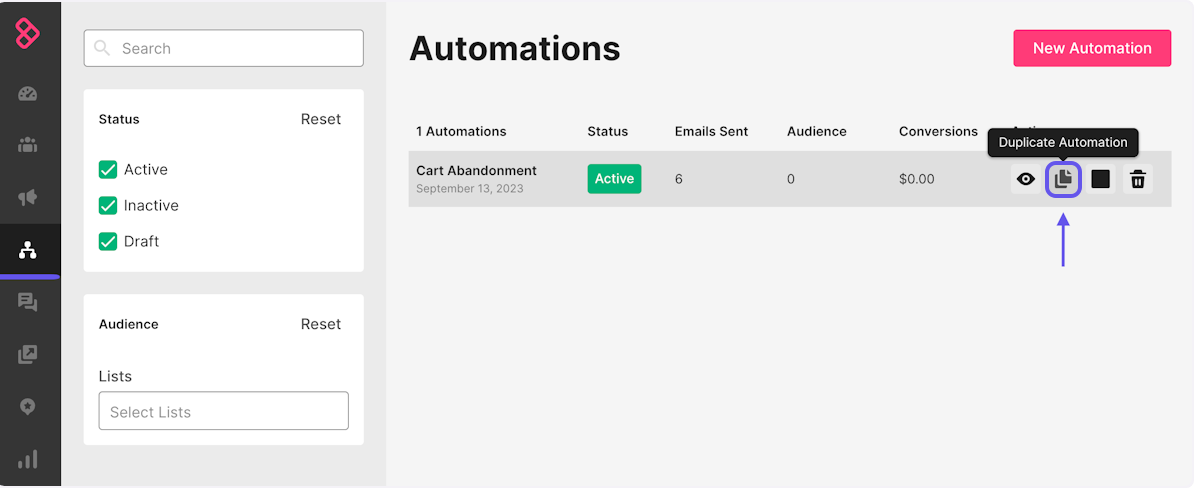
Measurement adds another tradeoff for you to consider. Sendlane lets you configure attribution windows from 1–30 days, with five days as the default for email. If you are comparing attributed revenue with another tool, make sure you normalize the attribution window first. Its send-timing feature also relies on behavior history and cannot run alongside experiments, so you will need to choose between predicted send times and cleaner testing. Our users value unified email/SMS and deliverability assistance, while our team found recurring friction around clunky complex branches, misfires, and weak version recovery.
| Pros | Cons |
|---|---|
| Unlimited profiles with event and product-feed depth | $100 monthly starting plan is high for smaller lists |
| Email/SMS workflows and deliverability assistance | Complex branches and migration quality require close QA |
| Send-volume pricing can suit large, lower-frequency databases | Send timing cannot run with experiments |
Verdict: We recommend Sendlane when your store uses 50,000 credits, values unlimited profiles, and has resources for migration validation. You should avoid it for a small list or when the $100 minimum exceeds realistic incremental gross profit. Before committing, confirm current calculator terms, overages, attribution settings, workflow version handling, and support ownership through a detailed migration test.
5. ActiveCampaign: complex journeys across ecommerce and CRM work
ActiveCampaign fits when your retention program crosses marketing, sales, and service. Its two-way Shopify sync carries order, product, customer, and abandoned-cart data for customers and guests. Deep Data fields include collection, revenue, currency, shipping, and order detail. Those fields can control segments, conditions, goals, content, and scores. Historical sync, however, is limited to Plus Plan, Professional Plan, and Enterprise Plan.
That breadth helps with conditional post-purchase paths, customer scoring, internal follow-up, and longer journeys. It also creates configuration choices. We recommend deciding which system owns consent, customer stage, tags, order status, and suppression before building. Our team identifies automation as a strength, with learning effort and occasional performance issues as tradeoffs.
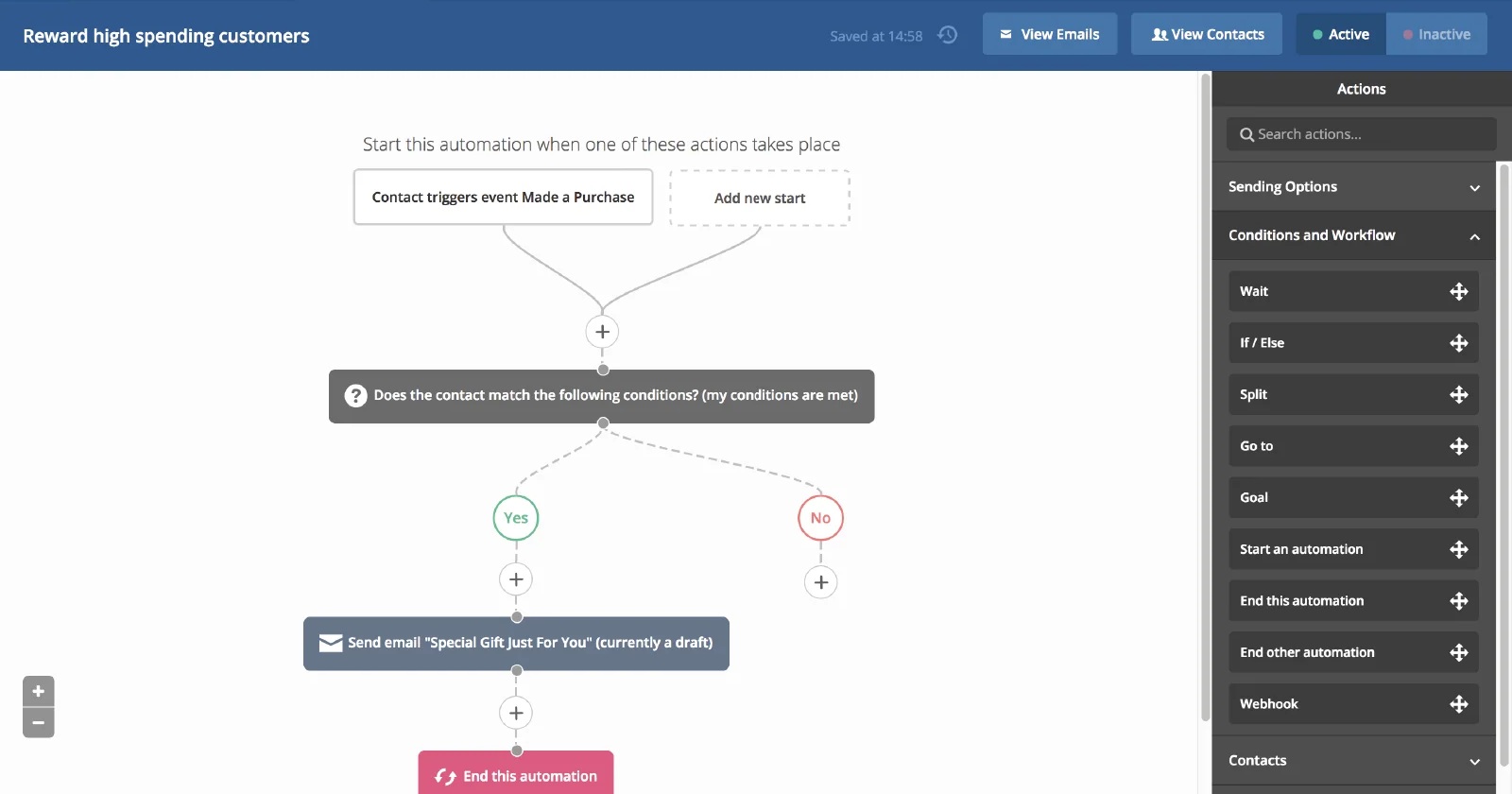
Starter Plan is $19/month for under 1,000 contacts on monthly billing, or $15/month when billed annually. Yet Starter Plan permits only five actions per automation, basic segmentation, a 10x send limit, one user, and basic ecommerce integration. Your lifecycle map may require a higher tier regardless of contact count. We recommend mapping your required actions before comparing prices.
Some of our users report deliverability declines, including Microsoft-specific problems, but individual accounts do not establish platform-wide failure. We recommend investigating authentication, list acquisition, bounce classes, engagement, frequency, and inbox-provider distribution first.
| Pros | Cons |
|---|---|
| Detailed Shopify data for conditional logic | Historical sync needs a higher tier |
| Advanced automation across team functions | Starter Plan caps automations at five actions |
| Segmentation, goals, and scoring in one system | Generalist breadth increases setup and ownership work |
Verdict: We recommend ActiveCampaign when ecommerce events must trigger longer cross-functional journeys and your team can govern a broader automation setup. You should avoid selecting Starter Plan from price alone when flows exceed five actions or need history. Before paying, map each branch, user, data owner, and required tier, then review ActiveCampaign alternatives.
6. Shopify Messaging: native simplicity before specialist depth
If you run a small Shopify team that values one admin and minimal connector work, Shopify Messaging, formerly presented as Shopify Email, is a sensible starting point. It gives you native access to customers, products, orders, discounts, marketing events, and store settings. That removes an external commerce sync and reduces duplicate data ownership, although your permissions and consent still require review.
This app covers campaigns plus basic email, SMS, and WhatsApp automation. For newsletters, welcome, cart or checkout, and simple post-purchase work, that may be enough for you. Our of our user describe easier operation and adequate flows. Our team found that advanced segmentation, A/B testing, and reporting are points where specialist tools become easier to justify.
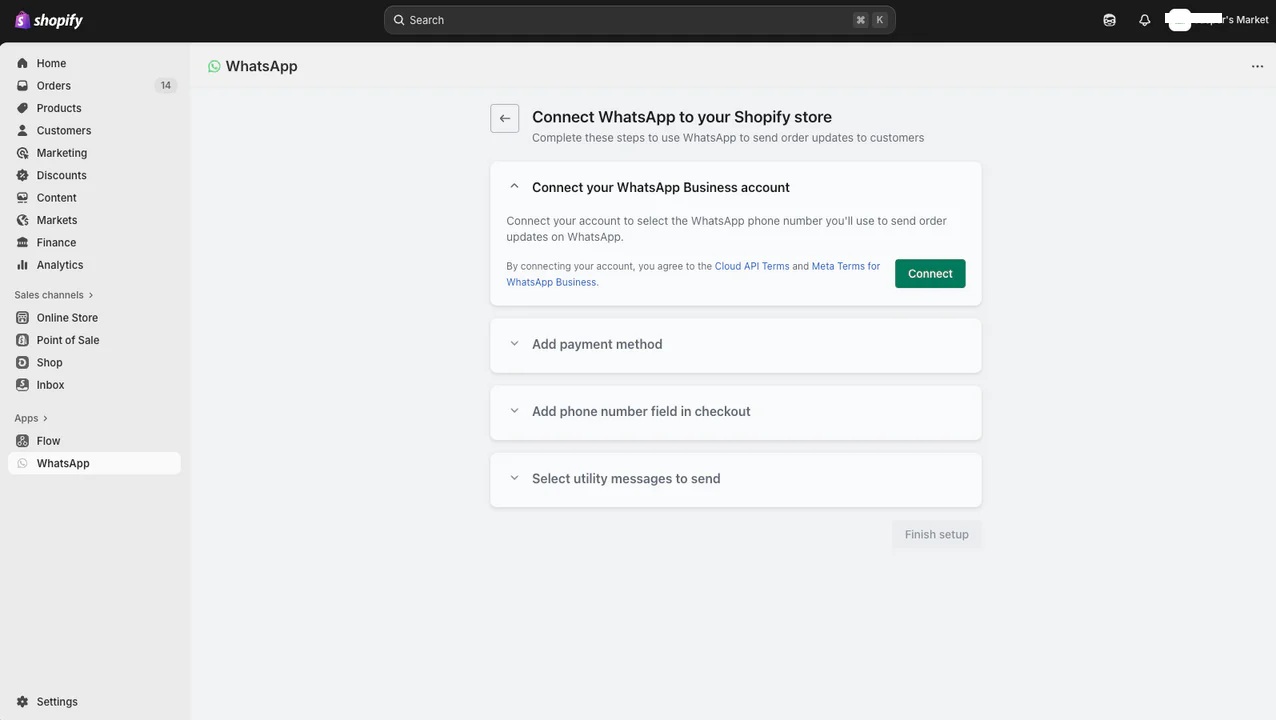
This app fee is $0, but an eligible paid Shopify plan is required. Email includes 10,000 sends monthly, then costs $1 per 1,000 through 300,000, $0.65 per 1,000 after 300,000, and $0.55 per 1,000 after 750,000. Abandoned-checkout automations are free. SMS prices vary by country; current US pricing is $0.012 per message, and long messages may split into multiple billed units.
Also, native data cannot guarantee inbox placement. Authentication, permission, frequency, complaints, and engagement remain necessary controls. Shopify Email has been repositioned within Shopify Messaging.
| Pros | Cons |
|---|---|
| Native store data with no external commerce connector | Less depth for segmentation, tests, and lifecycle reporting |
| 10,000 included monthly email sends | Paid Shopify subscription and metered usage sit outside $0 app fee |
| One admin for store and basic messaging | Country-specific SMS cost complicates comparison |
Verdict: We recommend Shopify Messaging when your small team needs reliable native access and can name no profitable flow or report that requires specialist depth. You should avoid assuming free install means zero total cost. Before selecting another platform, document the missing segment, test, branch, or attribution view, then estimate whether that capability will repay migration cost.
7. MailerLite: low-cost campaigns and lighter ecommerce automation
If your team is budget-conscious, MailerLite offers clean campaigns, forms, landing pages, and moderate ecommerce automation. Your Shopify customer, consent, and order data sync in real time into a selected group. Order count and total spent support practical segments, while product blocks bring images, descriptions, and prices into messages.
Supported triggers include abandoned checkout, any or specific purchase, category purchase, and purchase frequency. However, Shopify integration does not support an abandoned-cart trigger. This distinction matters if you rely on cart recovery, because checkout data appears later in the buying journey. If cart recovery is a core requirement for your team, we recommend testing it before you migrate.

Free Plan supports 250 subscribers and 2,500 emails each month. Comfort Plan starts at $12/month, while Power Plan starts at $25; your subscriber count and sends affect billing. Since June 16, 2026, Comfort Plan and Power Plan have replaced older plan names. Separate transactional emails API may require MailerSend. Include that service in your complete budget and use our transactional email cost comparison when relevant.
MailerLite may attribute orders within 30 days of a campaign or automation click. That window can over-credit email for longer purchase cycles. We recommend comparing attributed MailerLite revenue with your Shopify order records using the same attribution policy. Even with a simpler setup, you will still need to pay attention to authentication and list hygiene.
| Pros | Cons |
|---|---|
| $12 Comfort Plan and an approachable campaign workflow | Lighter deep segmentation and ecommerce reporting |
| Real-time consent, customer, and order fields | No Shopify abandoned-cart trigger |
| Forms, landing pages, product blocks, and automations | Transactional email can add a separate service and cost |
Verdict: We recommend MailerLite when straightforward campaigns and lighter purchase automation matter more than advanced commerce orchestration. You should avoid assuming abandoned checkout equals abandoned cart, or that $12 covers transactional email API needs. Before paying, verify subscriber and send limits, attribution settings, trigger coverage, projected monthly list growth, and current MailerLite pricing.
Conclusion: calculate fit before you subscribe
We recommend starting with your required customer events, not brand names. Write down each flow you need, the event that starts it, required product or order fields, exclusions, channel, owner, and success measure. A weekly newsletter and abandoned checkout flow create a different requirement set from category replenishment, locale-aware catalogs, predicted timing, or a service handoff. This step keeps you from paying for depth your team will not operate.
Next, calculate six-month cost. Use software subscriptions + message or credit overages + implementation + migration risk allowance + operator time.
This chart compares current starting price plan figures on unlike billing bases. It does not compare total ownership cost.
- Shopify Messaging$0Free app; paid Shopify store plan excluded
- Omnisend$11.20Monthly promotion; three months paid upfront
- MailerLite$12Monthly Comfort Plan
- ActiveCampaign$19Monthly Starter Plan; $15/month billed annually
- Klaviyo$20Monthly for 251-500 active profiles and 5,000 sends
- Drip$39Monthly for up to 2,500 subscribers and unlimited sends
- Sendlane$100Monthly for 50,000 credits; $2 CPM overage
Adjust each figure for contacts or profiles, sends, channels, renewal terms, and labor before shortlisting.
This bar shows starting price plan. Omnisend price plan is promotional. Shopify excludes its required store plan. ActiveCampaign presents annual and monthly figures, while Sendlane bills based on credits. Put expected tier and usage into the six-month calculation before eliminating a higher bar.
Horizontal axis: lighter or general commerce integration to native or deep commerce data. Vertical axis: simpler operation to advanced branching and orchestration.
Advanced operation, lighter or general commerce
ActiveCampaign: cross-functional journeys through a broad automation setup.
Advanced operation, deep commerce data
Klaviyo: granular lifecycle work. Sendlane: higher-volume credit economics. Omnisend and Drip: mid-advanced ecommerce flow operation.
Simpler operation, lighter commerce data
MailerLite: budget campaigns and lighter purchase automation.
Simpler operation, native commerce data
Shopify Messaging: native data and one-admin simplicity.
These placements summarize fit details. They are not coordinates, rankings, Sprout Scores, deliverability results, or ROI predictions.
Use this above quadrant to reduce seven tools from your selection list to two. Shopify Messaging is the native/simple choice. Omnisend suits a lean ecommerce team. Klaviyo fits deep Shopify lifecycle work. Drip focuses on ecommerce email. Sendlane targets higher-volume credit economics. ActiveCampaign supports cross-functional journeys. MailerLite covers budget campaigns and lighter automation. These are decision selections, not permanent winners. Move right or upward only when events, staffing, and gross-profit potential justify added complexity. This chart does not measure Sprout Scores or predict ROI.
Once you have a shortlist, audit consent, suppression, attribution, and delivery measurement. Export permission status, document deletion behavior, authenticate domains, define bounce and complaint thresholds, and standardize the revenue window. Test customers, products, discounts, carts, checkouts, orders, refunds, unsubscribes, and duplicate events. During cutover, prevent double sends and preserve suppression lists.
Finally, ask what your team can maintain. Advanced branches lose value when nobody reviews errors, catalog payloads, plan thresholds, or revenue logic. A simpler system with clear ownership will be a better purchase than unused depth. If your shortlist remains broad, use our Mailchimp alternative finder and email marketing software research to pressure-test it.
For smaller teams, a two-platform test is more useful than another feature list. Pick one simple option and one deeper option. Run the same flow and data checks, then compare six-month cost, operator time, and incremental gross profit. Our guide to Mailchimp alternatives for smaller teams will help narrow that pair.
FAQs about Mailchimp alternatives for ecommerce
What is the best Mailchimp alternative for Shopify stores?
Klaviyo fits deep lifecycle segmentation, Omnisend suits lean ecommerce automation, and Shopify Messaging covers native simplicity. Best fit depends on required flows, operating skill, and six-month cost.
Is Klaviyo a better Mailchimp competitor for ecommerce automation?
It can be when your team uses granular Shopify events and maintains complex flows. For basic campaigns, active-profile cost and implementation effort may outweigh that depth.
When is Shopify Messaging enough for email and SMS?
It is often enough when native data, newsletters, and basic automations cover your needs. Add a specialist only after naming a profitable segment, test, report, or branch it cannot support.
Which Mailchimp alternative is cheapest for a small ecommerce list?
Shopify Messaging has a $0 app fee but requires a paid Shopify plan. Omnisend price plan of $11.20 is promotional, while MailerLite Comfort Plan starts at $12, so compare full usage and renewal cost.
How should an ecommerce team compare contact pricing with send-volume pricing?
Forecast active contacts, monthly sends, overages, channels, and growth for six months. Add implementation and operator time, then compare total cost per usable lifecycle program.
Will switching email platforms improve deliverability or open rate?
No switch guarantees improvement. Check authentication, consent, list hygiene, message relevance, bounce classes, complaints, clicks, and orders before blaming platform choice.
How do I migrate Mailchimp automations without breaking consent, attribution, or cart flows?
Map data ownership, export permissions and suppressions, standardize attribution, test each store event, and prevent double sends during cutover. Keep a rollback and reconciliation checklist.
- 05 Feb 2026 – Updated deliverability section
- 10 Oct 2025 – Updated CRM sync coverage
How do we evaluate email marketing tool?
Manual testing is the process that goes beyond just ticking boxes. Our team start by defining clear testing objectives based on the intended use of email marketing tools and platforms. Each tools undergoes a rigorous user experience analysis, where we simulate real-world scenarios to gauge performance, usability, and reliability.
We pay special attention to the integration capabilities, data security, and compliance standards of the MarTech vendor. This hands-on 25 test-point approach allows us to uncover nuances that automated testing might miss, providing a more holistic understanding of the tools.
How do we evaluate and benchmark email marketing service effectively?
Our evaluation process is data-driven and multi-dimensional. Our team analyze tool performance metrics against industry standards and similar product platforms.
Key performance indicators (KPIs) are meticulously examined, including ease of use, customization options, scalability, customer support effectiveness, and innovation. We also incorporate user feedback to ensure our benchmarks reflect actual user experiences and expectations.
This comprehensive method ensures a fair and effective comparison of the email marketing services.
How accurate are these comparisons and alternative suggestions of the email marketing tools?
We pride ourselves on the accuracy of our comparisons and suggestions. Our team expertise, combined with advanced analytics tools, ensures that our data is both current and relevant. We constantly update our database with the latest market trends and user feedback, which helps us provide accurate and timely recommendations.
However, it’s important to remember that each business has unique needs, and our suggestions are a starting point for their decision-making process.
Why email marketing tool buyers trust Sprout24 reports and analysis?
Our reputation for trustworthiness stems from our commitment to impartiality and depth of research. We do not just skim the surface; we go deep into each email marketing tools and service capabilities and shortcomings.
Our reports are comprehensive, easy to understand, and transparent, explaining not just what we recommend but why. This transparency and thoroughness are why email marketing tool buyers trust our reports.
Our FTC Disclosure explains the sources of funding and revenue of Sprout24 platform; this enables us to curate straightforward and unbiased reviews.
How these reports help in reducing the time to purchase a email marketing platform?
Our reports and guides significantly reduce the time to purchase by providing clear, concise, and comparative information. Email marketing tool buyers don’t have to spend countless hours researching; they can find all the necessary information in one place.
Our Sprout scoring system, user reviews, and feature comparisons simplify the decision-making process, enabling buyers to make informed choices quickly.
How effective is the scoring system and help email marketing service buyers in making fast decision?
Sprout Score Scale of 0–10 rating is crafted to provide a quick, yet detailed view of a platform overall standing in various categories.
This scoring system, backed by in-depth contextual data analysis, allows email marketing service buyers to immediately gauge suitability of the tool / service for their needs. It simplifies complexity and enables fast, informed decisions, which is crucial in the fast-paced world of business.


