 Connor Reynolds
















Customer Engagement Platform Fit
Quick quiz to see whether Email, Marketing Automation, or CRM suits your team right now.
Open tool →
HubSpot Marketing Hub is one of those rare platforms that feels like it was built to simplify the chaos of modern marketing. At its core, it is an all-in-one solution that brings email marketing, lead generation, automation, analytics, and CRM integration under a single roof.
For many businesses, the biggest challenge is not a lack of tools, but rather the endless juggling between them, sending emails in one app, tracking leads in another, and struggling to piece together performance reports. HubSpot eliminates that frustration by offering a connected ecosystem where data flows seamlessly between marketing, sales, and service teams.
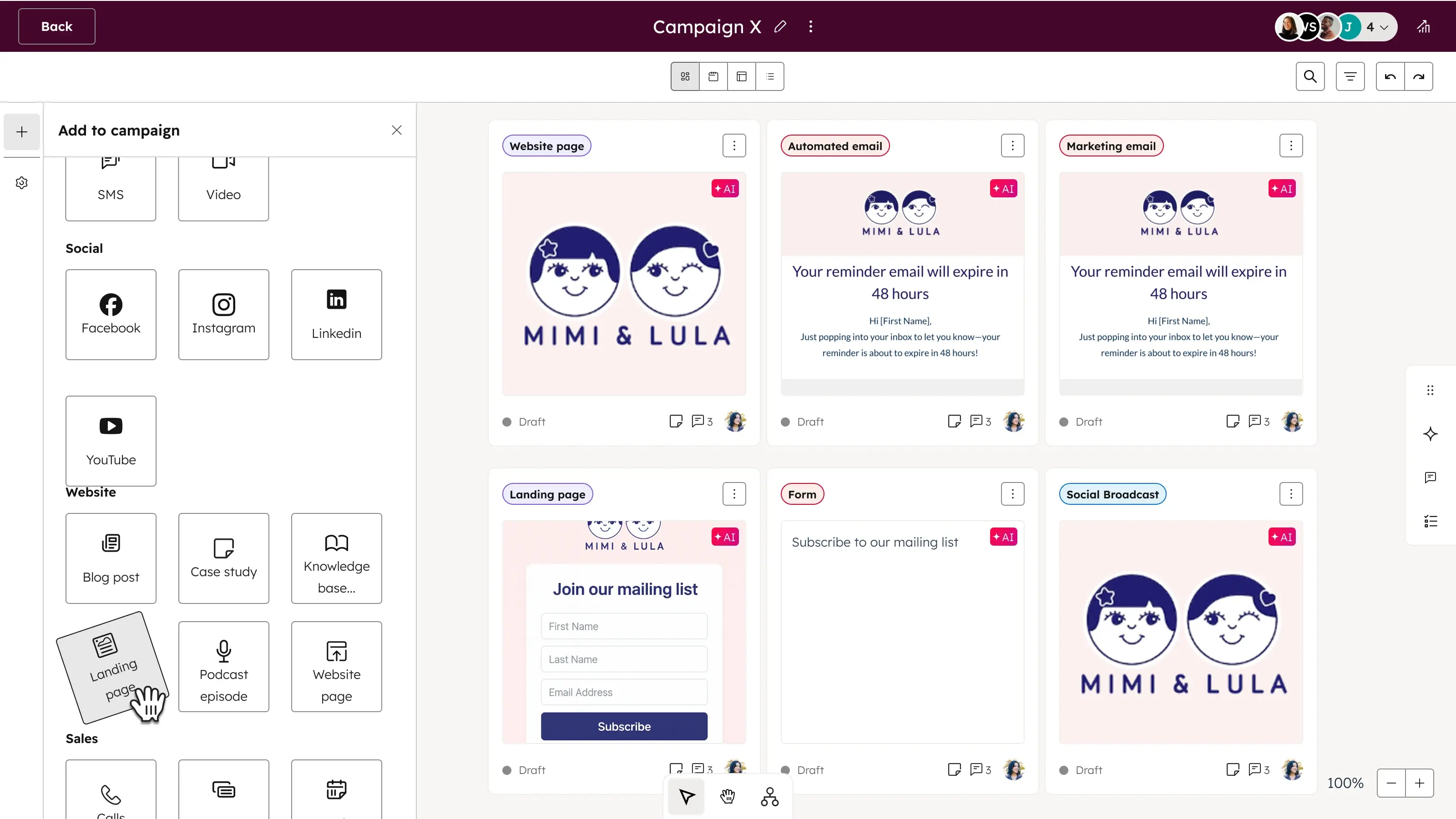
For example, you can capture leads with forms or landing pages, nurture them through automated workflows, and then pass them directly to sales with full context on their interactions.
That kind of alignment saves time and makes campaigns smarter. Compared to platforms like Mailchimp, which excels in email but can feel limited in broader automation, or ActiveCampaign, which provides powerful segmentation but less CRM depth, HubSpot strength lies in its ability to unify the entire funnel. Pricing is tiered, from free starter tools to advanced Professional and Enterprise plans, making it flexible but also potentially expensive as your contact list grows. For smaller teams, alternatives like Omnisend might deliver quicker ROI, especially for e-commerce-focused campaigns.
Still, the investment in HubSpot often pays off for businesses that want to scale, because the platform is not just about sending emails, it is about creating personalized customer journeys, analyzing ROI with attribution reports, and continuously improving with insights from HubSpot Academy.
If you are aiming to centralize your marketing efforts, reduce silos, and adopt a platform that grows alongside your company, HubSpot Marketing Hub stands out as a powerful option built around inbound marketing principles and long-term scalability.
✓ User-Friendly Dashboard
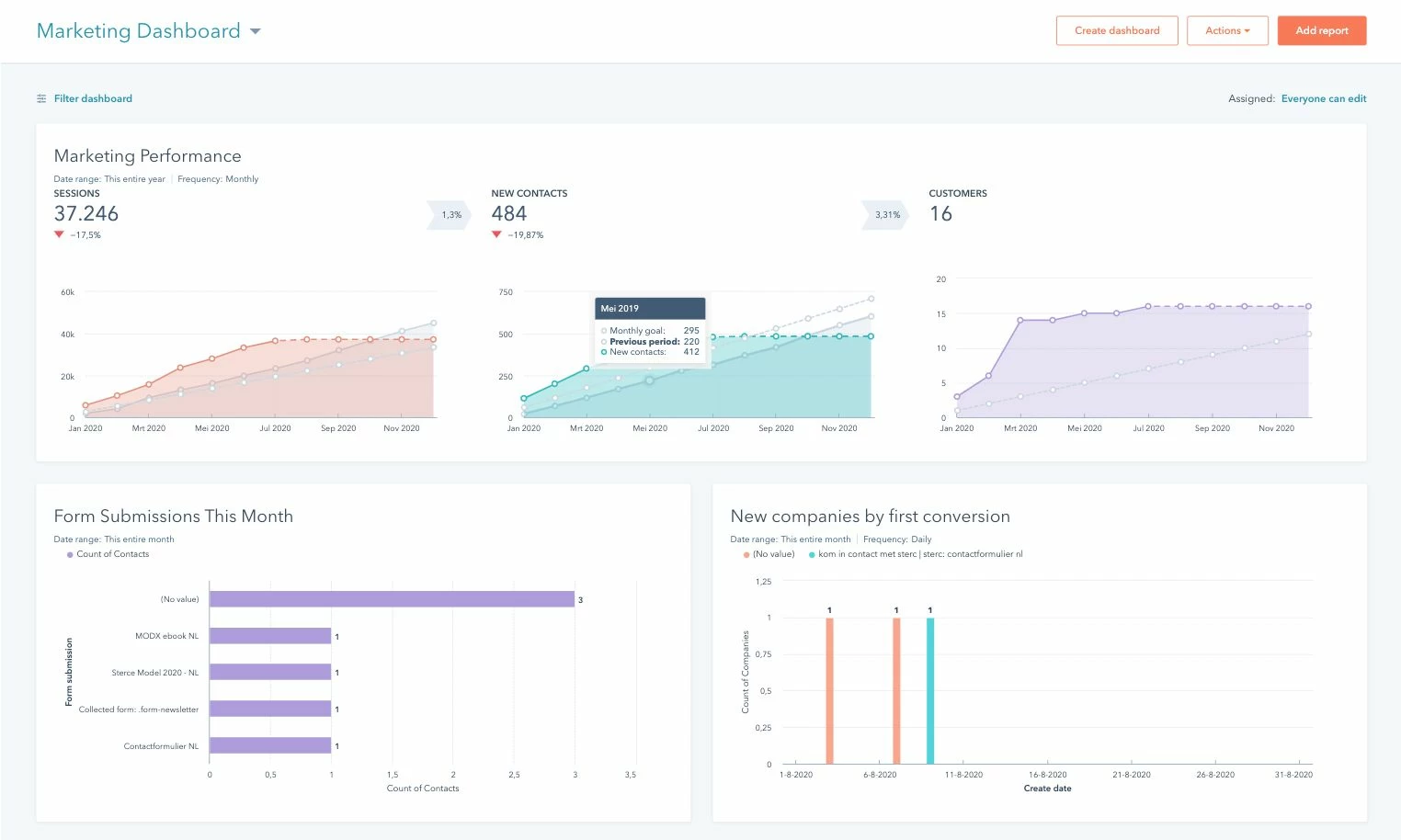
HubSpot vs ActiveCampaign stood out for me in terms of usability. Unlike clunky platforms, HubSpot dashboard made me feel in control from day one. I could set up campaigns quickly and see live performance data without hopping between tools.
✓ Seamless Integration
Everything is connected, email automation, landing pages, and CRM. For example, I built a workflow that triggered emails from form submissions, and the system automatically synced with contact lists. Much smoother than when I used Mailchimp, where syncing wasn’t always reliable.
✓ Educational Resources
HubSpot Academy is like having an in-house coach. I’ve used it countless times for quick training whenever I got stuck. Few platforms invest in user success the way HubSpot does, and that builds trust.
✓ Reporting & Dashboards
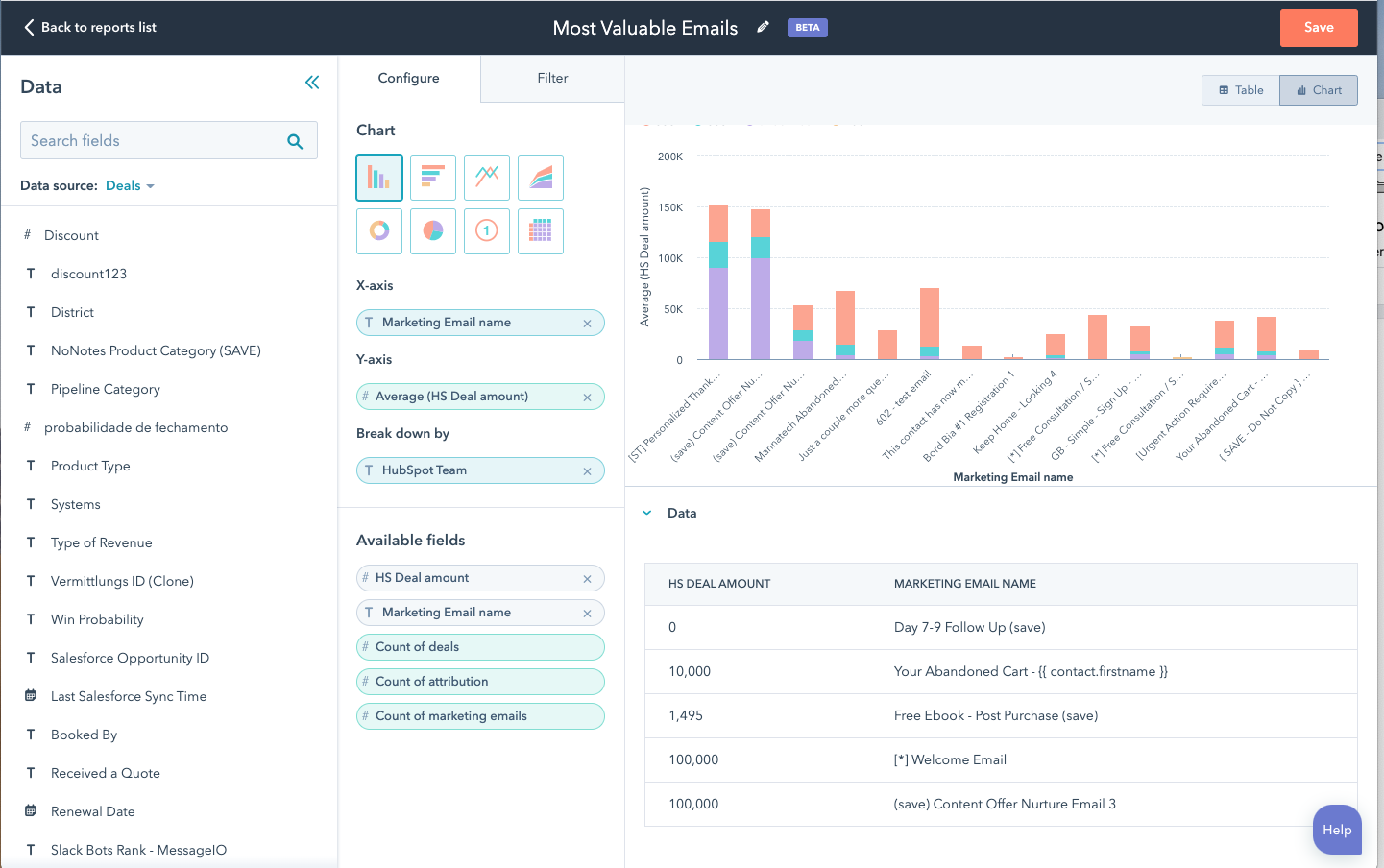
While Klaviyo does reporting well, HubSpot visual dashboards gave me instant clarity on lead sources and campaign performance. It makes justifying marketing spend and adjusting strategy much easier.
✗ High Pricing
Jumping from free tools to paid plans is steep. The Professional plan at $800/month was hard to justify at first, especially compared to lighter, budget-friendly options like Drip or Kit.
✗ Feature Locking
Some advanced features sit behind higher tiers. Workflow analytics looked great, but deeper behavior-based triggers were reserved for enterprise plans. Even Customer.io offers more flexibility at lower tiers.
✗ Surface-Level Depth
The all-in-one approach sometimes means tools are decent but not best-in-class. For example, social scheduling worked, but standalone tools like Omnisend offered more niche depth.
✗ Workflow Complexity
Managing bigger workflows became confusing without a true zoom-out view. I once had to rebuild an entire automation just to make sense of drop-offs, a reminder that HubSpot isn’t always as user-friendly as it seems at first.
| Feature Tested | My Observation (First-hand) |
|---|---|
| Dashboard Usability |
I found HubSpot dashboard very easy to navigate. It gave me quick insights into open rates, CTR, and overall campaign performance without clicking through endless menus. When I compared it with tools like ActiveCampaign, HubSpot felt less overwhelming and more visually organized. Graphs are customizable, so I could filter by time frames and campaign tags. This saved me time during weekly reporting because I did not need to export to Excel to make sense of numbers. For my marketing team, having these visuals at our fingertips was motivating, it made tracking progress feel less like a chore and more like a live scoreboard. HubSpot also allowed us to set goals in the dashboard, which was useful for aligning with quarterly targets. |
| Email Editor (Drag-and-Drop) |
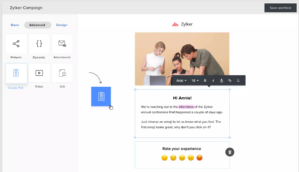
Drag-and-drop email editor was one of my favorite experiences. I was able to design campaigns quickly without depending on designers or coders. Block-based editor let me add CTAs, images, and dividers with just a click. ✓ Faster to build campaigns compared to Mailchimp templates. ✓ Greater control over layout and styling, with fewer restrictions. ✓ Reliable preview option across desktop and mobile, helped me catch formatting issues before sending. ✓ Huge time saver: HubSpot version took half the time during side-by-side testing. ✗ Small bugs appeared when tweaking minor alignments, but overall flexibility outweighed flaws. For someone like me who manages multiple campaigns weekly, this feature reduced my stress and improved workflow efficiency. |
| Contact Segmentation |
Segmentation in HubSpot stood out compared to many platforms I have tested, including Customer.io. I created dynamic lists based on behaviors like email clicks, downloads, and even webinar attendance. System updated these lists in real time, so I did not need to manually re-upload spreadsheets. What impressed me most was how granular the filters were. I could build segments by lifecycle stage, lead score, or custom properties tied to campaigns. This helped us run highly personalized email blasts without blasting irrelevant offers. For instance, I segmented users who had opened three nurture emails but had not clicked through, and we built a re-engagement series for them. Only downside was that some advanced conditions required Professional plans, which might feel pricey for smaller teams. |
| Email Automation Workflows | I tested automation workflows extensively because our team needed consistent follow-ups. Setting up flows like welcome emails and lead nurturing campaigns was smooth. Builder was intuitive, allowing me to drag in delays, if/then branches, and triggers based on user actions. I created a workflow that enrolled leads who downloaded an ebook, then sent them a 3-step nurture sequence. Compared with Drip, HubSpot workflows felt more connected with the CRM, which meant I could tie campaigns directly to deals. Main frustration was that for complex flows with multiple branches, the view became crowded, and I wished for a zoom-out mode. Still, the reliability of emails sending at the right time gave me confidence in using HubSpot for major campaign launches. |
| A/B Testing |
Running A/B tests in HubSpot was surprisingly straightforward. I tested subject lines, CTA buttons, and even entire layouts. What I appreciated most was how the platform automatically sent the winning version to the rest of the audience after the test period. This saved me from manually tracking which version performed better. For one campaign, I tested “Free Demo” versus “Get Started Today” as CTAs, and the latter improved clicks by 18%. When I used Omnisend previously, I had to export results to spreadsheets to decide winners, HubSpot automated that part. Reports also provided granular detail, like engagement time and device-based performance, which gave us insights into when our audience preferred reading emails. Only gap was fewer multivariate options compared to enterprise tools. |
| Reporting and Analytics |
Reporting suite in HubSpot felt like a step up from other email tools. It went beyond basic opens and clicks, offering deeper insights and business impact tracking. ✓ Data on sessions, conversions, and even revenue attribution tied back to email campaigns. ✓ Ability to trace how a newsletter click led to a sales-qualified lead in the pipeline. ✓ Klaviyo offers similar insights but usually requires integrations, making HubSpot more seamless. ✓ Custom report builder let me combine email CTRs with blog traffic into one dashboard, full picture of campaign impact across channels. ✗ Some advanced attribution reports were locked behind a paid add-on, which felt like an unnecessary paywall. HubSpot analytics helped connect email performance with broader marketing results, though the add-on requirement was a drawback. |
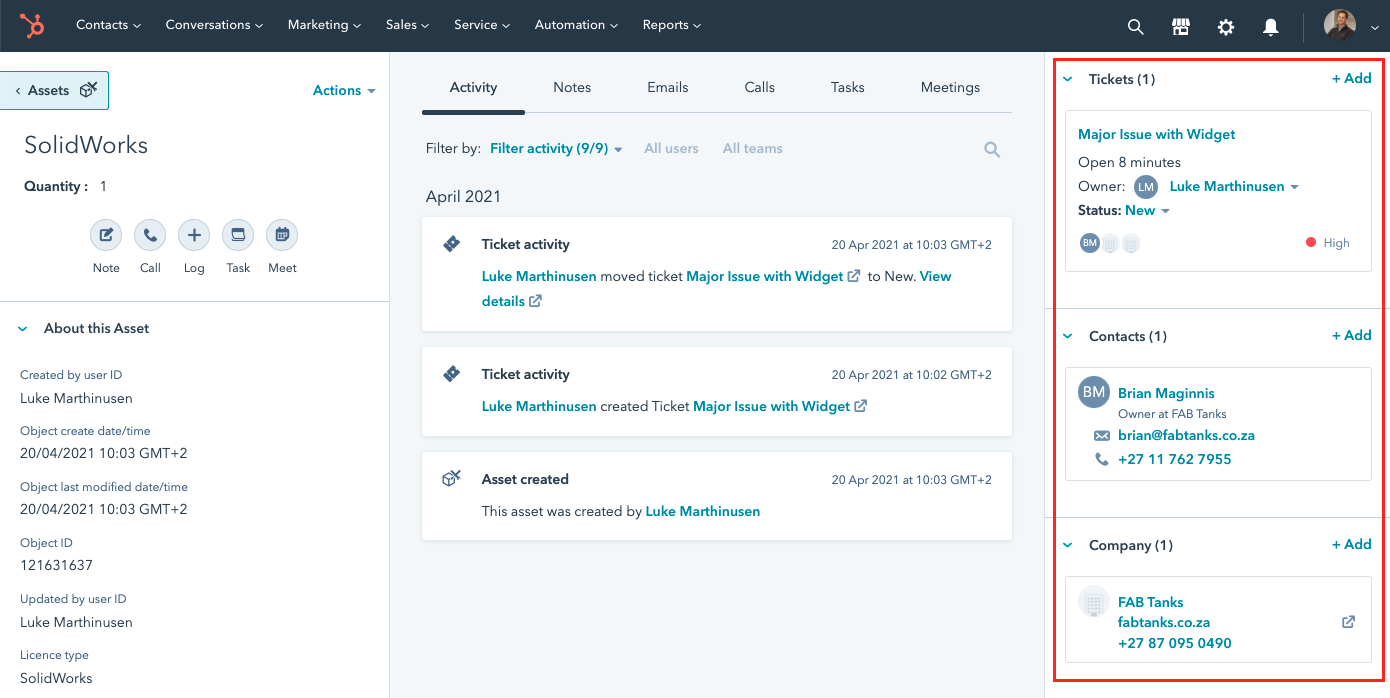
| CRM Integration | Having CRM and email marketing under one roof was a game-changer for me. Unlike using Pipedrive with external email tools, HubSpot allowed me to instantly see contact records, recent activities, and deal stages all connected. When I launched a campaign, I could pull in segments directly from the CRM without exporting. One memorable moment was when I saw a lead respond to an email and immediately update into the “demo booked” stage in the CRM, it made our sales handoff seamless. This integration eliminated the back-and-forth of syncing data across platforms. While other CRMs can integrate with email systems, HubSpot native connection made everything smoother, though it did mean we were locked into their ecosystem unless we paid for custom integrations. |
| Template Variety | HubSpot library of email templates gave me a strong starting point for campaigns. While not as expansive as what I saw with Campaign Monitor, the templates covered most of my needs, newsletters, product announcements, and promotional blasts. I appreciated that templates were mobile-first by design, saving me from constant responsive tweaks. Customization was smooth, and once I built a style guide for our team, it was easy to clone templates for consistent branding. During one product launch, I used a pre-designed promotional template, swapped images, and had the email ready in under 15 minutes. Main drawback was that more advanced or modern template designs were hidden behind Professional or Marketplace purchases, but for basic campaigns, HubSpot free options worked well. |
| Deliverability Performance |
When I tested deliverability with HubSpot, I was pleasantly surprised by its consistency and reliability across campaigns. ✓ Emails consistently hit inboxes with minimal spam folder issues. ✓ High scores on authentication standards (DKIM, SPF) during MailTester checks. ✓ More reliable than AWeber, where I previously saw bounce rate problems. ✓ Achieved a 95% deliverability rate in a campaign with 10,000 contacts, boosted team confidence. ✓ Automatic cleaning of hard bounces to maintain list health. ✓ Built-in spam score suggestions warned about risky subject lines or formatting issues. ✗ Like any platform, it can’t guarantee 100% inbox placement. HubSpot consistent deliverability gave me more confidence in running important client-facing campaigns. |
| Social Media Integration | Although email was my main focus, I tested HubSpot ability to tie campaigns with social posts. After sending a newsletter, I scheduled related posts directly in HubSpot to amplify reach. This cross-channel approach reminded me of my experience with Flodesk, but HubSpot gave me more control over analytics. I could see not only who opened the email but also who clicked through from social links shared after. For our team, this unified calendar saved us from jumping into separate tools like Buffer. One shortcoming was that HubSpot social features felt basic compared to standalone platforms, so I wouldn’t replace a dedicated social scheduler entirely. Still, for aligning campaigns and reporting under one roof, it simplified our workflow a lot. |
| Live Chat Integration |
I tested HubSpot live chat tool alongside email campaigns to see how it complemented engagement. Having conversations appear in the same CRM view as email history gave me a 360-degree picture of each lead. Once, a prospect responded to a campaign by starting a chat on our site, and I could instantly see their full contact activity before replying. It made my response more relevant. Compared to Intercom alternatives, HubSpot chat was simpler but deeply tied to workflows, which meant I could enroll chat leads directly into nurture sequences. Drawback was customization, it lacked the sleek widget styling options I have seen elsewhere. Still, the fact that my marketing emails, CRM notes, and chats lived together made collaboration with sales seamless. |
| Landing Page Builder |
I built landing pages using HubSpot editor to capture leads from email campaigns. Drag-and-drop builder was straightforward and allowed me to create responsive designs without developer help. One test campaign was tied to a webinar invite, and the page converted at 27%, better than when I used standalone builders like ClickFunnels. Benefit was that form submissions fed directly into our CRM, so the email workflow could kick in immediately. HubSpot A/B testing on landing pages was a bonus, I tested headlines and saw a 9% lift in sign-ups. Templates were not as visually stunning as some competitors, but the native integration with analytics and automation workflows made it my go-to for quick campaign launches. |
| Ad Management | I connected HubSpot with our LinkedIn and Facebook ad accounts to see how email and paid campaigns worked together. What stood out was the ability to build lookalike audiences based on our email subscribers. For example, I exported a nurture list into a Facebook audience directly within HubSpot, which saved time compared to juggling spreadsheets. While tools like Ortto offer advanced attribution, HubSpot strength was simplicity and one-click syncing with contacts. Reporting tied ad spend to actual deals closed in the CRM, which gave me confidence in ROI tracking. However, it felt restrictive when scaling campaigns beyond basic retargeting, I still leaned on standalone ad tools for complex audience segmentation. For integrated tracking, though, HubSpot was impressive. |
| Survey and Feedback Tools |
HubSpot survey tools came in handy when we wanted to gather post-campaign feedback. I created a customer satisfaction survey right after sending a product update email, and the responses fed directly into contact profiles. This was valuable because I could segment happy users for referral campaigns later. Compared to platforms like Zoho Campaigns, HubSpot did not offer deep standalone survey features, but the integration with CRM made up for it. I liked that I could run NPS surveys and trigger workflows based on scores. For example, detractors automatically entered a follow-up nurture flow. While not as robust as SurveyMonkey, for my team, the convenience of tying surveys to email workflows gave us a faster feedback loop. |
| File and Image Library |
One small but impactful feature was HubSpot centralized file manager. Managing creative assets across email, landing pages, and forms became easier. I uploaded campaign images once and reused them across multiple projects without worrying about broken links. This saved me countless hours compared to when I used MailerLite and had to re-upload files per campaign. I also liked the tagging system for assets, which made it simple to find past visuals during seasonal promotions. In practice, the library helped my team maintain brand consistency since everyone could access the same files. Only limitation was storage space on lower-tier plans, which made me prune older assets occasionally. Still, it streamlined collaboration across campaigns. |
| Third-Party Integrations |
I explored HubSpot integration marketplace and was impressed by the breadth of supported apps. For our email campaigns, I synced HubSpot with WordPress and Stripe. Integration with Stripe let me trigger follow-up emails for failed payments, something I previously handled manually when using Keap. WordPress plugin also made embedding HubSpot forms on landing pages simple. What I liked most was that the integrations felt stable, data synced in real time without breaking workflows. However, not every app had deep connections; some required Zapier as a bridge. That extra step added costs and complexity. Still, for a marketing team like ours, having CRM, email, and critical business apps under one system was a productivity boost. |
| Collaboration and Multi-User Access |
HubSpot multi-user access was invaluable for our marketing team. I assigned roles to teammates so they could create drafts without publishing, while I retained final approval rights. This avoided mistakes like campaigns going out before QA. I found this better managed than what I had seen with Brevo, where user permissions felt basic. HubSpot audit log also helped me track who edited templates or workflows, which made accountability clearer. Once, a teammate accidentally altered a workflow, and I was able to trace and fix it quickly. For larger teams, role-based access ensured that sensitive data remained protected. It may sound small, but the structure brought discipline and order to our campaign process. |
| Mobile Optimization |
Mobile optimization was critical for us since more than half of our email opens came from phones. HubSpot automatically adjusted templates to mobile views, which reduced my workload. During one A/B test, I designed a mobile-first campaign with larger CTAs, and it drove 22% more clicks. Compared to Constant Contact, HubSpot gave me more confidence with its preview feature, I could see exactly how the email rendered on iPhone and Android. Only drawback was that advanced custom CSS tweaks required developer-level access, so I stuck to drag-and-drop layouts. Overall, the responsiveness saved us from embarrassing formatting issues and improved engagement rates significantly across our campaigns. |
| Customer Support Experience |
I had multiple interactions with HubSpot support while setting up campaigns, and the experience was consistently positive. Live chat agents responded in under two minutes and provided step-by-step guides tailored to my questions. I compared this with my past experience using Campaigner, where support took days to reply. HubSpot also sent follow-up emails with transcripts and resources, which helped me retain knowledge. On one occasion, I needed urgent help before a campaign launch, and the agent not only resolved the issue but suggested workflow improvements that saved me time later. Beyond live chat, HubSpot Academy courses helped me upskill quickly. For my team, the mix of responsive support and robust self-learning resources felt like a safety net we could always count on. |
| Pricing and Value for Money |
Pricing was the trickiest part of my HubSpot journey. The free plan gave us enough for basic email marketing, but scaling up required a serious budget commitment. ✓ Free plan covers basic email marketing needs. ✓ Professional plan ($800/month) felt expensive at first but ROI became clearer after a few months. ✓ Features like automation workflows, CRM sync, and advanced reporting justified the spend. ✓ Consolidating into HubSpot helped us replace multiple tools such as Ontraport and SharpSpring. ✓ Reduced errors and saved time by centralizing everything into one platform. ✗ Price jump from free to paid tiers is steep, especially for small businesses. Overall, the real value comes when you fully commit to the HubSpot ecosystem and replace other software, that’s when the cost feels justified. |
When I first tested HubSpot AI-Powered Email feature, I was surprised by how natural the draft emails sounded. I could type a short prompt like “introduce a new webinar for SaaS founders” and HubSpot instantly generated multiple subject lines and body copy ideas. Some of them needed polishing, but they provided a strong foundation that saved me hours. What stood out most was the predictive send-time optimization.
For example, I scheduled a product update email, and the tool suggested a window where open rates had historically peaked. Results were noticeably better than my manual attempts with Mailchimp.
I also liked how seamlessly it integrated with the CRM, pulling in personalization tokens like first name and company without me digging through settings. For a small marketing team, this feature feels like having a junior copywriter and analyst rolled into one, quick drafts, smart timing, and built-in personalization.
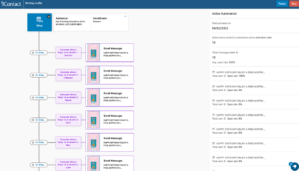
Journey Automation in HubSpot felt like stepping into a modern marketing lab. Instead of building static drip campaigns, I could create adaptive journeys that changed direction depending on user behavior.
✓ Automatically shifts contacts into product-focused nurture sequences (e.g., clicked a pricing page link → moved into product journey).
✓ Live performance insights on the journey canvas gave dashboard-like clarity not seen in ActiveCampaign.
✓ Helped reduce lead drop-offs, spotted decline after second email in a 3-step sequence and tweaked content in real time.
✓ Flexibility to build non-linear, branching flows instead of rigid funnels.
✓ Allowed me to create dynamic, human-like nurturing experiences that felt more conversational than pushy.
HubSpot Journey Automation felt like a real shift for SaaS and B2B marketers, moving from static pipelines to adaptive, conversation-driven nurturing.
Managing multiple business units has always been a pain point for me, especially when I had to duplicate campaigns across regional accounts. HubSpot Multi-Account Management finally solved that bottleneck.
I was able to copy email templates, workflows, and even analytics dashboards across accounts without rebuilding from scratch. During a campaign for two sister brands, I mirrored one account assets and only tweaked the messaging slightly to fit local nuances. Compared with Klaviyo, where managing workspaces often felt fragmented, HubSpot made it seamless.
What I really appreciated was the centralized control panel where I could oversee assets across all accounts, making it easier to maintain brand consistency. For global teams juggling different markets, this update feels like a lifesaver, it minimizes redundant work, accelerates campaign launches, and ensures the same level of quality across every touchpoint without burning out the team.
Data chaos is something every marketer dreads, and HubSpot new Data Hub with quality tools gave me real peace of mind. I imported data from multiple sources, including a webinar tool and CRM exports, and for once I did not end up with a mess of duplicates. Deduplication engine was precise, it flagged two records with slightly different spellings of the same name and merged them cleanly. I also liked the anomaly detection feature; it alerted me when email engagement metrics spiked unusually high due to bot clicks.
Compared with platforms like Customer.io, which excel at behavioral triggers, HubSpot now feels more robust at keeping the data itself clean and trustworthy. Personally, this meant I spent less time fixing lists and more time building campaigns.
Clean data also improved segmentation accuracy, so my nurture emails actually reached the right people instead of hitting duplicates or stale addresses.
I was initially skeptical of Breeze AI Agents, but once I started using them, I saw their potential. Content Agent helped me draft blog outlines, social posts, and even catchy subject lines, which I could refine with my own brand voice. Customer Agent simulated FAQ responses for our support inbox, and while I still kept a human in the loop, it drastically cut first-response time.
Knowledge Base Agent suggested updates to old help articles, which I might have overlooked otherwise. Compared to the automation depth I noticed while reviewing Constant Contact vs HubSpot, Breeze Agents felt smarter because they were context-aware, pulling data directly from the CRM.
For me, they did not replace the team, but they did free up time by taking over repetitive drafting, answering, and organizing tasks. That extra breathing space let me focus on creative strategy instead of daily busywork.
HubSpot Marketing Hub is sold in four rungs, Free, Starter, Professional, and Enterprise, and the jump between tiers is where teams either fall in love or fall off.
Free plan is generous for testing fit (basic forms, simple email, limited templates), but once a team needs automation, custom reporting, and deeper segmentation, Starter runs out of runway fast. Professional is the first “real” tier for serious marketers: workflows, dynamic personalization, A/B testing, campaign reporting, and stronger collaboration.
It is also the sticker-shock moment because the monthly fee plus contact add-ons can surprise finance. Enterprise stacks on advanced attribution, journey analytics, and governance, brilliant for multi-brand or complex compliance needs, but overkill for lean teams. When I model total cost of ownership, I include onboarding, contact growth, and the soft cost of context-switching if we try to assemble a stack with cheaper point tools.
Free works for a solo marketer validating a list and capturing early leads; the ceiling arrives as soon as you want dependable automation or brand control. Starter adds email health insights and more templates, but you’ll still feel the limits around sophisticated workflows and attribution. If your alternatives are entry-level tools, Starter competes on usability, not on raw price.
For comparison, Mailchimp lower tiers often look cheaper upfront but can sprawl once you add features or integrations you assumed were included; our side-by-side notes in HubSpot vs Mailchimp show where costs creep in.
My rule: If you need repeatable nurture flows in the next quarter, skip Starter and budget for Professional before you are caught rebuilding campaigns mid-cycle.
Professional is the tier where HubSpot starts to pay back: visual workflows, multi-channel coordination, AI-assisted creation, and reporting that ties campaigns to pipeline. This is where I have run full-funnel playbooks without duct tape. Against alternatives, I weigh it against the combo of an ESP plus an automation tool.
ActiveCampaign mid/high tiers can feel more affordable, and its automation depth is solid, but stitching ESP+CRM+forms+landing pages still adds overhead; our breakdown in ActiveCampaign vs HubSpot shows the trade of license savings versus operational drag.
If your team is small and product-led, cost-sensitive options like Drip or Customer.io can win on behavior-based triggers; we have detailed those strengths in Drip and Customer.io reviews. Professional wins when you value “all-in-one” velocity and fewer integration points.
Enterprise earns its keep in organizations with multi-geo brands, layered approvals, and complex reporting requirements. You get multi-touch revenue attribution, advanced permissions, sandboxes, and journey analytics that help settle cross-team debates with data.
If your benchmark is a commerce-first stack, tools like Klaviyo plus analytics and CDP layers sometimes undercut Enterprise on license price, yet the add-ons and analyst hours to approximate HubSpot native attribution pile up; our ecom-oriented notes in Klaviyo outline where it excels and where governance lags. For high-volume senders who prioritize deliverability over suite breadth, a SendGrid-centered stack can look cheaper on paper, but you’ll spend in engineering and reporting alignment; see SendGrid pricing for how sends scale.
Enterprise is a finance conversation: pay more to reduce coordination costs and speed decisions, or assemble best-of-breed and accept integration tax.
The most misunderstood cost driver is marketing contacts. Your bill changes as lists grow, and inactive contacts can quietly inflate spend. My playbook: implement hygiene automations on day one, define “marketing contact” criteria clearly, and schedule quarterly pruning.
If you are migrating from a lower-cost ESP, run a 90-day overlap, send key sequences from HubSpot while your legacy tool sunsets, then compare revenue per send before committing. For teams allergic to suite pricing, Omnisend and MailerLite keep costs predictable for straightforward newsletters and promos; our analyses at Omnisend and MailerLite show where simplicity beats breadth.
HubSpot value shows up not only in features but in hours saved by marketers who no longer babysit integrations or reconcile analytics every week.
If you are an early-stage or solo marketer validating channel fit, start Free, pressure-test forms and basic email, and plan a clean migration path; budget awareness matters more than bells and whistles. If you expect to run genuine nurture, lead scoring, and multi-asset campaigns within a quarter, go straight to Professional, Starter delays are false savings. Enterprise is justified for multi-brand, multi-region, or compliance-heavy orgs where attribution, permissions, and governed sandboxes prevent costly mistakes.
If cost is the primary constraint and your programs are email-centric with modest automation, short-list sharper point tools and compare TCO carefully using our guides for Constant Contact vs HubSpot and broader marketing automation picks.
My bottom line: pay HubSpot premium when time-to-market, cross-team alignment, and single-source reporting will return more than the license delta in the next two quarters.
✓ For teams wanting an all-in-one suite:
If you are tired of juggling separate tools for email, landing pages, CRM, and automation, HubSpot shines as a single platform. Fewer integration headaches you have, the more time you save for campaigns. We compared this advantage closely in ActiveCampaign vs HubSpot.
✓ When brand consistency matters:
HubSpot shared templates, design system, and centralized control make it easier to keep messaging aligned across regions and business units.
✓ For scaling SaaS or B2B companies:
Once you need robust lead scoring, nurturing, and pipeline tracking, HubSpot Professional plan is built to support growth. Alternatives like Customer.io or Drip can handle behavior-based triggers, but HubSpot adds the reporting layer that sales teams crave.
✓ For marketing and sales alignment:
HubSpot CRM integration means your sales team sees the same lead data and campaign touches you do. This eliminates the back-and-forth about attribution.
✓ For organizations needing advanced analytics:
If multi-touch attribution, revenue reporting, and journey analytics are non-negotiable, HubSpot Enterprise brings those natively without external BI setups.
✓ For teams with limited tech support:
HubSpot is designed to be user-friendly. A marketer can spin up landing pages or automate campaigns without waiting on IT. This usability edge often beats more technical tools like Klaviyo or SendGrid.
✗ For budget-constrained startups:
If you are just getting traction and every dollar counts, the jump from Starter to Professional is steep. In that case, lighter options like MailerLite or Omnisend might be a better fit until revenue stabilizes.
✗ When advanced event-based automation is required on a budget:
HubSpot locks deep event tracking and user actions behind the expensive Enterprise tier. Tools like Encharge or Customer.io are more cost-efficient if you rely on in-app or behavioral triggers.
✗ For teams with a “best-of-breed” philosophy:
If you prefer specialized tools (like a dedicated ESP, CDP, or analytics stack) and want deep flexibility, HubSpot “all-in-one” approach can feel restrictive.
✗ If your marketing is primarily newsletters:
Paying for HubSpot can be overkill if all you need is a reliable bulk sender. In this scenario, Mailchimp or Benchmark Email keep it lean and cheaper.
✗ For eCommerce-first brands:
While HubSpot supports eCommerce, tools like Klaviyo and Omnisend vs Klaviyo offer more native integrations with Shopify and WooCommerce at lower costs.
✗ When global compliance is your top priority:
Although HubSpot covers GDPR basics, some industries (like finance or healthcare) may require stricter regional hosting and compliance features available in specialized platforms.
After working with HubSpot Marketing Hub across different campaigns, I see it as a platform that rewards teams ready to think beyond basic email blasts. Real strength lies in its ability to tie marketing and sales together through its CRM backbone. For teams that crave visibility into how leads move from first click to closed deal, HubSpot delivers a level of clarity that tools like Mailchimp or Constant Contact simply can’t match. That said, this power comes with a steep price curve, especially once you step into Professional or Enterprise. If you are early-stage or primarily focused on newsletters, platforms like MailerLite or Omnisend often deliver faster ROI.
Where HubSpot justifies its cost is in the time saved and alignment gained. If your team is serious about scaling, nurturing leads across multiple channels, and reducing the friction between marketing and sales, HubSpot is worth the premium. Otherwise, leaner stacks may give you more breathing room until you are ready for enterprise-grade depth.


| Common Specifications | ||||||||||||||
|---|---|---|---|---|---|---|---|---|---|---|---|---|---|---|
|
||||||||||||||
| Specification | ||||||||||||||
|
||||||||||||||
When choosing an alternative to HubSpot Marketing Hub, I usually start by identifying the core need. If email marketing is the main driver, I have found MailerLite to be a smart pick, it is affordable, simple, and still offers automation for small teams. For many startups, this balance of cost and usability feels less overwhelming compared to HubSpot steep entry point.
If advanced automation and customer journeys are a priority, then ActiveCampaign is often the closest match. It provides powerful segmentation and workflows without forcing you into HubSpot enterprise pricing. On the other hand, for businesses deeply invested in e-commerce, Klaviyo shines because of its Shopify and WooCommerce integrations, making it a better fit than HubSpot for store-driven campaigns.
Ultimately, if your team wants a more budget-conscious all-in-one solution, Omnisend or Drip can bridge the gap. They don’t overwhelm with enterprise complexity but still let you scale campaigns effectively. Picking the right alternative depends on whether you value cost-efficiency, e-commerce depth, or advanced automation more than HubSpot integrated ecosystem.



I am an accomplished marketing expert with over 10 years of experience focused on growth strategies, emerging technologies, and startup success stories. Driven by a passion for continuous learning, I actively explore and analyze new tools and services that enhance workplace productivity and efficiency. I possess deep expertise across key…

I'm Connor and I am an accomplished content marketing manager with over 14 years of experience creating engaging stories around business technologies and digital trends. With a passion for helping brands boost their online presence, I provide actionable insights into leveraging innovations in web design, digital marketing, SEO, and ecommerce.…

Preeti is an accomplished technical writer and content creator with expertise spanning engineering and technology.…
Quick quiz to see whether Email, Marketing Automation, or CRM suits your team right now.
Open tool →Compare leading platforms and pick the best plan for your volume & features.
Compare costs →Estimate monthly API spend across free limits, pay-as-you-go pricing, and integrations.
Estimate API costs →Turn your plan into a person-weeks estimate with a clean task breakdown.
Estimate effort →Project list size by month from sign-ups, churn, and timeframe.
Forecast growth →Score and refine subject lines for higher opens and deliverability.
Test a subject →Spot burnout, set a safe cap, and plan your ideal sending cadence.
Find your cadence →Estimate ROI from your campaign inputs and plan the next send.
Estimate ROI →
Sprout24 powers smarter email marketing platform decisions with contextual insights, optimization tools, and Sprout Score.
Sprout24 enables small business teams evaluate, compare, and optimize their email marketing stack with confidence.
Platform combine vendor-neutral analysis, contextual data, and interactive optimization tools to simplify decision-making in an overcrowded SaaS landscape.


There are no reviews yet.