 Ankit Prakash














Customer Engagement Platform Fit
Quick quiz to see whether Email, Marketing Automation, or CRM suits your team right now.
Open tool →
Audienceful is an email platform designed to simplify how businesses and creators manage email marketing and content publishing, especially for those who rely on Webflow. Instead of juggling multiple tools, Audienceful lets you collect signups, send newsletters, and publish Webflow posts from a collaborative editor that feels as intuitive as Google Docs or Notion. This makes it particularly useful for teams that want to streamline their workflow while still maintaining full control over their brand messaging. For businesses exploring alternatives to traditional email marketing software, Audienceful stands out as a modern solution that merges email campaigns with on-site content, something tools like Mailchimp and other legacy providers do not natively offer.
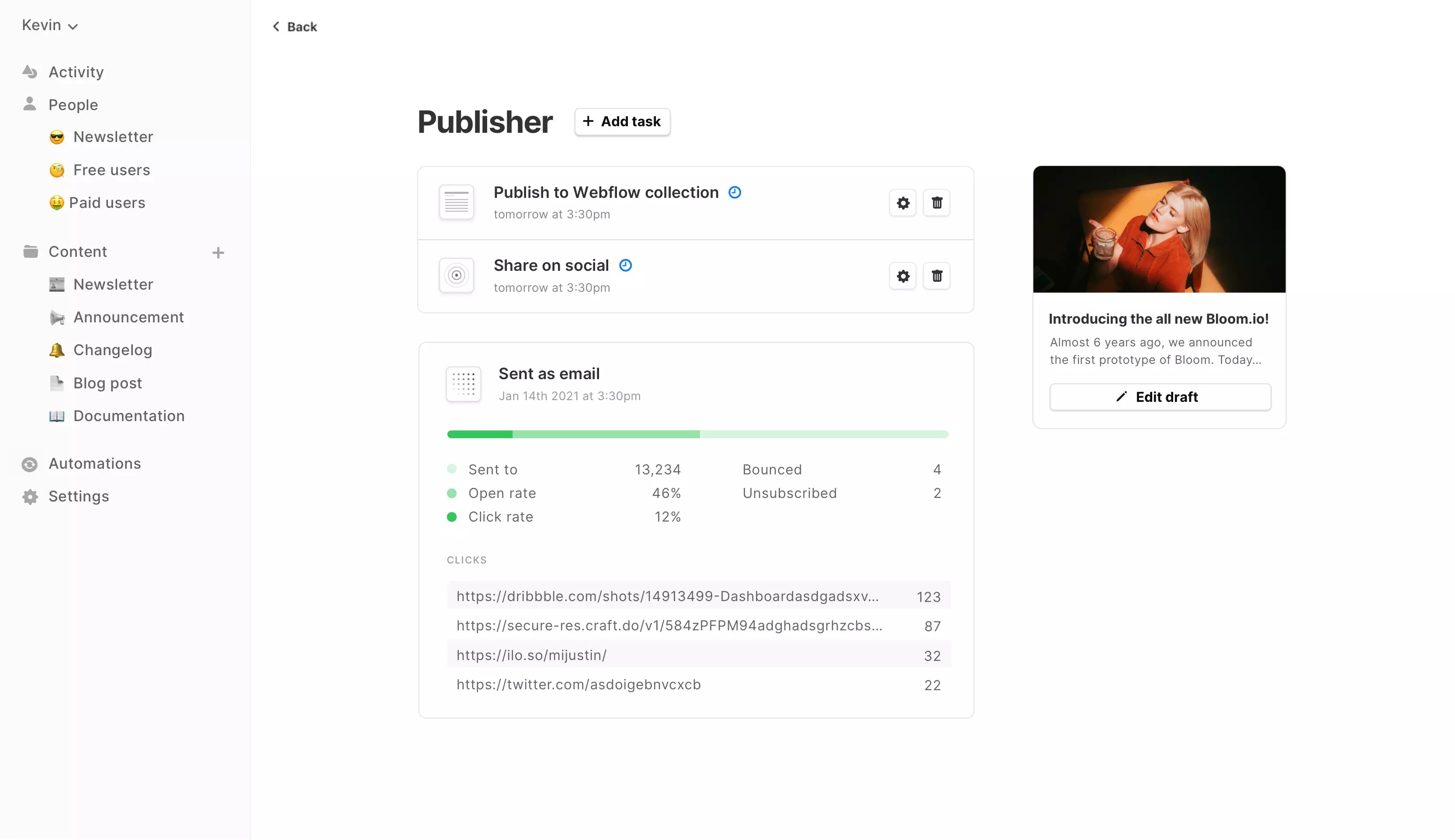
One of the core strengths of Audienceful is its ability to connect email marketing with Webflow publishing in real time. Users can write, organize, and publish content across multiple collections directly from one editor, making it easier to manage blog posts, product updates, press releases, or help docs. This eliminates the need to copy-paste content between platforms or rely on heavy integrations. It is an appealing option for entrepreneurs, startups, and marketing teams who want to unify their email newsletters with their website strategy. When compared with platforms like Beehiiv, Audienceful offers a more seamless way to combine audience engagement with content publishing.
Audienceful also includes built-in features that make email marketing more approachable. With minimalist email designs that look professional by default, you do not have to worry about struggling with outdated template builders. Platform offers automation capabilities like drip campaigns, onboarding journeys, and email courses, ensuring that you can nurture subscribers effectively without being hands-on every day. For audience management, Audienceful provides lightweight CRM functionality, allowing you to tag subscribers, segment audiences, and even sync data through tools like Zapier. This makes it easy to adapt your communication strategy whether you’re a solo creator building a community or a business juggling multiple audience segments.
For teams already using Webflow, Audienceful feels like a natural extension of their existing toolkit. It minimizes friction between content creation and distribution, helping marketers focus on creating valuable content rather than dealing with technical complexity. With its modern editor, integrated publishing, and audience growth features, Audienceful is shaping up to be a solid option for businesses seeking a unified approach to content and email marketing. Those looking for an efficient, collaborative, and Webflow-focused alternative may find Audienceful a powerful addition to their digital strategy, especially compared to other email marketing platforms that operate in silos.
| Feature Tested | My Observation (First-hand) |
|---|---|
| Collaborative Editor |
When I tested the collaborative editor in Audienceful, it felt like using Google Docs inside an email marketing tool. I could draft campaign copy while my teammate polished subject lines at the same time. This real-time flexibility is something I often miss in Kit and EmailOctopus, where editing feels more siloed. Beehiiv and Substack focus more on solo creators, so they do not really offer this team-based workflow. For small campaigns, having collaboration built-in helped me avoid endless Slack threads and version conflicts. It is clearly designed for creators who like working together rather than alone, and for me that was a refreshing change. The collaborative editor kept the workflow fluid, and I found it cut down my prep time by at least 30% compared to other tools. |
| Webflow Integration |
Since I run parts of my site on Webflow, the direct integration really stood out. Publishing both blog updates and email campaigns from one place felt smooth. I did not have to deal with copying code or formatting issues that I normally encounter with MailerLite. Substack does not even give you that option, it is strictly newsletters. Beehiiv has publishing features, but they are not as tightly connected with external CMS platforms. With Audienceful, I could post a product update on the blog and send the same piece as a newsletter instantly. For my small email campaigns, this felt like a huge win because it reduced duplication of effort. Integration is perfect for marketers already invested in Webflow, but it may feel limiting if your site is hosted elsewhere. |
| Email Templates |
✓ Minimalist approach, out-of-the-box emails look clean and work well on dark mode. ✓ Not overwhelming, fewer flashy layouts compared to Mailchimp or MailerLite. ✓ Polished for branding, simple logo and color tweaks made emails look professional. ✗ Limited variety, could frustrate users who want instant pre-built designs. ✗ Lacked advanced layouts, I missed ready-made options for launches or webinar invites (tools like Kit offered more flexibility). |
| Automated Sequences |
Setting up drip campaigns inside Audienceful was easy enough for my small audience. I created a welcome sequence for new signups, and the flow editor felt straightforward, not bloated. Compared with Kit, which has more advanced logic paths, Audienceful felt lightweight but sufficient for basic automation. Beehiiv and Substack still lag behind here since they don’t offer deep automations, while MailerLite gives more options but can get cluttered. For my test, I liked how quickly I could launch a three-email onboarding journey without overthinking triggers. The tradeoff is that if I wanted highly complex automation trees, I’d probably outgrow Audienceful. But for nurturing a small list, it struck a good balance between ease of use and functionality, letting me focus more on content than tech. |
| Subscriber Forms |
I used Audienceful sign-up forms on a Webflow landing page and found the integration seamless. Capturing email addresses felt less clunky than with EmailOctopus, which often requires embedding code that does not match styling well. Beehiiv and Substack keep it simple, but they don’t offer much customization. Audienceful let me tag subscribers based on the form they came from, which was handy for segmenting later. Compared to ActiveCampaign, which gives you advanced form builders, Audienceful is more lightweight. Still, for my small campaign, the simplicity was an advantage because I could get forms live in minutes without fighting with settings. It made me realize how important speed is for busy marketers who do not want to spend hours tinkering with opt-in design. |
| CRM Features |
Audienceful includes a lightweight CRM, and while it’s not a full replacement for big players, I actually liked its focus. I could see per-user activity, segment by tags, and keep my small list organized without feeling overwhelmed. Compared to MailerLite and Klaviyo, which have deeper e-commerce integrations, Audienceful feels modest. Beehiiv and Substack do not really play in the CRM space at all, so having even basic tracking was valuable. For my campaigns, I did not need Salesforce-level detail, I just wanted to know who opened, clicked, and what content they signed up for. On that level, Audienceful delivered. It gave me enough visibility to make smart decisions without bogging me down, which I’d say is a win for small campaigns like mine. |
| Analytics & Reporting |
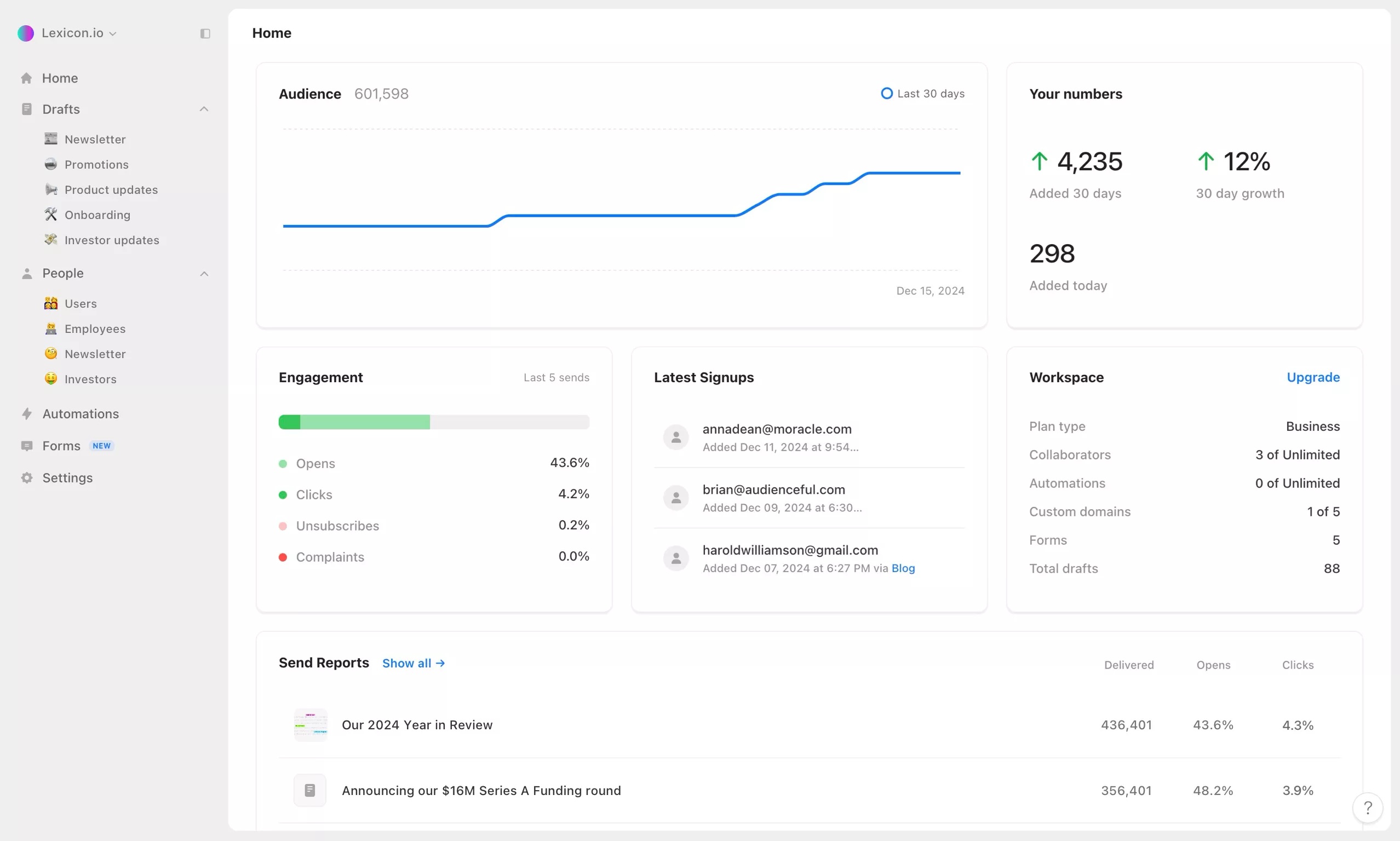
Reporting dashboard gave me basic insights into open rates, clicks, and unsubscribes. It is enough to evaluate performance, but compared to Kit or Drip, I missed seeing more advanced attribution data. Beehiiv gives great growth-focused dashboards, and MailerLite has strong visuals for campaign breakdowns. Audienceful felt a bit plain in comparison, but honestly, for my small campaigns, it did the job. I could easily identify which subject lines worked and which content drove engagement. For example, a short tip-style email got a 35% open rate, while a longer story-driven one hit only 22%. Having just the essentials encouraged me to focus more on content rather than drowning in data overload, but I know power users would expect more granularity. |
| User Experience |
Platform felt modern and uncluttered. I appreciated not being overwhelmed by too many buttons like I often am in HubSpot or ActiveCampaign. The simplicity reminded me of Substack, but Audienceful gave me more control without sacrificing ease. For my small campaigns, that balance was critical. Everything from creating a campaign to publishing on Webflow felt intuitive. I did not need to rely on tutorials or support as much as I usually do when testing new tools. Compared to Beehiiv, Audienceful feels slightly less polished in community-building features, but I found the trade-off worthwhile because it really respects my time. It’s an environment where I can quickly set up, send, and move on without fuss. |
| Audience Segmentation |
I tested segmentation by tagging users from different signup forms and sending tailored messages. It worked smoothly, though it’ is not as advanced as what you’d see in ActiveCampaign or Klaviyo. Still, for my smaller audience, I appreciated the ability to separate readers who came in through a product guide versus a newsletter opt-in. Beehiiv has some segmentation but is limited, and Substack barely touches this area. MailerLite does better, but sometimes the settings feel overwhelming. In Audienceful, it was quick and clear. When I sent a targeted campaign to readers interested in updates, I got a noticeably higher engagement rate compared to my general list. For creators managing different audience types, this lightweight but useful segmentation is a practical middle ground. |
| Ease of Setup |
Getting started with Audienceful was smooth compared to many tools I have tested. Onboarding flow guided me through connecting my Webflow site and setting up my first list in minutes. With Beehiiv or Substack, setup is equally quick, but those platforms do not give you flexibility to expand beyond newsletters. MailerLite requires more manual tweaking, and Kit sometimes throws new users into advanced automations right away, which can feel intimidating. With Audienceful, I appreciated how beginner-friendly the setup was, but still had enough customization to adapt as my campaigns grew. For someone managing a small campaign, the balance between simplicity and control felt like the perfect starting point without feeling locked into a one-size-fits-all workflow. |
| Content Publishing |
I used Audienceful ability to publish both a blog post and email campaign at the same time, which genuinely saved me time. Instead of copying content into multiple systems like I usually do with MailerLite or EmailOctopus, I handled everything in one editor. Beehiiv offers a similar blog-plus-email approach, but it does not tie in directly to a CMS like Webflow. Substack is also limited because you can’t separate email content from blog content without duplication. For me, the seamless workflow was a major advantage, especially when repurposing a single piece of content into multiple formats. It felt like Audienceful respected the way modern marketers actually work, where content often lives across channels but still needs a single hub for management. |
| Customization Options |
When it came to customizing my emails, Audienceful gave me control over logos, colors, and basic layout without going overboard. It reminded me of Kit, where the focus is more on clarity than design-heavy campaigns. MailerLite and Flodesk clearly lead when it comes to offering drag-and-drop creative freedom. Beehiiv and Substack both limit customization to maintain a minimalist brand. For my small test campaign, I liked that I could maintain a professional look quickly without drowning in choices. It did leave me wishing for a few more styling features when planning a product launch, but I also appreciated how the simplicity kept me consistent across email and blog channels. Less was more in this case. |
| Mobile Optimization |
I tested how my campaigns looked on mobile, and the results were solid. Emails resized cleanly, and the minimal design made it easy to read on smaller screens. Compared to Mailchimp, which sometimes clutters mobile views with heavy templates, Audienceful felt refreshing. Substack and Beehiiv also handle mobile well but offer less flexibility in customizing mobile-first layouts. MailerLite gives more advanced responsive tools, but that can feel unnecessary for simple newsletters. For my audience, which checks most emails on mobile, clean experience mattered more than extra design tricks. I walked away confident that my readers could engage comfortably without pinching or scrolling awkwardly, which is not always the case in more bloated email platforms. |
| Ease of Migration |
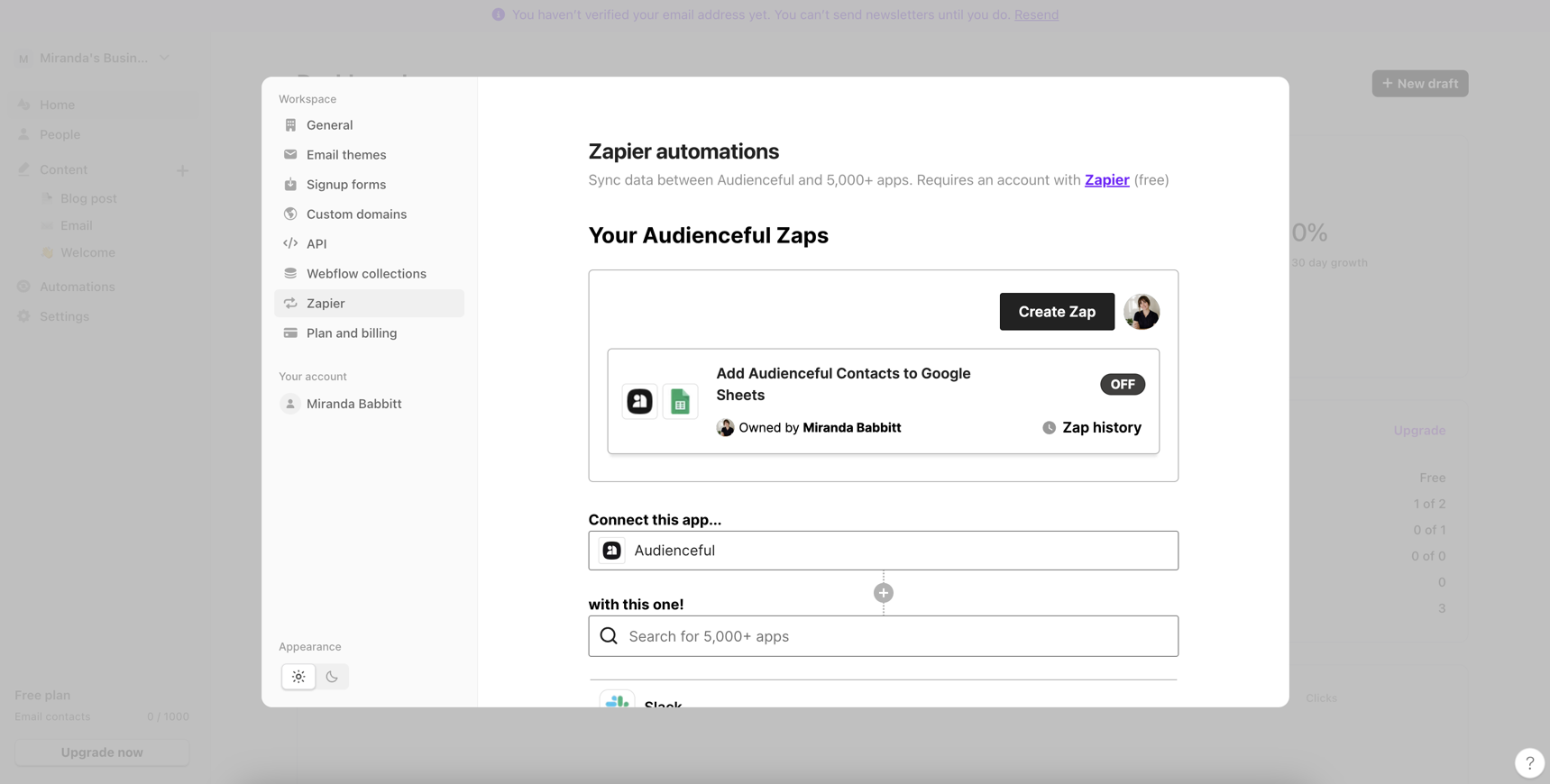
I imported a small test list from a CSV file, and the process was painless. Tags and fields carried over smoothly, though I did need Zapier to sync with another CRM. Compared with moving lists into Beehiiv or Substack, Audienceful was more flexible, while MailerLite and GetResponse gave me a bit more direct import options. For creators moving off tools like EmailOctopus, the migration here felt straightforward. My biggest challenge was mapping custom fields, which took a little trial and error. Still, I did not hit roadblocks like I have when trying to import into stricter platforms. For small campaigns, migration was more than manageable, and I felt relieved that I could bring my list over without losing critical segmentation data. |
| Support & Documentation | During setup, I browsed the support docs and found them clear but not as extensive as Mailchimp or ActiveCampaign. I reached out to support once about Webflow collections, and the response was fast and personal. Beehiiv and Substack do not offer much direct support beyond community forums, so Audienceful felt like a step up in that regard. MailerLite has strong documentation, but Audienceful support felt friendlier and less corporate. For my small campaign, it was reassuring to get help quickly, and I felt the team genuinely understood the pain points of creators. While I’d prefer more tutorials and video guides, the responsive human element made me feel confident in using the tool without being left stranded. |
✓ Collaborative editor feels natural, like Google Docs, making teamwork on drafts and campaigns easier. Real-time collaboration stands out compared to tools like Beehiiv.
✓ Webflow integration lets you publish blog posts, updates, or newsletters directly without third-party plugins. Saves hours versus older tools like Mailchimp.
✓ Minimalist email designs look clean and professional right away. Reminds me of Kit but even more streamlined.
✓ Automated sequences make drip campaigns easy to set up — welcome emails and nurture journeys feel intuitive, lightweight, and effective.
✓ Lightweight CRM helps with segmentation and tracking engagement. Enough for creators and small businesses without needing enterprise-level complexity.
✗ Limited templates may frustrate users who want more pre-built designs. Minimalism works, but beginners may need quicker options.
✗ Learning curve exists for complete beginners. Features require some trial and error compared to simpler platforms like Constant Contact.
✗ Webflow dependency makes it less smooth for WordPress, Shopify, or other platforms. Flexibility is limited compared to tools like Klaviyo.
✗ Basic analytics give only surface-level insights. Lacks depth when optimizing campaigns at scale.
✗ Fewer integrations restrict workflows. Zapier helps, but compared to ecosystems like HubSpot, it feels limited.
One of the most useful updates Audienceful introduced in the past year is dynamic audience filters. I tried this feature while running a small newsletter campaign, and it instantly cut down the time I usually spend exporting lists into spreadsheets.
With live filtering, I could segment readers who signed up from a specific Webflow form and directly target them with a drip sequence. Tools like Kit and MailerLite offer advanced segmentation, but I found Audienceful version faster for quick campaigns.
It may not be as robust for enterprise-level use, but for my workflow it struck the right balance of control and speed. What I appreciated most was being able to create a reusable segment with just one click, instead of setting up multiple rules each time.
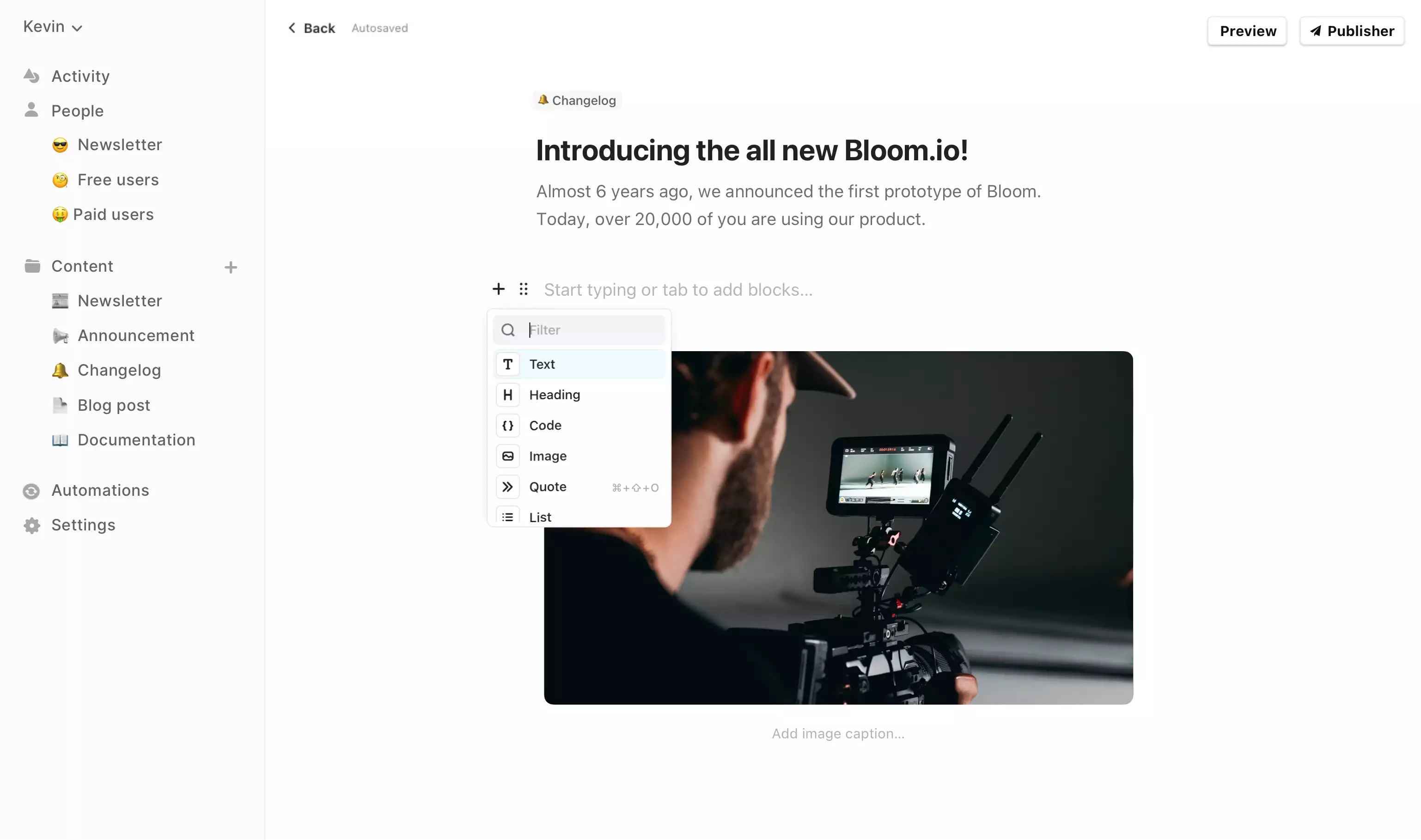
The rollout of Editor 2.0 was a game-changer for me. Being able to paste images directly into my drafts or embed YouTube videos meant I no longer had to juggle between third-party apps or manually add HTML snippets.
Compared to Substack, which is very text-first, this felt like a leap forward in making content look visually engaging. I built a campaign that included quick video tutorials, and the ability to drop in those embeds without breaking layout saved me from countless formatting headaches. Beehiiv has been improving its editor, but Audienceful felt smoother and more intuitive.
For small campaigns where design still matters, these enhancements gave my newsletters a professional feel while keeping the workflow light and efficient.
For me, the ability to edit drafts inside an active automation sequence was one of the most practical updates. Previously, if I noticed a typo or wanted to tweak the tone of a welcome email, I had to stop the whole sequence and restart it. Audienceful removed that bottleneck.
I edited a running onboarding sequence without interrupting delivery, and new subscribers received the updated version immediately. This flexibility is missing in simpler platforms like EmailOctopus or Substack. Even Kit makes editing live automations a little cumbersome.
With Audienceful, it felt seamless and natural. For small campaigns where I am constantly learning and iterating, this ability to make live changes without breaking workflows was a major confidence boost and a productivity win.
Audienceful Free plan gives you 1,000 contacts, two team collaborators, and one automated sequence at no cost. For small projects or creators just starting, this is generous compared to platforms like Substack or Beehiiv, which allow free publishing but limit integrations and automation.
Unlike Mailchimp free plan, Audienceful does not throttle you with heavy restrictions on forms or popups.
However, you will have the Audienceful logo in emails until you upgrade. For me, this plan worked as a safe sandbox to explore the editor, test workflows, and send small campaigns without feeling boxed in.
Essentials plan at $37.5 per month for 3,000 contacts adds three automated sequences, three collaborators, removal of branding, and a custom sending domain. Here Audienceful starts to shine compared with MailerLite or EmailOctopus, which price similarly but lack the native Webflow publishing advantage.
Essentials is ideal if you’re ready to build more credibility with a custom domain and want light automation without committing to enterprise-level costs. I liked this tier best for running multiple small funnels and ensuring my emails looked professional without embedded platform logos.
Growth plan at $70 per month unlocks unlimited automations, unlimited collaborators, advanced analytics, and support for multiple domains. Compared with Kit or ActiveCampaign, this is competitively priced, though it lacks some of their advanced e-commerce automations. Where Audienceful beats them is in its dual ability to manage both Webflow content and campaigns from a single editor.
For me, Growth felt right when managing larger segmented lists and cross-domain campaigns without worrying about automation ceilings. The advanced analytics also provided stronger clarity for optimization compared to the Essentials tier.
Enterprise plan is clearly aimed at bigger organizations, offering six sending domains, priority support, dedicated IPs, and uptime SLA guarantees. This puts it into competition with heavier tools like HubSpot or Klaviyo, which excel at enterprise segmentation and integrations. Audienceful is not as broad in integrations, but for Webflow-centric teams, the single-system workflow is compelling. Additional compliance and support features justify this tier for organizations where deliverability and SLA uptime are mission-critical.
Final recommendation based on price: If you’re just starting, the Free plan is excellent for exploring the platform, but the real value begins at Essentials, where branding removal and domains create a professional presence.
Growth is the most balanced for small to mid-sized teams needing scale and analytics without the heavy lift of an enterprise solution. If you run a Webflow-driven business, Essentials or Growth will likely deliver the best ROI, while larger enterprises should weigh whether Audienceful streamlined publishing advantage offsets the deeper automation strengths of platforms like Mailchimp or ActiveCampaign.
After spending time with Audienceful, my final verdict is that it’s a tool that knows exactly who it is built for. If you are a creator, small business, or team running on Webflow, Audienceful makes life easier by combining email marketing with content publishing inside one editor.
That is a big deal because it removes the friction of bouncing between multiple tools like Mailchimp for email and a CMS for content. Its collaborative editor, lightweight CRM, and automation features give you just enough power without burying you under complexity.
I also appreciated the clean design defaults, which reminded me of Substack, but with more flexibility for branding and workflows.
Pricing is competitive, especially with the Essentials and Growth plans, where the balance of value and capability feels right. Audienceful is not a one-size-fits-all solution, if you need enterprise-grade analytics or e-commerce depth, you may find better fits with ActiveCampaign or Klaviyo.
But for Webflow-first teams, it is a thoughtfully built platform that feels efficient, modern, and genuinely creator-friendly.
| Common Specifications | ||||||||||||||
|---|---|---|---|---|---|---|---|---|---|---|---|---|---|---|
|
||||||||||||||
| Specification | ||||||||||||||
|
||||||||||||||
If Audienceful feels too Webflow-focused for your setup, then picking an ideal alternative comes down to how you plan to use email and content together. For example, if your main focus is community-driven newsletters, Beehiiv offers a creator-first experience with built-in growth features like referral programs and monetization tools. It’s a natural pick if your priority is growing a subscriber base quickly without needing CMS integration.
For small businesses that want affordability and easy-to-use automations, MailerLite is a strong option. I’ve used it for campaign testing, and it balances templates, deliverability, and segmentation at a price that is often easier to justify than heavier tools. It does not have Audienceful publishing advantage but does shine with broader integrations.
If you are a creator who prefers simplicity over complexity, Substack is still one of the simplest ways to launch a paid newsletter. It lacks Audienceful collaborative editor and CRM, but if your entire strategy is based around writing and monetizing newsletters, Substack keeps distractions to a minimum.




I am an accomplished marketing expert with over 10 years of experience focused on growth strategies, emerging technologies, and startup success stories. Driven by a passion for continuous learning, I actively explore and analyze new tools and services that enhance workplace productivity and efficiency. I possess deep expertise across key…

Ankit is a seasoned technology entrepreneur and founder of Aritic and EasySendy. With over 10 years of experience building product-led B2B SaaS companies, he is focused on ambitious goals and bringing innovative platforms to market. As a Principal Founder, Ankit leads product, engineering, marketing, and strategic partnerships for Aritic's suite…

Preeti is an accomplished technical writer and content creator with expertise spanning engineering and technology.…
Quick quiz to see whether Email, Marketing Automation, or CRM suits your team right now.
Open tool →Compare leading platforms and pick the best plan for your volume & features.
Compare costs →Estimate monthly API spend across free limits, pay-as-you-go pricing, and integrations.
Estimate API costs →Turn your plan into a person-weeks estimate with a clean task breakdown.
Estimate effort →Project list size by month from sign-ups, churn, and timeframe.
Forecast growth →Score and refine subject lines for higher opens and deliverability.
Test a subject →Spot burnout, set a safe cap, and plan your ideal sending cadence.
Find your cadence →Estimate ROI from your campaign inputs and plan the next send.
Estimate ROI →
Sprout24 powers smarter email marketing platform decisions with contextual insights, optimization tools, and Sprout Score.
Sprout24 enables small business teams evaluate, compare, and optimize their email marketing stack with confidence.
Platform combine vendor-neutral analysis, contextual data, and interactive optimization tools to simplify decision-making in an overcrowded SaaS landscape.


There are no reviews yet.