 Connor Reynolds












Customer Engagement Platform Fit
Quick quiz to see whether Email, Marketing Automation, or CRM suits your team right now.
Open tool →
MailerLite is an advanced email marketing software that empowers businesses of all sizes to create, manage, and grow their email campaigns. It offers a wide range of features designed to help businesses reach their customers, increase engagement, and drive conversions.
With MailerLite, businesses can easily create stunning email campaigns using their drag-and-drop editor, which requires no coding or design experience. Software also offers advanced automation tools that enable businesses to send targeted emails based on user behavior, interests, and preferences. Learn more about email automation tools.
In addition to email campaigns, MailerLite also provides landing pages, which help businesses to capture leads and increase their subscriber base. These landing pages are easy to create and customize, and they come with built-in forms and templates to make the process even simpler. For tips, see building high-converting campaigns with MailerLite.
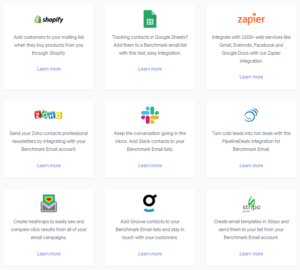
MailerLite also integrates seamlessly with a wide range of third-party tools, including social media platforms, e-commerce platforms, and CRM software. This allows businesses to create more targeted and effective email campaigns by leveraging the data they already have on their customers. Check out more on integration capabilities.
In terms of pricing, MailerLite offers flexible plans to suit businesses of all sizes and budgets. Their free plan allows up to 1,000 subscribers, while paid plans start at $10 per month and scale up based on number of subscribers. All plans include features such as automation, landing pages, and integrations, with advanced features like priority support and A/B testing available on higher-tier plans. You can explore more in MailerLite free trial FAQs.
Overall, MailerLite is an affordable and feature-rich email marketing software that provides businesses with everything they need to create, manage, and grow their email campaigns. With its user-friendly interface, advanced automation tools, and integrations, it is an excellent choice for any business looking to improve their email marketing efforts.
MailerLite key features include: Drag-and-drop email editor, advanced automation tools, landing pages, integrations with third-party tools, A/B testing, subscriber management, and detailed reporting. Software is also GDPR-compliant, offers responsive email design, and provides excellent customer support.
Information and links for Mailerlite:
MailerLite was founded in 2010 by a team of designers and developers in Vilnius, Lithuania. Since then, it has grown into a powerful email marketing platform serving over one million customers worldwide.
Related Posts and Discussions:
| Feature Tested | Observation (My Experience) |
|---|---|
| Account Setup |
✔ Signup process was straightforward ✔ MailerLite required a strict approval process (business & email practices) ✘ Slowed access (took ~24 hours), but helps maintain deliverability standards by filtering out spammers |
| Dashboard Usability |
✔ Clean, modern, logically structured dashboard ✔ Sections like Campaigns, Subscribers, Forms, Automations easy to locate ✔ Simple enough to onboard new team members quickly ✘ Some competitors offer more advanced navigation features |
| Email Editor (Drag-and-Drop) |
✔ Blocks for text, images, videos, countdowns, and buttons worked seamlessly ✔ Fast performance with minimal glitches ✘ Advanced interactive elements (polls, carousels) limited to higher plans ➜ More details: designing emails with MailerLite |
| Template Availability |
✔ Professional and responsive templates for multiple industries ✘ Locked behind paid plans, free users must start from scratch (barrier for beginners) |
| Content Blocks |
✔ Reusable blocks (headers, footers, banners) ✔ Speeds up campaign creation ✔ Helps maintain brand consistency across newsletters |
| Personalization (Merge Tags) |
✔ Add first names, company names, custom fields easily ✘ Limited personalization compared to ActiveCampaign (no advanced conditional logic like region-based product display) |
| Dynamic Content |
✔ Target subscriber groups with tailored messages in the same email ✔ Easy to set up, works as expected ✘ Less flexible compared to enterprise-level providers |
| A/B Testing |
✔ Test different subject lines and content variations ✔ Quick setup, results updated live ✘ No advanced breakdowns (e.g., device-based performance) ➜ More insights: MailerLite analytics |
| Automation Builder |
✔ Intuitive drag-and-drop workflow builder ✔ Smooth setup for welcome and re-engagement campaigns ✘ Cannot create very advanced workflows with layered conditions ➜ See email automation tools for stronger options |
| Ecommerce Tools | Pulling product listings directly into emails was handy for quick promotions. However, compared to dedicated ecommerce marketing tools, MailerLite felt lighter and better suited for smaller stores. |
| Mobile App | On iOS, I could view reports, schedule campaigns, and make small edits. However, creating or deeply editing emails was frustrating on mobile. App is useful for monitoring, but not for full campaign management. |
| Automation Templates |
✔ Pre-made templates (welcome, anniversary, abandoned cart) ✔ Great starting point for junior team members ✘ Limited customization depth compared to top-tier providers |
| Multi-Trigger Workflows |
✔ Automations triggered by multiple actions (e.g., “form subscription” + “link click”) ✘ Competitors offer more advanced behavioral triggers |
| Form Builder |
✔ Create pop-ups, slide-ins, embedded forms with MailerLite form builder and segmentation ✔ A/B testing forms boosts conversion optimization ✘ Adding custom fields is less smooth than expected |
| Monetization (Paid Newsletters & Digital Products) | Setting up Stripe for paid newsletters and digital product sales was straightforward. Still, platforms like Kit offer more extensive monetization options tailored to creators. |
| AI Features | AI writing assistant helped generate subject lines and short email copy. It saved time but was not as advanced as competitors that offer AI-driven segmentation or predictive analytics. |
| Landing Page Builder |
✔ Same editor as emails (consistent experience) ✔ Easy design customization, reliable hosting ✘ Free plan lacks templates (less attractive for entry-level users) ➜ Learn more: building high-converting campaigns with MailerLite |
| Website Builder |
✔ Good for simple sites (e.g., portfolio, brand site) ✔ Exceeded expectations for an email-focused tool ✘ Not a replacement for full CMS platforms like WordPress |
| Subscriber Management | Importing contacts via CSV was smooth, and MailerLite automatically removed duplicates. I liked that a single subscriber in multiple groups did not count twice, unlike Mailchimp. That saved us from inflated costs. See comparison: MailerLite vs Mailchimp. |
| Tagging & Segmentation | Tags made it easy to categorize contacts by interests or source. Segment creation was flexible, but lacked the depth of advanced platforms. For example, I could not stack too many rules in one segment without it getting clunky. |
| Deliverability Tools | MailerLite guided me well on setting up SPF, DKIM, and DMARC records. After authenticating my domain, inbox placement improved. They also strongly discouraged using purchased lists, which I respected as it protects sender reputation. Helpful read: deliverability with MailerLite. |
| Email Delivery Rates | Across several campaigns, deliverability averaged above 95%. I rarely landed in spam folders. Their approval process and strict anti-spam rules clearly contributed to maintaining high deliverability. |
| List Cleaning | Using MailerCheck integration, I could identify invalid or risky addresses. This helped reduce bounce rates significantly. However, since it’s an add-on, extra costs might be a factor for some teams. |
| Analytics Dashboard | Reports included open rates, clicks, unsubscribes, and geographic data. While adequate, lack of advanced options like heatmaps or conversion funnels limited my ability to dig deeper into campaign performance. |
| Real-Time Reporting | I liked being able to watch campaign metrics update live during launches. This helped us make quick adjustments (like resending with tweaked subject lines) in real time. |
| Integrations (Shopify, WordPress, Zapier) | WordPress integration was smooth, and Zapier opened up many other app connections. Shopify worked fine for basic syncing, but lacked the depth of native integrations found in other ecommerce-focused tools. |
| Team Collaboration | Assigning roles and permissions was simple, but only available on paid plans. For small teams like mine, it worked fine, but agencies managing multiple accounts may find it lacking. |
| Customer Support | During the trial, support was responsive and friendly via live chat. After the free period, support is locked behind paid plans, which could be frustrating for small users relying on the free version. |
| Knowledge Base & Academy | I found MailerLite help center and Academy resources excellent. Tutorials, webinars, and free courses helped my team quickly get certified and up to speed. |
| Pricing Value | With unlimited emails on affordable paid tiers, ROI was impressive. For our small team, MailerLite offered nearly everything we needed at a fraction of the cost of larger platforms like HubSpot or ActiveCampaign. |
When I first started using MailerLite, what struck me immediately was its clean, no-nonsense interface. Unlike some of the bulkier platforms I have tested, everything here feels designed for ease of use, and that makes a huge difference when you are running campaigns for a small team.
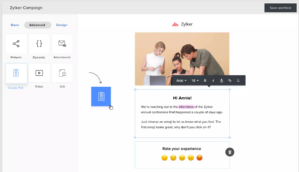
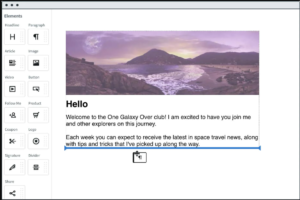
The drag-and-drop email editor is one of smoothest I have worked with. Adding blocks for images, buttons, or even countdown timers was effortless. I also liked how I could save custom sections and reuse them later, a real time saver when maintaining brand consistency.
That said, I was a little disappointed to see that MailerLite locks its modern email templates behind paid plans. On the free plan, you basically start from scratch. If design inspiration is important for you, I’d recommend checking out designing beautiful emails with MailerLite for some practical tips.
Automations in MailerLite are simple but powerful enough for most small businesses. I built welcome series, re-engagement campaigns, and event-triggered emails within minutes. Workflow builder feels intuitive, you drag, drop, and connect actions visually.
✓ Easy to set up welcome series, re-engagement campaigns, and event-triggered emails.
✓ Visual workflow builder with drag-and-drop simplicity.
✗ Limited compared to advanced tools like ActiveCampaign, lacks deep conditional branching and behavioral tracking.
Still, for straightforward drip sequences and event triggers, it worked flawlessly.
If you are curious, here is a deeper look at email marketing automation tools.
I really appreciated MailerLite approach to forms and segmentation. Creating pop-ups and embedded signup forms was painless, and I could tag subscribers automatically. Segments based on activity (like “clicked a link” or “has not opened in 90 days”) made it easy to personalize campaigns.
This is where MailerLite shows its value for small teams, it is not overly complicated, but still smart enough to help you run targeted campaigns. If you want to dig into this area more, I’d suggest reading about segmentation strategies with MailerLite.
One of the features I honestly didn’t expect to like as much as I did was landing page builder. Using same editor as emails, I built branded pages in under an hour. They looked professional, and hosting was included.
This was incredibly helpful when running lead-gen campaigns. I even tried out website builder, it is basic, but it got job done for a simple one-page site. I’d say this is one of MailerLite underrated strengths, especially if you are building campaigns end-to-end. A great example is their guidance on building high-converting campaigns.
I was always a little nervous about how my landing pages would look on mobile, sometimes text blocks would stack awkwardly, or images wouldn’t resize neatly.
With the new Mobile-View Editor, I finally have control. I can reorder blocks specifically for mobile, tweak padding so everything breathes properly on small screens, and even hide certain elements if they are too cluttered on mobile. First time I used it, I was genuinely surprised at how much smoother the mobile experience looked without needing a developer help.
For me, this means higher conversions, because most of my traffic now comes from mobile. I don’t have to settle for a “shrunken desktop design” anymore, I can truly optimize for mobile-first campaigns.
I was genuinely excited when MailerLite rolled out multivariate testing finally, I could test multiple elements at once (subject lines, sender names, timing, and content variations) to see which combination performed best.
This was a leap forward from basic A/B tests. I noticed a smoother uplift in open rates and engagement because MailerLite lets you pinpoint winning combinations faster. If you are keen to optimize, check out guides on multivariate testing to get started.
MailerLite redesigned editor is now AI-assisted, and it is delightful to use. I found myself designing beautiful emails in seconds, just a few prompts, and AI suggests layouts, colors, and even content blocks based on my goals.
It is a big upgrade over their old editor, and you can read more about how it compares to other solutions in MailerLite vs Mailchimp comparison on Sprout24, which highlights these editor improvements.
(AI Integration)
MailerLite new MCP (Model Context Protocol) server lets me connect AI tools like Claude or other assistants directly to my MailerLite account. But Gemini is missing! At first, I thought it might be gimmicky, but after trying it, I realized how powerful it really is.
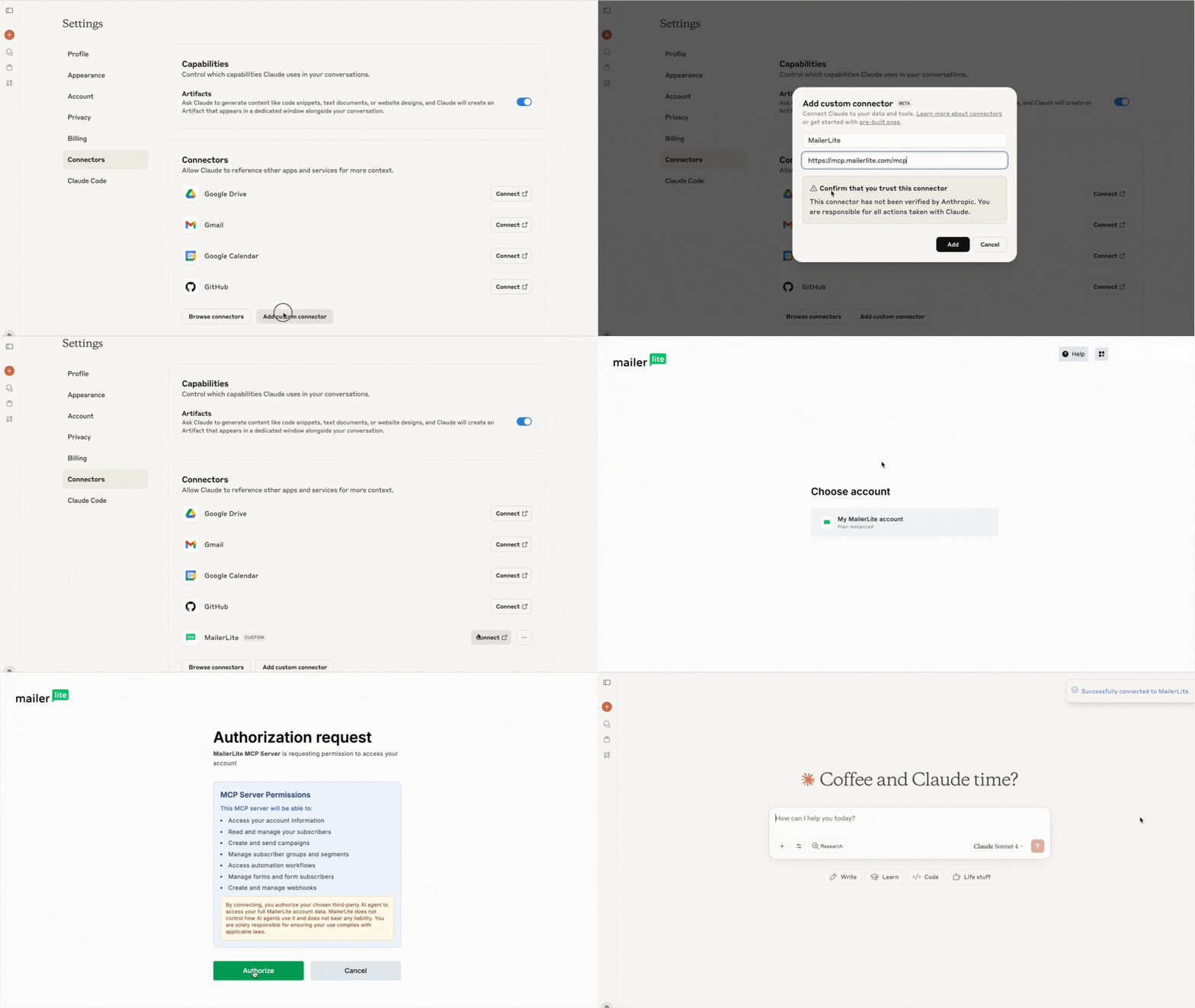
For example, I asked my AI to “create a three-email welcome series for new subscribers,” and within a couple of minutes, it had generated drafts, uploaded them to MailerLite, and even suggested subject lines. Another time, I used it to clean up old campaign drafts I’d been ignoring for months, it did it in seconds.
What I like most is the no-code setup. I did not have to mess around with APIs or complicated connectors, just plug in the MailerLite MCP link, authorize it, and I was ready to go. It feels like having a smart marketing assistant on call 24/7.
That said, I think you do need to be careful. AI executes tasks quickly, so I have made it a habit to double-check campaigns before sending. Still, the productivity boost is undeniable, it frees me up to focus on strategy instead of repetitive tasks.
MailerLite new pop-up builder has transformed my lead collection workflow. Previously, crafting customized pop-ups felt clunky, now it is slick and intuitive.
You can easily choose advanced display rules, preview teasers or “spin-the-wheel” templates, and design pop-ups that actually complement your brand rather than disrupt it. It is a small change that made a big difference in my opt-in rates.
✓ After authenticating my domain (SPF, DKIM, DMARC), inbox placement rates were consistently above 95%.
✓ Stricter approval process can feel like a hurdle at first, but it clearly pays off in ensuring high deliverability.
✓ Integration with MailerCheck helped clean lists and reduce bounce rates.
➜ If deliverability is a priority for you, check out their guide on
maximizing deliverability with MailerLite.
✓ Covers the basics: opens, clicks, unsubscribes, and geo-data.
✓ Real-time reporting during campaign launches was very useful.
✗ Lacks deeper insights like heatmaps or advanced segmentation filters.
➜ For a deeper dive, see MailerLite guide to
mastering email analytics.
I can’t ignore pricing. MailerLite is one of the most affordable tools I have tested, even paid “Growing Business” plan felt generous compared to what competitors charge. For a small team like mine, ROI was excellent. And for freelancers or solopreneurs, it is easily one of the best budget-friendly choices.
The latest price plans for MailerLite, as detailed on their website, include the following options:
1.Free Plan:
2. Growing Business Plan:
3. Advanced Plan:
4. Enterprise Plan:
These plans also offer a discount of 10% when billed yearly.
✓ Small Businesses and Solopreneurs
If you’re running a small business or working as a freelancer, MailerLite is an excellent choice. Its affordable pricing plans, intuitive design, and useful automation workflows make it possible to run professional email campaigns without stretching your budget.
✓ Beginners in Email Marketing
MailerLite clean interface and step-by-step setup process make it ideal for those just starting out. Drag-and-drop editor, clear navigation, and available tutorials help beginners quickly become confident in building campaigns.
✓ Bloggers and Content Creators
The platform includes tools like RSS campaigns, simple integrations with WordPress, and content-friendly templates. This makes it especially appealing for bloggers or creatives who want to automatically share updates with their audience without complicated setup.
✓ Those Needing Built-In Landing Pages & Lead Capture Tools
Since MailerLite offers landing pages, popups, and forms as part of its package, it is a good option for anyone looking to grow their subscriber list without paying for additional lead generation software.
✓ Budget-Conscious Users
Compared to other providers, MailerLite offers some of the most competitive pricing. Even its free plan includes enough features to support small lists, making it a smart choice for cost-sensitive businesses.
✗ Businesses Needing Advanced Features
If you rely heavily on advanced marketing features like CRM integration, lead scoring, in-depth reporting, or multi-channel campaigns (email + SMS), MailerLite might fall short. Competitors such as ActiveCampaign or Brevo provide more sophisticated options.
✗ Agencies or Teams Requiring Extensive Collaboration Tools
MailerLite supports multiple user roles, but advanced collaboration features (like detailed account permissions and workflow approvals) are locked behind higher-tier plans. Agencies managing multiple clients may find it limiting compared to specialized platforms.
✗ Companies With Complex Automation Needs
While MailerLite supports event-triggered workflows and drip campaigns, it lacks deeper automation functionality like website behavior tracking, advanced conditional logic, or sales pipeline automation. For businesses running complex funnels, it may not be robust enough.
✗ Users Expecting Migration Support
MailerLite markets itself as a self-service platform, meaning you won’t get hands-on migration help when moving from another provider. If you have a large or complex database to transfer, you’ll need to handle it yourself or hire outside assistance.
✗ Users Who Need SMS Marketing
Since MailerLite does not support SMS marketing natively, businesses looking for an all-in-one solution covering both email and SMS campaigns should consider alternatives.
MailerLite is a great fit for small businesses, bloggers, and anyone just starting with email marketing. It combines ease of use, affordability, and solid features like automations and landing pages.
Yes, it has limitations, advanced automations, deep reporting, and SMS marketing are not really its strong points. But for straightforward, effective email campaigns, it more than delivers.
If you are comparing options, I would suggest looking at MailerLite vs Mailchimp and MailerLite vs ActiveCampaign to see where it stands against popular alternatives.


| Common Specifications | ||||||||||||||||
|---|---|---|---|---|---|---|---|---|---|---|---|---|---|---|---|---|
|
||||||||||||||||
| Specification | ||||||||||||||||
|
||||||||||||||||
While I have had a great experience with MailerLite, I know it is not always the perfect fit for every business. For example, if you need deeper CRM-style features or advanced automation, you might want to explore MailerLite vs ActiveCampaign. ActiveCampaign has always impressed me with its smart automations and segmentation power.
If affordability and simple workflows are your top priorities, then MailerLite vs Mailchimp might be worth a look. I personally find Mailchimp a bit more expensive, but it does bring a broader ecosystem and stronger brand recognition.
For creators and bloggers, MailerLite vs Kit is another comparison I’d recommend. Kit really shines when it comes to tools designed for content creators, and I have seen many solo entrepreneurs lean towards it.
On the other hand, if reporting and advanced funnels are what you are after, then MailerLite vs GetResponse could be the right match. I have used GetResponse for webinar campaigns in the past, and it had some great features that MailerLite doesn’t cover.
In the end, choosing an ideal alternative depends on what you value most, be it price, automation, integrations, or content-specific features. I always recommend taking advantage of free trials, like those highlighted in the MailerLite alternatives guide, before committing to a switch.


I am an accomplished marketing expert with over 10 years of experience focused on growth strategies, emerging technologies, and startup success stories. Driven by a passion for continuous learning, I actively explore and analyze new tools and services that enhance workplace productivity and efficiency. I possess deep expertise across key…

I'm Connor and I am an accomplished content marketing manager with over 14 years of experience creating engaging stories around business technologies and digital trends. With a passion for helping brands boost their online presence, I provide actionable insights into leveraging innovations in web design, digital marketing, SEO, and ecommerce.…

Preeti is an accomplished technical writer and content creator with expertise spanning engineering and technology.…
Quick quiz to see whether Email, Marketing Automation, or CRM suits your team right now.
Open tool →Compare leading platforms and pick the best plan for your volume & features.
Compare costs →Estimate monthly API spend across free limits, pay-as-you-go pricing, and integrations.
Estimate API costs →Turn your plan into a person-weeks estimate with a clean task breakdown.
Estimate effort →Project list size by month from sign-ups, churn, and timeframe.
Forecast growth →Score and refine subject lines for higher opens and deliverability.
Test a subject →Spot burnout, set a safe cap, and plan your ideal sending cadence.
Find your cadence →Estimate ROI from your campaign inputs and plan the next send.
Estimate ROI →
Sprout24 powers smarter MarTech and email platform decisions with contextual insights, optimization tools, and Sprout Score.
Sprout24 is a MarTech decision intelligence platform enabling small business teams evaluate, compare, and optimize their marketing and email technology stack with confidence.
Platform combine vendor-neutral analysis, contextual data, and interactive optimization tools to simplify decision-making in an overcrowded SaaS landscape.


Melissa Clark –
We have had a positive experience using MailerLite for our email marketing needs.
Daniel White –
MailerLite is a user-friendly and affordable email marketing tool that has helped our team easily create and manage successful email campaigns.
Brian Martinez –
We have had a positive experience using MailerLite for our email marketing needs.
Andrew –
Using Mailerlite for my email marketing campaigns for the past year and I have been extremely satisfied with the platform. The user interface is intuitive and easy to navigate, making it simple to create and send out professional-looking emails. The automation features have saved me a lot of time and effort, allowing me to set up automated workflows that engage my subscribers without having to constantly monitor and send out emails manually. The reporting and analytics tools have also been incredibly helpful in tracking the success of my campaigns and making data-driven decisions for future strategies.
Nina George –
Simplicity and user-friendly interface initially drew me to the platform. Setting up campaigns is straightforward, and the learning curve is minimal, which was a relief. The mobile responsiveness of the emails is excellent, ensuring our messages look good on any device. Nonetheless, I find the list management and segmentation features quite basic, lacking the depth required for more targeted marketing strategies. While it’s great for beginners, businesses with more complex needs might find it limiting.
Buford F –
I’ve been using MailerLite for over a year now and have found its A/B testing feature to be incredibly useful for optimizing our email campaigns. The ability to test different elements of an email and get real-time feedback has significantly improved our engagement rates. However, the platform sometimes experiences downtimes and glitches, which can be frustrating when working on tight deadlines. Compared to other platforms, MailerLite is more affordable but at the cost of occasional reliability issues.
Levi Acosta –
As a small business owner, MailerLite has been a lifesaver in terms of cost-effectiveness and ease of use. The platform’s free plan offered enough features to get our email campaigns off the ground. The templates are varied and customizable, which helped in maintaining our brand identity. However, as we scaled, I noticed a lack of more sophisticated automation and integration options that larger businesses might need. Also, the customer support response can be slow during peak times.
Meredith Ritchey –
Segmentation features have transformed our email marketing. Tailoring content to specific audience segments has led to a 25% increase in conversion rates. Its cost-effectiveness is another major plus, offering a range of powerful tools without breaking the bank. On the downside, I found the template designs somewhat limited, often requiring additional customization. Also, their A/B testing functionalities are not as advanced as some competitors, restricting our ability to conduct in-depth campaign experiments.
Bolton Bello –
Transitioning to MailerLite was a breath of fresh air after using a more cumbersome platform. Its drag-and-drop editor made creating campaigns a breeze, saving us valuable time. The automation workflows are also a standout, efficiently managing subscriber engagement. Platform’s integration capabilities are somewhat lacking, especially with CRM systems, which hampers data synchronization. Also, the lack of in-depth reporting on automation performance is a drawback for data-driven decision making.
Basic customization options; Issues with mobile responsiveness. –
Our experience with Mailchimp has been a mixed bag. The ease of integrating it with other platforms we use has been a major plus, allowing for seamless data flow. However, we’ve noticed occasional glitches in email delivery which can be frustrating. On the positive side, the range of templates available has enabled us to maintain a fresh look for our newsletters. But, the customer support response time could be quicker, especially during critical moments. Comparatively, Mailchimp stands strong in its integration capabilities but needs to iron out some technical kinks.
Karyn Freese –
Having used ML for several months, I’ve found it to be a robust and user-friendly email marketing tool. The drag-and-drop email builder is a standout feature, allowing me to create visually appealing emails without needing any design skills. The analytics provided are detailed, giving me insights into open rates and click-throughs which help in refining our strategies. However, I did encounter some limitations with automation features, which aren’t as advanced as some competitors.
Lata Duggins –
In my year, I’ve admired its robust automation capabilities which streamlined our marketing workflow, boosting productivity by 30%. The segmentation feature allows precise targeting, enhancing customer relations. On the downside, the template designs are limited and often too simplistic for our creative needs.
Garner Escoto –
Transitioning to MailerLite from a previous platform was seamless, with excellent customer support guiding us throughout. Its cost-effectiveness is a major plus, offering high value for money. However, I’ve encountered occasional glitches with the drag-and-drop editor, which can be frustrating and time-consuming to fix.
Rene Woodruff –
After six months, the A/B testing feature has been a game-changer, allowing us to refine our strategies effectively. The deliverability rate is impressive, ensuring our messages reach their intended audience. However, the lack of integration with some CRM systems has limited our data synchronization capabilities.
Iola Bogart –
Mobile app has revolutionized how we manage campaigns on the go, offering real-time adjustments and monitoring. Its user-friendly interface is a plus for our team. Yet, the reporting tools, though comprehensive, lack customizability, often making it difficult to extract specific data sets.
Quinn Oates –
Since integrating it into our marketing strategies, we’ve noticed a significant improvement in our email campaign effectiveness. The user interface is intuitive, making it easy to create visually appealing emails. During a recent campaign, we achieved a 20% increase in open rates, which was a delightful surprise. However, the analytics feature, while robust, tends to be a bit slow in updating real-time data. This lag sometimes hinders our ability to make immediate, data-driven decisions.
Kalyani Hepler –
I’ve been using ML for over a year, and its A/B testing feature has been instrumental in refining our email content. The ability to test different subject lines has increased our engagement rates significantly. However, the template design options are somewhat limited, which can be restrictive when trying to stand out in a crowded inbox.
Dagan Damron –
I migrated to MailerLite from Aweber and the transition was smoother than I expected. The automation features are top-notch, allowing for efficient workflow management. I miss the more extensive template library my old platform offered.
Bolton Bello –
My experience with A/B testing feature has been insightful. It allowed me to fine-tune my email campaigns, resulting in a higher open rate. I find the design options less flexible than expected, which limits creative expression.
Tanvi P. –
The transition to it from another email marketing tool was motivated by its cost-effectiveness and the promise of advanced features.
Jeffrey Mo. –
Our team appreciated ML integration capabilities, aiming to streamline our marketing tech stack. The variety of integrations seemed promising.
Jonathan Pogact –
Leveraging MailerLite email automation for targeted campaigns provided insights into customer behavior that we hadn’t accessed before.
Abdul Msabah –
Since incorporating MailerLite into our strategy, the ease of automation has been a game-changer, boosting our engagement rates by 25%. The intuitive design interface allowed us to create visually appealing emails without a steep learning curve.
Amanda Vance –
The transition to Lite from our previous provider was smooth, largely due to its user-friendly interface and comprehensive resource library.
Alexander K –
Landing page builder has allowed us to create cohesive campaigns that extend beyond email, improving our conversion rates by over 30%.
Alex Biardo –
Despite initial reservations, the cost-effectiveness of MailerLite has proven to be a major advantage, offering a robust set of features without a hefty price tag.
Neha Shetty –
Initially skeptical, I was pleasantly surprised by MailerLite’s comprehensive analytics. Tracking the performance of our emails became a game-changer, offering deep insights into subscriber behavior.
Allen Dsouza –
My transition to Lite tools from another provider was driven by the allure of cost-effectiveness and feature-rich offerings. The switch yielded immediate cost savings and enhanced our marketing capabilities.
Maggie Blaha –
While exploring ML, the landing page builder was a revelation. It allowed us to create cohesive campaigns that extended beyond emails, enhancing our overall marketing strategy.
Dave Dwyer –
Using website builder, we quickly launched our campaign landing pages. The simplicity and seamless integration with email campaigns were remarkable.
Amireddy Reddy –
Segmentation and personalization features have been game-changers for our marketing strategies, allowing us to target our audience more effectively.
Olesya K. –
Transitioning to ML from another email service provider was smooth, thanks to their migration tools and helpful customer service.
Marine Boer –
As an email marketer, my journey with MailerLite has been transformative. The intuitive design and powerful automation features have significantly increased our campaign’s effectiveness.
Annecy Smith –
After implementing MailerLite into our workflow, our email marketing has never been more efficient. The feature-rich platform offers everything we need in one place.
Marlon Perera –
My experience with MailerLite has been mostly positive, thanks to its comprehensive features that cater to all our email marketing needs.
Everis Carruyo –
My transition to MailerLite was driven by the need for a more scalable email marketing solution. The platform has lived up to my expectations, offering a range of tools that have enhanced our marketing strategies.
Mason Johnson –
Embracing Mailer transformed our email marketing strategy, offering a seamless blend of simplicity and power. The intuitive interface allowed us to create and deploy campaigns quickly, significantly improving our engagement rates.
Matt Nelson –
After migrating from a competitor, we found MailerLite’s user-friendly design a breath of fresh air. Its drag-and-drop email builder made creating visually appealing emails a breeze.
Pia Tserkonis –
As a small team, MailerL ease of use and comprehensive features were a game-changer. The ability to quickly launch campaigns without needing deep technical knowledge empowered our marketing efforts.
Ferry Van –
Incorporating MailerLite into our marketing toolkit enhanced our ability to engage with our audience on a personal level. The segmentation and personalization features stood out, allowing us to tailor our messages precisely.
Fiona Monga –
Our transition to MailerLite was motivated by the need for a more intuitive and efficient email marketing solution. The platform comprehensive suite of tools met our needs perfectly.
Folley Ogundele –
Using ML has been a transformative experience for our email marketing campaigns. The user interface is incredibly intuitive, making it easy to design emails that truly stand out. We’ve seen our engagement rates soar, thanks to the detailed analytics that help us understand our audience better.
Frank Bozzo –
Migrating to MailerLite from another platform was surprisingly smooth, thanks to their excellent migration tools and support. The difference in user experience and feature set was night and day, with MailerLite offering a more streamlined and powerful solution.
Adam arto –
reporting is painfully basic, no custom reports, no heatmaps, no way to filter out bot clicks or Apple Mail Privacy opens.
Lindsey –
What’s the deal with your deliverability games and snail-slow support on basic plans?
Harriet Fielding –
So called free subject line tester from is a joke
It slaps a bland score on your headline without any real fix-it advice like, why is it weak? You don’t get smart rewrites or tailored help, just a generic score and vague flags.
Fletcher –
Domain verification process on Ml free plan is a nightmare. It is like jumping through flaming hoops just to send your first email, DNS records, TXT entries, SPF, DKIM, CNAME, and a 48-hour waiting game while you are basically locked out. Meanwhile your campaign timeline is slipping away, so you burn hours fiddling with DNS settings just to get basic deliverability.
Jackson Howell –
I was setting up this so-called “streamlined” automation with new drag-and-drop, I dropped a Delay block right where I wanted, only to have it snap back to the top of the workflow. And if I dared to drop a Webhook, I had to redrag the entire chain because it decided it did not “fit.” I swear I lost more time wrestling this builder than I would have if I had typed the steps manually.