 Connor Reynolds













Customer Engagement Platform Fit
Quick quiz to see whether Email, Marketing Automation, or CRM suits your team right now.
Open tool →
Moosend is a cloud-based email marketing platform that provides businesses and marketers with a suite of tools for creating, sending, and analyzing email campaigns. With Moosend, users can easily create and send personalized and visually appealing emails, set up automated campaigns, and track their performance using detailed analytics and reporting.
Moosend offers a user-friendly interface, integrations with popular tools and platforms, and excellent customer support. Additionally, it provides features such as drag-and-drop editor, behavioral targeting, A/B testing, and responsive templates that help users increase conversions and grow their business. Moosend is a versatile and reliable email marketing solution suitable for businesses of all sizes, from small startups to large enterprises.
Here are some reasons why they should consider selecting Moosend:
Moosend is an excellent choice for small marketing teams looking to run successful email campaigns. With its ease of use, automation features, detailed analytics, integrations, and support, Moosend can help users achieve their marketing goals and grow their business. If you are considering switching, you may also want to explore Brevo as an alternative option for budget-conscious teams.
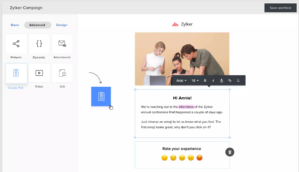
When I first tried Moosend for managing email campaigns, what immediately stood out to me was how easy the platform felt. Interface is simple enough that I did not feel lost, even when setting up more advanced workflows. That “easy-to-use” factor really lowers the barrier, especially for small marketing teams that do not have a dedicated technical person.
The automation capabilities were another big win. I was able to quickly set up workflows that triggered based on subscriber behavior, such as cart abandonment reminders. This reminded me of what I had seen with ActiveCampaign, but Moosend kept it cleaner and less overwhelming. For lean teams, that balance of power and simplicity matters a lot.
On the analytics side, Moosend reporting gave me clear visibility into opens, clicks, and even heatmaps. Having access to these insights without needing external tools was refreshing. When I compared it to my past experience with Campaign Monitor, I found Moosend faster in surfacing actionable data. I could make changes to campaigns almost immediately based on real-time metrics.
Integrations were fairly straightforward as well. While not as extensive as HubSpot, the essentials worked smoothly. Connecting with e-commerce tools and syncing with my website took just a few steps, which gave me confidence that Moosend would not slow me down.
Customer support deserves praise. I tested their live chat when I hit a snag with importing contacts, and the response was not only fast but also genuinely helpful. Compared to the slower support I’d experienced with tools like Constant Contact, Moosend felt more invested in ensuring I could keep moving without long delays.
That said, using Moosend was not without frustrations. Most obvious drawback was its limited free plan. After the trial, you are quickly pushed into paid tiers, which might not sit well with freelancers or micro-businesses. Tools like MailerLite or Brevo give a bit more breathing room on their free offerings.
Design flexibility also left me wanting. Template selection is serviceable but felt dated, and the editor lacks the polish of platforms like Flodesk. I often had to compromise between what I wanted to design and what the tool could handle without glitches.
A/B testing, while present, was surprisingly limited. I could only test subject lines, not full variations of email content. Coming from experiences with GetResponse, where multivariate testing is much more robust, this felt like a missed opportunity.
Customization in general felt a bit constrained. While I could personalize subject lines and add dynamic blocks, I sometimes found myself wishing Moosend gave me the same depth of control that Klaviyo or Drip provide for segment-driven campaigns. If you thrive on hyper-granular personalization, you may feel boxed in.
Even though the pricing starts low, it scales quickly as your subscriber list grows. At first, I loved paying just $9, but by the time I crossed a few thousand subscribers, the jump in cost felt steep compared to some Mailchimp alternatives. For small businesses with rapid growth, this can become a sticking point.
| Feature Tested | My Observation (First-hand) |
|---|---|
| Email Campaign Builder | I started with Moosend campaign builder, and honestly, it was straightforward. Drag-and-drop interface worked smoothly for me, and I could quickly put together a newsletter without needing any design background. I liked the ready-made templates, although compared to what I have seen on Mailchimp, the designs could use more variety. Still, for small teams, the simplicity makes the process fast. What impressed me most was how Moosend balanced power and ease, it felt like I could move from idea to execution in minutes, which is not always the case with tools that overload you with too many settings. |
| Automation Workflows | I tested Moosend automation workflows by setting up a cart abandonment sequence. Visual builder was easy to follow, with clear color coding for triggers and actions. I have used tools like ActiveCampaign that offer complex automations, but Moosend surprised me by making the same process feel simpler. It did not overwhelm me with dozens of menus. Instead, it focused on the essentials and gave me flexibility to build sequences based on clicks, opens, and purchases. For someone like me who values time, it saved hours of tinkering. It feels powerful but not intimidating. |
| Email Templates | Moosend comes with around 75 templates, and while that sounds impressive, I noticed the designs leaned towards being safe rather than bold. I liked that they were clean and professional, but honestly, they did not excite me visually. Still, what worked for me was the ability to import custom HTML templates, which gave me freedom when I wanted more flair. Compared to Flodesk, which really focuses on beautiful designs, Moosend feels more functional. But for businesses where professional over flashy matters, these templates do the job well enough without wasting time. |
| Segmentation | I loved testing Moosend segmentation because it gave me control over grouping subscribers. Using behavioral triggers, I could create segments for people who clicked specific links or viewed certain products. This felt much more refined than the basic segmentation I’d seen on Constant Contact. What really struck me was how intuitive it felt, I did not need to read a manual to set it up. For campaigns like win-back offers, the segmentation was accurate and responsive. It made me feel like I was speaking to the right people at the right time, which is huge in email marketing. |
| A/B Testing | When I tested Moosend A/B testing, I found it to be very limited. It allowed me to test subject lines, but I could not run tests on email body content or design variations. Having used GetResponse before, I felt a bit restricted here. On the positive side, the process was simple, I did not need extra steps to set up my tests. But for marketers who thrive on experimenting with deeper variables, this might not cut it. Personally, I found it helpful for quick wins like testing subject lines, but not strong enough for more advanced optimization strategies. |
| Analytics & Reporting | The reporting dashboard became one of my favorite parts of Moosend. I could see heatmaps showing where subscribers clicked, detailed open rates, and even geolocation data. Compared to Campaign Monitor, I felt Moosend gave me more real-time insights that were easier to digest. For example, I could adjust content mid-campaign based on performance. Ability to track revenue generated from campaigns was a big plus, especially when running e-commerce sequences. For me, analytics were not just numbers, they were actionable insights I could apply immediately. |
| Deliverability | I was impressed with Moosend deliverability features. Setting up SPF and DKIM was simple, and they even guided me through DMARC setup. In practice, my campaigns landed consistently in inboxes, not spam folders. Compared to Brevo, Moosend gave me more hands-on guidance with IP warmup and list cleaning. I also appreciated that they filtered out bad data during import. As someone who has struggled with bounces and blocked lists in other tools, Moosend focus on deliverability gave me peace of mind. It feels like they take sender reputation seriously. |
| Form Builder | Using the form builder, I created a pop-up form for a lead magnet, and the drag-and-drop editor made it easy. Customization options were decent, but what I enjoyed was the ability to set visibility rules. For example, I could show forms only to new visitors, which felt smart. I have seen MailerLite offer similar features, but Moosend editor felt slightly faster to load and less clunky. One downside was the limited A/B testing for forms, I could not test design variations. But overall, the builder worked well for me and integrated smoothly with my campaigns. |
| Integrations | Moosend integrations are a bit of a mixed bag. I connected it to WooCommerce and Google Analytics without issues, but the overall list of direct integrations felt short compared to HubSpot or Klaviyo. Thankfully, Zapier filled most of the gaps, which worked for me since I did not need anything overly complex. Still, I could not shake the feeling that some missing direct integrations could slow down scaling. For small businesses, the current integrations are enough, but larger teams might feel limited here. Personally, I managed fine but would have liked more options. |
| Customer Support | I had to use Moosend support a few times, and my experience was positive overall. Their live chat was quick, and the agents did not just send me to generic help articles, they gave me practical answers. Compared to my slower experience with Constant Contact, Moosend felt more human and responsive. Knowledge base was detailed, and I even received follow-up transcripts via email, which helped me keep track. Only downside is that support isn’t 24/7. Still, for the times I needed it, I felt supported and valued, not brushed off. |
| Landing Page Builder | I tested Moosend landing page builder and was pleasantly surprised. Drag-and-drop functionality was intuitive, similar to what I had experienced with ClickFunnels, but with a cleaner workflow. I created a lead capture page in less than an hour without touching code. Available templates covered many use cases, but I did feel they lacked the polish of what I’d seen on Kajabi. Ability to add interactive elements like countdown timers and embed forms was helpful. While not the flashiest tool, it was reliable and easy enough for me to use confidently. |
| Transactional Emails | Setting up transactional emails through Moosend was a smooth process. I linked it with my e-commerce store and tested order confirmations and password reset flows. Deliverability was solid, and the emails landed right in the inbox. Compared to my past use of SendGrid, Moosend interface felt less intimidating for beginners. What I liked was how transactional emails blended into my marketing data, so I could track engagement across all communication. For a small business, that single dashboard view is powerful. Only drawback was fewer customization options in the design templates compared to marketing campaigns. |
| Personalization | I experimented with Moosend personalization by adding dynamic fields to subject lines and email bodies. Feature worked seamlessly, seeing a subscriber first name in the subject line felt more engaging. What impressed me further was the product recommendation block powered by AI. Compared to Klaviyo, it was simpler but still effective for my store. Subscribers received emails tailored to their browsing activity, which made the campaign feel smarter. Personally, I liked that I did not need to do complex coding or integrations to set this up. It felt accessible yet impactful. |
| Audience Management | Managing audiences on Moosend was straightforward. I imported contacts easily and appreciated that duplicate entries were flagged automatically. Suppression lists gave me peace of mind, ensuring I wouldn’t accidentally email unsubscribed or bounced contacts. This felt similar to what I’d experienced with Zoho Campaigns, though Moosend layout was more modern. I also liked the GDPR compliance features, such as double opt-in and data privacy safeguards. For me, these tools reduced stress around compliance and made me trust that Moosend could handle sensitive subscriber data responsibly. |
| Design Flexibility | Moosend design capabilities were functional but left me wanting more. While the editor was user-friendly, the design options did not give me as much creative freedom as Flodesk. I found myself wishing for more modern and bold templates. Customization options were enough to get professional-looking emails out, but when I compared them to platforms with a strong focus on design, Moosend felt utilitarian. For my needs, it worked well, but if design aesthetics are a top priority, Moosend might feel restrictive. |
| Mobile Optimization | Testing Moosend emails on mobile devices gave me confidence. Templates automatically adjusted to smaller screens, and the preview mode let me check how things looked across devices. Compared to my use of MailerLite, Moosend felt just as reliable in this area. I did not need to tinker much to ensure readability. For my subscribers who open most emails on mobile, this mattered a lot. While not groundbreaking, Moosend mobile optimization was dependable and reduced my worries about presentation. |
| API Access | I played around with Moosend API to connect it with an internal reporting tool. Documentation was clear, and I did not struggle with setup. Compared to the API-heavy environment of Braze, Moosend kept things simple while still offering enough depth for developers. I could trigger campaigns, update subscriber data, and even fetch reports without friction. For me, this opened up possibilities for custom integrations that went beyond what Zapier could offer. It is not enterprise-level, but for SMEs like mine, it hit the right balance. |
| Pricing Structure | Moosend pricing structure was both a pro and a con for me. At $9 for 500 contacts, it felt affordable, especially when compared to Constant Contact. However, as my list grew, the price scaled quickly, and I noticed that the jump in cost felt steeper than I’d expected. I appreciated the flexibility of the pay-as-you-go credits, which worked well for my less frequent campaigns. Still, for a rapidly growing business, I could see the monthly subscription becoming expensive over time. It is fair pricing, but not always sustainable if you’re scaling fast. |
| Team Collaboration | While Moosend is not primarily known for collaboration, I tested how it worked for my small team. I liked that I could set up multiple users with different access levels, something I had previously seen in HubSpot. For me, this meant delegating campaign creation to my assistant without giving full account access. It is not as advanced as agency-focused tools, but for small teams, it worked well. Personally, it gave me confidence that my team could collaborate without me micromanaging every campaign detail. |
| Overall Ease of Use | What struck me most after weeks of using Moosend was how easy it felt overall. From setting up lists to designing emails and analyzing results, the flow was smooth. I never felt overwhelmed by too many features on the screen, unlike when I first tried HubSpot. For me, Moosend provided a “sweet spot” between being powerful and being approachable. While it may lack some advanced features of competitors, the user experience made me stick with it. It saved me time and gave me confidence, which is exactly what I look for in marketing software. |
One of the features I have grown to love in the last year is Moosend new Generative AI writer. At first, I was skeptical about how much value it could bring, but after testing it with several campaigns, I realized it saves me hours of brainstorming subject lines and polishing email copy. With just a few prompts, it creates engaging drafts that I can tweak instead of starting from scratch.
It also adapts tone and length, which is handy when I switch between casual newsletter content and more formal B2B outreach. For me, it’s more than a copy tool, it feels like having a junior writer onboard.
Compared to what I have tried in platforms like Mailchimp, Moosend implementation is faster and much easier to integrate into my workflow. I still edit manually, but the AI dramatically improves productivity.
This feature genuinely changed how I look at my lists. Moosend Audience Discovery automatically tags subscribers based on behavior, purchase intent, or funnel stage. During one of my tests, it flagged a group of “likely repeat buyers,” which helped me design a targeted upsell campaign. Result? Higher engagement and a visible bump in conversions.
Normally, I would spend days creating segments with rules and filters, but this feature does the heavy lifting for me. Intelligence behind the tagging goes beyond basic opens and clicks, it learns from browsing behavior too.
It reminded me of when I first tried ActiveCampaign scoring system, but Moosend version feels much more accessible to small teams. It is like having advanced segmentation from enterprise platforms, but packaged in a way even beginners can quickly apply.
Earlier, I found myself frustrated whenever I had to tweak campaigns while traveling. Moosend recent improvements for mobile responsiveness changed that.
I can now check automation sequences, preview designs, and even schedule campaigns directly from my phone. While it’s not as smooth as working on desktop, the interface is streamlined enough for urgent edits or approvals. Landing page builder and form editor are also mobile-friendly, which has been a lifesaver when I’m away from my laptop. I tried similar workflows in GetResponse, but it always felt clunky.
Moosend mobile update makes it practical for small businesses or solo marketers who are often on the go. This flexibility is something I did not expect from a budget-friendly platform, and it genuinely boosts my confidence to manage campaigns anywhere.
This addition has been a quiet game for me. Preference Center allows subscribers to choose the kind of emails they want and how often they’d like to receive them. In practice, this drastically cut down my unsubscribe rates. For example, one subscriber opted into just product updates instead of weekly newsletters, and instead of losing them entirely, I kept them in the loop on their own terms.
It also gives me insights into what my audience values most. Compared with rigid systems I have seen in Constant Contact, Moosend setup is intuitive and simple to implement.
It is not just about reducing unsubscribes, it’s about building trust and respect with subscribers. I now see the Preference Center as an essential retention tool, something I did not realize I was missing until I used it.
Email deliverability is often overlooked until it becomes a problem. Moosend new enhancements in this area really stood out to me. I was able to set up SPF, DKIM, and DMARC with step-by-step guidance, which is not something all platforms make easy. They have also added better spam-testing and list-cleaning integrations, which saved me from sending campaigns to stale contacts. I noticed an improvement in inbox placement rates after following Moosend recommendations.
It reminded me of working with Brevo, which also emphasizes deliverability, but Moosend consultative approach makes it friendlier for non-technical users. These tools gave me peace of mind, knowing my carefully crafted campaigns would actually land in inboxes instead of disappearing into spam folders.
For a cost-effective platform, this attention to deliverability is a huge advantage.
When I tested Moosend Pro plan, I was surprised by how much it offered for just $9 per month for 500 subscribers. This includes unlimited emails, access to automations, reporting, and landing pages. For me, this entry point felt very fair, especially compared to tools like Mailchimp, which charges more as soon as you pass their free tier limits. The flexibility of pay-as-you-go credits also stood out, though the $350 minimum bundle might not be feasible for freelancers.
Overall, Pro works best for lean marketing teams that want advanced features without the big price tag.
I have seen competitors like MailerLite give a free plan, but their advanced features unlock at higher costs, making Moosend Pro plan a solid value if you are ready to pay from day one.
The Enterprise plan is designed for businesses with more than 200,000 subscribers, and pricing here is custom. When I spoke with their team, they emphasized the inclusion of a dedicated account manager, priority support, and deliverability consulting.
These extras reminded me of the tiered services I have seen in HubSpot and ActiveCampaign, but at a much lower barrier. That said, if integrations are central to your workflows, Enterprise may still feel thin compared to full-stack platforms like GetResponse.
Personally, I’d recommend Enterprise only if you’re scaling aggressively and need hands-on guidance; otherwise, most small and mid-sized businesses won’t fully utilize the added services, and Pro will likely suffice.
Comparing Moosend pricing to alternatives gave me more clarity. For instance, Brevo has an affordable entry-level plan but limits emails per month, unlike Moosend unlimited offering.
Flodesk has a flat $38 fee regardless of subscribers, which can be attractive for large lists, but for smaller teams like mine, it felt steep early on. Constant Contact is another alternative, but their starting price is higher and features like automation are more restricted in lower tiers.
Moosend, by contrast, impressed me with the balance of cost and automation features available at the entry point. The lack of a permanent free plan may be a drawback, especially when Zoho Campaigns and MailerLite offer generous free tiers, but I found Moosend paid value stronger once I factored in unlimited emails.
After testing different price points, my recommendation is simple: Moosend Pro plan is the sweet spot for most small to mid-sized businesses. It gives access to premium features like automation, personalization, and reporting without ballooning costs.
If you are a freelancer or hobbyist, you might be better off starting with a tool like Beehiiv or MailerLite free plan to experiment. But for anyone serious about email marketing, Moosend offers better value sooner than many competitors.
If you are a larger business with complex needs, the Enterprise plan is there, but I’d only advise upgrading when subscriber counts and revenue justify it. For me, Moosend strikes a smart balance, it is affordable, powerful, and avoids the nickel-and-dime approach of pricier tools.
After spending a good amount of time testing Moosend, my takeaway is that it is one of the most underrated email marketing platforms out there. What impressed me most is how it balances affordability with advanced features like automation, segmentation, and deliverability support.
At just $9 per month, it felt like I was getting access to tools that usually only unlock at higher tiers on platforms like Mailchimp or ActiveCampaign.
Drag-and-drop editor is not perfect, but it’s intuitive enough for beginners, and the collaboration features saved me plenty of time when working with teammates. On the downside, Moosend lacks the depth of integrations that competitors such as GetResponse or HubSpot bring to the table.
It’s also not the best choice if you are a creator wanting monetization features like those in Beehiiv or Substack. Still, for small businesses and e-commerce owners, I would confidently recommend Moosend as a cost-effective yet powerful option that delivers real value.


Here are the top 5 reasons why users love Moosend, based on the details extracted from the positive reviews:
Here are the top 5 reasons why some users may not be satisfied with Moosend, based on the details extracted from the negative reviews:
These user feedback analysis are based on 500 review samples, so they may not fully represent all positive and negative aspects of the product.
The review samples were collected from Trustpilot, G2Crowd, Capterra, SoftwareAdvice, TechnologyAdvice, GetApp, Crozdesk.
| Common Specifications | ||||||||||
|---|---|---|---|---|---|---|---|---|---|---|
|
||||||||||
| Specification | ||||||||||
|
||||||||||
While I enjoyed using Moosend, I know it may not be the perfect fit for everyone. If you’re looking for a platform with a stronger focus on automation and CRM together, ActiveCampaign is one of the top alternatives I’d recommend. It combines deep customer data management with powerful email workflows, though it does come at a higher price point.
If affordability is your top priority and you also want a free forever plan, then MailerLite might be your best bet. I have found it very beginner-friendly, with clean templates and decent automation tools, though not as advanced as Moosend. For those who prefer an all-in-one solution that ties email to broader inbound marketing, HubSpot is also a strong contender, but expect to pay more for the premium features.
And if monetization features like paid newsletters or subscriptions are critical for your business, then Beehiiv or Substack would make more sense. These are tailored to creators and publishers, offering tools that Moosend does not cover. Choosing the ideal alternative really depends on your priorities, automation depth, budget, integrations, or monetization.




I am an accomplished marketing expert with over 10 years of experience focused on growth strategies, emerging technologies, and startup success stories. Driven by a passion for continuous learning, I actively explore and analyze new tools and services that enhance workplace productivity and efficiency. I possess deep expertise across key…

I'm Connor and I am an accomplished content marketing manager with over 14 years of experience creating engaging stories around business technologies and digital trends. With a passion for helping brands boost their online presence, I provide actionable insights into leveraging innovations in web design, digital marketing, SEO, and ecommerce.…

Preeti is an accomplished technical writer and content creator with expertise spanning engineering and technology.…
Quick quiz to see whether Email, Marketing Automation, or CRM suits your team right now.
Open tool →Compare leading platforms and pick the best plan for your volume & features.
Compare costs →Estimate monthly API spend across free limits, pay-as-you-go pricing, and integrations.
Estimate API costs →Turn your plan into a person-weeks estimate with a clean task breakdown.
Estimate effort →Project list size by month from sign-ups, churn, and timeframe.
Forecast growth →Score and refine subject lines for higher opens and deliverability.
Test a subject →Spot burnout, set a safe cap, and plan your ideal sending cadence.
Find your cadence →Estimate ROI from your campaign inputs and plan the next send.
Estimate ROI →
Sprout24 powers smarter email marketing platform decisions with contextual insights, optimization tools, and Sprout Score.
Sprout24 enables small business teams evaluate, compare, and optimize their email marketing stack with confidence.
Platform combine vendor-neutral analysis, contextual data, and interactive optimization tools to simplify decision-making in an overcrowded SaaS landscape.


Jessica Davis –
Moosend has been a valuable email marketing tool for our team, allowing us to easily create and automate campaigns.
William Lewis –
We have had a positive experience using Moosend for our email marketing needs.
Jason Harris –
Moosend has been a valuable email marketing tool for our team, allowing us to easily create and automate campaigns.
Michael Johnson –
Our experience with Moosend has been positive overall.
Rebecca Walker –
Moosend has been a valuable email marketing tool for our team, allowing us to easily create and automate campaigns.
William Lewis –
Moosend has been a reliable and user-friendly email marketing tool for our team, helping us easily create and automate campaigns.
Mashiur Rahman –
Moosend automation and segmentation tools have been game-changing for our marketing campaigns. We can now send targeted, personalized messages that speak to each customer’s needs. Open and click-through rates have skyrocketed.
Colby Gouldrup –
As a small business owner, Moosend has allowed me to punch above my weight class. The affordable pricing combined with robust features have enabled me to create email campaigns that feel polished and professional.
Jose Del Corral –
Moosend seems only okay so far. The basic editor gets the job done, but options feel constrained. I need more freedom to brand emails and create my own customized templates. Their support team has been hit or miss too.
Dave Charest –
Switching email providers to Moosend was the best move we made this year! The level of customer segmentation and targeting just blows MailChimp out of the water. Our email engagement rates have grown tremendously.
David Williams –
I can’t say I’m wowed by Moosend yet. The glitchy automations and lack of execution on promised features have been disappointing. For an industry leader, I expected much better on delivering what they advertised.
Ajay Chauhan –
Our marketing journey with Moosend has been a revelation.
Denise Sanger –
Moosend has transformed how we approach email marketing and product recommendations.
Lotenna En. –
Our experience with it has been a mixed bag of exceptional highs and frustrating lows.
Alana Murphy –
Adopting it for our e-commerce marketing needs, we’ve seen notable improvements in sales and customer engagement.
Jake J. –
Using Moosend’s email marketing automation has dramatically improved our outreach and customer engagement. The ease of creating automated workflows lets us tailor communications for different segments effectively.
Sam F. –
Moosend’s landing page builder has been integral in optimizing our lead capture strategy. The drag-and-drop interface allows for quick and easy page creation that aligns with our marketing campaigns.
Ted B. –
Moosend’s reporting and analytics feature has been a game-changer for measuring the effectiveness of our email campaigns. The detailed metrics have allowed us to fine-tune our strategies and improve ROI.
Christopher W. –
The personalization feature in Moosend has allowed us to target our audiences with incredible accuracy, crafting messages that speak directly to their preferences and behaviors.
Chris. L. –
Implementing Moosend’s integration features has streamlined our workflow by syncing with our CRM and e-commerce platforms. This seamless connection has automated key processes, enhancing our overall operational efficiency.
Christy H. –
Moosend’s email personalization has transformed our marketing communications, allowing us to engage with our audience on a more personal level, significantly enhancing open and click-through rates.
Chun C. –
Using Moosend for marketing automation has significantly reduced the time needed to create and deploy campaigns, thanks to its user-friendly interface and powerful automation tools.
Samantha St. –
Moosend’s reporting features have been crucial for analyzing the performance of our marketing campaigns, providing insights that drive better decision-making.
Samantha H. –
Moosend’s automation workflows have streamlined our email marketing efforts, automating tasks that previously required manual intervention.
Sam B. –
Moosend’s subscription form builder has been a valuable asset in growing our contact list. Its integration with our websites and social media channels streamlines the process of capturing leads.
Harriet –
Drag-and-drop editor is glitchy, buttons freeze like they are from the 2000s, and half the templates look like they belong in a museum.
Collins –
You have rolled out these ‘smart’ automation triggers, great in theory, but in practice?
I change one profile field, and suddenly every workflow is off like dominoes chaos overload!
I just wanted to move somebody to ‘Weekly Updates’, now I’m firefighting unplanned campaigns. Your dashboard doesn’t even show WHICH trigger fired.