 Navodit Ravi













Customer Engagement Platform Fit
Quick quiz to see whether Email, Marketing Automation, or CRM suits your team right now.
Open tool →
Mailercloud is an integrated email marketing, deliverability, transactional messaging, and email verification platform designed for creators, ecommerce stores, agencies, SaaS companies, and growing businesses that want to manage customer communication from one system. Its marketing platform supports regular campaigns, autoresponders, advanced automation workflows, behavioral triggers, contact segmentation, personalization, A/B testing, web forms, and real-time reporting.
Teams can create responsive campaigns with a drag-and-drop builder, choose from more than 400 templates, or use custom HTML for greater design control. Mailercloud also offers AMP email capabilities, allowing recipients to complete forms, answer surveys, browse products, and interact with dynamic content directly inside supported inboxes.
For deliverability management, Mailercloud platform includes Inbox Tracker, spam-score analysis, blacklist monitoring, sender-reputation reporting, and visibility into SPF, DKIM, and DMARC health. These capabilities make it relevant for teams comparing solutions in Sprout24 email marketing tools directory or evaluating deeper workflow options through marketing automation platform directory.
Mailercloud separate Email API supports transactional and marketing messages through REST API or SMTP, with message-level logs, webhooks, IP allowlisting, role-based access, and inbox-placement monitoring. Common API use cases include OTPs, password resets, order confirmations, shipping notifications, alerts, and product updates. Its email verifier can process bulk files, validate individual addresses, detect duplicates, assign delivery scores, and connect to signup forms or CRMs through an API.
Pricing includes a free marketing plan with 1,000 contacts and 12,000 monthly emails, paid plans with expanded automation and unlimited sends under fair-use terms, enterprise options, and credit-based email verification. Teams estimating costs can also use Sprout24 Email Marketing Cost Calculator and Transactional Email API Cost Calculator.
Key Features:
| Feature Test | Testing Focus | My Observation (First-hand) | Comparison With Other Email Marketing Applications |
|---|---|---|---|
| Real-Time Campaign Analytics | Opens, clicks, bounces, unsubscribes, and revenue reporting | I found main reporting workflow easy to follow when checking campaign activity after a send. Opens, clicks, bounces, and unsubscribe data were presented in a way that helped me identify problems without moving through too many screens. Reporting feels practical for everyday campaign decisions, although I wanted more flexible custom dashboards, channel attribution, and deeper cohort analysis for a complex enterprise email program. | Mailercloud feels more approachable than ActiveCampaign, while ActiveCampaign offers deeper CRM and lifecycle reporting. See our email platforms with advanced analytics. |
| Advanced Reporting | Location data, timestamps, engagement patterns, and performance trends | I found advanced reports useful when I wanted more context than a basic open-rate summary. Location, timestamp, and engagement information helped me understand when and where subscribers interacted with a campaign. I could use these details to improve scheduling and segmentation decisions. Reports are useful for small and midsize teams, but You should still test data exports, saved report views, and long-term history before relying on them for executive reporting. | Mailercloud provides stronger built-in reporting than many basic newsletter tools. MailerLite remains a useful comparison for simpler creator reporting, supported by our MailerLite analytics guide. |
| Campaign A/B Testing | Subject lines, email content, send times, and winning variations | I liked having A/B testing connected directly to campaign reporting because it reduced the need for manual comparisons. I could evaluate subject-line or content variations using the same analytics area used for regular campaigns. Process appears suitable for routine optimization, but I would confirm how sample sizes are selected, when a winner is declared, and whether statistical confidence is shown before using results for major strategy changes. | Mailchimp has a more established testing ecosystem, while Mailercloud offers A/B testing at a relatively accessible paid tier. You can compare platforms through Sprout24 email marketing directory. |
| Click Heatmap | Visual analysis of links, buttons, and content engagement | I found click heatmap helpful because it showed where subscriber attention was concentrated inside email rather than giving me only a total click rate. This made it easier to judge whether main button, supporting links, or lower sections were working. You should use this insight to adjust content order and calls to action, although I still want device-level filtering and clearer separation between unique and repeated clicks. | Mailercloud heatmap adds useful visual context that may be missing in entry-level tools. Mailchimp and Brevo offer broader reporting ecosystems, but Mailercloud keeps the workflow relatively simple. |
| Inbox Tracker | Inbox, promotions, and spam-folder placement monitoring | I considered Inbox Tracker one of Mailercloud most valuable analytics features because delivery confirmation alone does not show where an email actually landed. Placement view can help me detect problems across Gmail, Yahoo, and Outlook before engagement declines sharply. You should still verify how many seed addresses and regions are included, because inbox tests based on a small sample may not represent every subscriber or sending domain. | Built-in inbox monitoring gives Mailercloud an advantage over platforms that require a separate testing service. Sprout24 lists additional deliverability-focused email platforms. |
| Sender Reputation Dashboard | SPF, DKIM, DMARC, blacklist status, and domain health | I found sender-health view useful because it brought authentication and reputation signals closer to campaign analytics. When performance changes, I want to know whether the cause is content, audience quality, or technical configuration. Seeing SPF, DKIM, DMARC, and blacklist indicators together would make troubleshooting faster. You should still use external checks for confirmation, especially after domain changes, dedicated IP setup, or an unexpected increase in bounces. | Mailercloud exposes more deliverability context than many standard campaign tools. Our Email Authentication Infrastructure Audit provides a deeper review of authentication and sending infrastructure. |
| Contact Segmentation | Behavioral groups, subscriber attributes, and targeted reporting | I found segmentation important for making Mailercloud analytics more meaningful. A single account-wide average can hide major differences between new subscribers, regular buyers, and inactive contacts. By reviewing groups separately, I could identify which audiences were responsible for stronger clicks or higher unsubscribe rates. Interface appears suitable for common targeting needs, although you should test nested conditions, exclusions, custom fields, and automatic segment refreshes before building advanced lifecycle campaigns. | Mailercloud is easier for routine segmentation, while ActiveCampaign and Drip provide deeper behavioral logic for complex automation programs. |
| Contact Rating | Engagement scoring and identification of active or inactive subscribers | I found contact rating useful for quickly separating engaged readers from contacts who rarely open or click. This can improve both analytics and list hygiene because poor engagement often affects campaign averages and sender reputation. You should use ratings to create re-engagement or suppression groups rather than treating every subscriber equally. Before relying on score, You should confirm which actions influence it and how recent behavior is weighted. | Contact rating is simpler than lead-scoring systems in ActiveCampaign, but it is easier to use for basic email engagement decisions. We also covered email list-cleaning tools. |
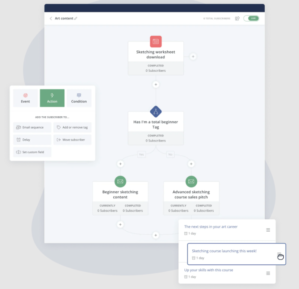
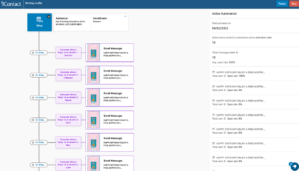
| Automation Performance | Workflow triggers, journey results, and subscriber movement | I found visual automation approach suitable for welcome series, onboarding, abandoned-cart reminders, and re-engagement campaigns. From an analytics perspective, I wanted to see how many contacts entered, completed, paused, or dropped from each path. Workflow builder appears more capable on Premium than Free. You should carefully test event timing, branching, wait conditions, re-entry rules, and step-level reporting before using it for revenue-critical customer journeys. | Mailercloud offers more accessible automation than many free tools, while ActiveCampaign and Drip provide deeper branching and customer-journey controls. |
| Email Builder and Templates | Drag-and-drop creation, mobile preview, and campaign production speed | I found drag-and-drop builder practical when moving from campaign creation into analytics testing. Large template collection should help a team launch different campaign types without starting from an empty design. Desktop and mobile previews are important because layout problems can reduce clicks even when delivery is strong. You should still test reusable blocks, brand controls, undo history, inbox rendering, and template permissions before using builder across several teams. | Mailercloud offers more than 400 templates, while Mailchimp may provide a broader design ecosystem and MailerLite offers a particularly simple creator experience. |
| AMP Email Analytics | Interactive forms, surveys, carousels, and live inbox content | I found AMP email especially interesting because it can measure interactions that happen directly inside a supported inbox. Forms, surveys, and product carousels may reduce drop-off caused by sending subscribers to another page. Limitation is that AMP is not supported everywhere, so you should always test the standard HTML fallback. You should also confirm how Mailercloud reports AMP actions separately from normal clicks and website conversions. | Mailercloud provides fuller AMP support than Mailchimp and MailerLite, where comparable interactive functionality is limited or unavailable. Its value depends on audience mailbox providers and quality of the fallback design. |
| Email API Logs and Webhooks | Transactional status tracking, errors, events, and debugging visibility | I found message-level logs valuable for connecting product emails with measurable delivery outcomes. Following a message from queued to delivered, opened, bounced, or complained about would help me investigate individual failures without relying only on account-wide totals. Webhooks add real-time event data for internal dashboards. You should still test webhook retries, log retention, filtering, API latency, and the separation of transactional and marketing reputation before deploying it at scale. | Mailercloud combines marketing analytics with developer-focused visibility, while specialized providers may offer deeper API controls. Teams can estimate costs with our Transactional Email API Cost Calculator. |
Mailercloud separates its services into a Marketing Platform, an Email API, and an Email Verifier. Marketing Platform uses contact-based pricing, while paid subscriptions include unlimited email sending under a fair-use policy. This structure can be attractive to businesses that send frequently because the monthly cost is primarily determined by the number of stored contacts rather than the number of campaigns sent. However, you should review Mailercloud fair-use terms and calculate how contact growth will affect future subscription costs.
| Plan | Starting Price | Contact Allowance | Email Allowance | Best For |
|---|---|---|---|---|
| Free | $0 per month | Up to 1,000 contacts | 12,000 emails per month | Creators, new businesses, and teams testing email marketing |
| Premium | From $10 per month | Pricing scales with contact volume | Unlimited under fair use | Regular senders needing advanced automation, testing, and support |
| Enterprise | Custom pricing | Custom contact allowance | Unlimited under agreed terms | Agencies, high-volume senders, and organizations requiring dedicated services |
Mailercloud Free plan provides 1,000 contacts and 12,000 emails each month without requiring a credit card. It includes regular campaigns, a drag-and-drop email builder, basic automation, GDPR and data-processing support, and email-based customer service. The free plan is useful for small lists and early-stage testing, but it excludes A/B testing, AI-generated subject lines, AMP email support, bulk automation, and priority chat support. Only one advanced automation is listed, so teams building several customer journeys may need to upgrade quickly.
Premium plan starts at approximately $10 per month for 1,000 contacts and increases as the database grows. Mailercloud lists unlimited email sending under a fair-use policy, advanced workflow automation, up to 25 advanced automations, bulk automation, A/B testing, AI subject-line generation, AMP email support, and priority chat assistance. This tier is best suited to ecommerce stores, SaaS teams, newsletters, and small businesses that send regularly. Mailercloud also offers annual billing with a stated saving of up to 30% compared with monthly payment.
Pricing clarification: Mailercloud supplied pricing information shows the Premium plan as $10 per month in more than one billing context. You should confirm whether the displayed $10 rate applies to monthly billing, annual billing, or a promotional term before completing payment.
Enterprise plan uses customized pricing based on contact volume, sending requirements, technical needs, and support expectations. It includes everything in Premium, unlimited advanced automations, dedicated IP addresses, a dedicated account manager, custom integrations, SAML-based single sign-on, and service-level or uptime commitments. This plan is the more appropriate choice for agencies managing multiple clients, enterprises with strict security requirements, and organizations that need controlled sending infrastructure or specialized implementation support.
| Stored Contacts | Mailercloud Reference Price | Pricing Observation |
|---|---|---|
| 10,000 | $50 per month | Competitive for businesses that send many campaigns because paid sending is described as unlimited under fair use. |
| 25,000 | $125 per month | Suitable for growing databases, although contact-based pricing means inactive subscribers can increase the bill. |
| 50,000 | $230 per month | Potentially cost-effective for frequent senders compared with platforms that combine contact and send limits. |
| 100,000 | $380 per month | At this level, businesses should compare Enterprise terms, dedicated IP requirements, and account-management support. |
Mailercloud Email API is a separate developer-focused product for sending transactional and marketing messages through REST API or SMTP. Pricing is advertised from approximately $7 per month. It supports OTP messages, password resets, order updates, alerts, and application-triggered communication. You should confirm message volume, overage pricing, log retention, dedicated IP availability, webhook limits, and support before purchasing. Use our Sprout24 Transactional Email API Cost Calculator to model API expenses before committing.
Email Verifier uses a credit-based model that is separate from Marketing Platform. Pricing starts at $5 for 1,000 verification credits, and the same credits can be used for bulk files, Quick Verify, or REST API validation. Subscription credits renew during each billing cycle, while pay-as-you-go credits are described as non-expiring. Annual verification subscriptions receive a stated 20% discount. Existing Mailercloud subscribers also receive 100 complimentary verification credits.
| Verification Credits | Reference Price |
|---|---|
| 1,000 | $5 |
| 2,000 | $9 |
| 5,000 | $19 |
| 10,000 | $29 |
| 50,000 | $79 |
| 100,000 | $129 |
| 500,000 | $449 |
| Platform | Pricing Approach | Mailercloud Advantage | Where Alternative May Be Stronger |
|---|---|---|---|
| Mailchimp | Contact and feature-tier pricing with plan-specific sending allowances | Mailercloud offers free automation, built-in inbox monitoring, AMP emails, and lower reference pricing at larger contact volumes. | Mailchimp has a broader integration ecosystem, greater brand recognition, and more extensive creative and commerce resources. |
| Brevo | Primarily email-volume-based pricing with contact and feature conditions | Mailercloud may be more predictable for frequent senders because paid plans advertise unlimited sending under fair use. | Brevo provides a broader suite covering CRM, transactional messaging, sales tools, chat, and multichannel communication. |
| MailerLite | Subscriber-based pricing with feature differences between tiers | Mailercloud includes advanced deliverability tools such as Inbox Tracker and supports interactive AMP emails. | MailerLite may offer a more mature creator workflow, website builder, landing pages, and newsletter monetization ecosystem. |
| ActiveCampaign | Contact-based pricing influenced by automation, CRM, and feature tier | Mailercloud is generally simpler and less expensive for standard campaigns, inbox monitoring, and routine automation. | ActiveCampaign provides more advanced CRM functions, lead scoring, sales pipelines, branching logic, and lifecycle orchestration. |
| Contacts | Mailercloud | Mailchimp | Brevo | ActiveCampaign |
|---|---|---|---|---|
| 10,000 | $50 | $133 | $70 | $175 |
| 25,000 | $125 | $258 | $150 | $400 |
| 50,000 | $230 | $382 | $393 | $650 |
| 100,000 | $380 | $764 | $793 | $1,000 |
Comparison figures are reference prices supplied by Mailercloud and may exclude taxes, add-ons, regional adjustments, promotional pricing, or contract discounts. Competitor pricing can change, so you should verify current checkout costs directly before making a decision.
Mailercloud presents strong value for businesses that send frequently and want advanced automation, AMP email, inbox-placement monitoring, and campaign analytics without a separate sending cap on paid plans. Free plan is generous enough for testing but is limited to 1,000 contacts and basic automation. Premium is strongest fit for regular small-business and ecommerce campaigns, while Enterprise is better for agencies and high-volume teams. Main long-term cost consideration is contact growth, because every stored subscriber can affect the subscription price even when that contact is not actively receiving campaigns.
When I choose an alternative to Mailercloud, I will start with the reason for switching. Mailercloud combines campaign creation, automation, inbox monitoring, AMP email, API delivery, and email verification, so I avoid comparing platforms only by their entry price. I first review contact limits, monthly sending rules, automation depth, deliverability controls, integrations, analytics, support, and expected migration effort. Sprout24 Email Marketing Tools Selection Guide helps organize these requirements before testing vendors.
For a simple interface and creator-friendly newsletters, you should compare MailerLite. It is a practical option for teams focused on campaigns, forms, landing pages, and straightforward automation. However, you should check whether its inbox-monitoring and transactional email capabilities match Mailercloud. Teams can also review MailerLite alternatives for additional lightweight choices.
For deeper automation, CRM workflows, lead scoring, and sales pipelines, you should consider ActiveCampaign. It is generally stronger for complex customer journeys, although it may cost more and require additional setup. ActiveCampaign alternatives section is useful when advanced automation is the main requirement.
For broader multichannel communication, you should compare Brevo, while ecommerce businesses should also assess Klaviyo or Omnisend. Mailchimp remains relevant for businesses prioritizing integrations and an established ecosystem, and Sprout24 Mailchimp alternatives guide provides more options.
My final decision would follow a live trial using real templates, segments, automation events, and authenticated domains. I would compare actual inbox placement, reporting quality, support response, and projected costs with the Sprout24 Email Marketing Cost Calculator before migrating.




| Common Specifications | ||||||||||||||
|---|---|---|---|---|---|---|---|---|---|---|---|---|---|---|
|
||||||||||||||
| Specification | ||||||||||||||
|
||||||||||||||

I am an accomplished marketing expert with over 10 years of experience focused on growth strategies, emerging technologies, and startup success stories. Driven by a passion for continuous learning, I actively explore and analyze new tools and services that enhance workplace productivity and efficiency. I possess deep expertise across key…
I am an accomplished marketing expert with over 10 years of experience focused on growth strategies, emerging technologies, and startup success stories. Driven by a passion for continuous learning, I actively explore and analyze new tools and services that enhance workplace productivity and efficiency. I possess deep expertise across key…

Preeti is an accomplished technical writer and content creator with expertise spanning engineering and technology.…
Quick quiz to see whether Email, Marketing Automation, or CRM suits your team right now.
Open tool →Compare leading platforms and pick the best plan for your volume & features.
Compare costs →Estimate monthly API spend across free limits, pay-as-you-go pricing, and integrations.
Estimate API costs →Turn your plan into a person-weeks estimate with a clean task breakdown.
Estimate effort →Project list size by month from sign-ups, churn, and timeframe.
Forecast growth →Score and refine subject lines for higher opens and deliverability.
Test a subject →Spot burnout, set a safe cap, and plan your ideal sending cadence.
Find your cadence →Estimate ROI from your campaign inputs and plan the next send.
Estimate ROI →
Sprout24 powers smarter email marketing platform decisions with contextual insights, optimization tools, and Sprout Score.
Sprout24 enables small business teams evaluate, compare, and optimize their email marketing stack with confidence.
Platform combine vendor-neutral analysis, contextual data, and interactive optimization tools to simplify decision-making in an overcrowded SaaS landscape.


There are no reviews yet.