
 Navodit Ravi

Drip email campaign tools automate a sequence, but choosing one is not a simple feature-count exercise. A creator welcoming 800 readers, a SaaS team reacting to product events, and an ecommerce brand recovering carts all need a different data model. Price also changes with contacts, profiles, or sends. I use fit, not popularity, as my starting point.
Our 2026 shortlist keeps eight platforms from our hands-on review history and adds three products already evaluated in Sprout24 email marketing research. My quick answer is practical: MailerLite is an approachable small-list option, Kit suits creator-led sequences, Drip fits ecommerce lifecycle work, and Customer.io fits event-rich product journeys. No one choice wins every context.
This guide separates our own observations and findings from public facts verified on official vendor pages on July 20, 2026. Prices are starting points, before tax and add-ons, and can change. Use our email marketing cost calculator after you narrow a shortlist.
Drip email campaign software compared
Start with data and workflow depth. “Basic” below means a timed sequence with simple conditions. “Visual” means branching workflow logic. “Event-rich” means behavior or product data can drive paths. Fit labels are editorial inferences from documented capabilities and our review context, not vendor test claims.
| Tool | Best-fit job | Automation profile | Starting paid price | Free access | Sprout Score | Official evidence |
|---|---|---|---|---|---|---|
| MailerLite | Small lists and simple funnels | Visual; free plan step limits | $12/mo | 250 subscribers; 2,500 sends/mo | 9.1/10 | Pricing |
| Drip | Ecommerce lifecycle | Visual, behavior and purchase driven | $39/mo, 2,500 people | Trial | 7.6/10 | Plan page |
| GetResponse | Campaigns, funnels, webinars | Basic on Starter; full visual on Marketer | $19/mo monthly | Free account and 14-day premium trial | 7.1/10 | Pricing |
| Encharge | SaaS onboarding | Visual, behavior driven | $99/mo | 14-day trial | 7.7/10 | Pricing |
| Customer.io | Data-rich lifecycle messaging | Event-rich, cross-channel | $100/mo | Conditional startup program | 7.7/10 | Pricing |
| Benchmark Email | Small-business campaigns | Automation Lite or paid automation | $15/mo | 500 contacts; send cap applies | 6.8/10 | Pricing |
| Kit | Creators and digital products | One basic free automation; unlimited paid | $39/mo monthly | Up to 10,000 subscribers | 7.0/10 | Plan terms |
| Sendloop | General email and SMS | Paid journeys and autoresponders | $39/mo | Storage free; sends $0.01 each | 7.2/10 | Pricing |
| Vision6 | Australian email and SMS teams | Standard and advanced automation | AUD $45/mo | 30-day trial; 250 sends | Not currently published | Pricing |
| ActiveCampaign | Advanced SMB automation | Visual builder and recipes | $15/mo | 14-day trial | 7.0/10 | Automation |
| Brevo | Budget multichannel work | Automation up to 2,000 contacts free | $9/mo | 300 sends/day | 6.8/10 | Plan guide |
Our review of 11 drip campaign tools
1. MailerLite: simple visual automation for small lists
MailerLite Free plan now supports up to 250 active subscribers and 2,500 monthly emails, with three active automations and five steps per automation. Comfort starts at $12 monthly and allows 50 automations with up to 100 steps; Power starts at $25 and adds unlimited automations, unlimited sends, multiple triggers, and unlimited seats. A 14-day premium trial is available.
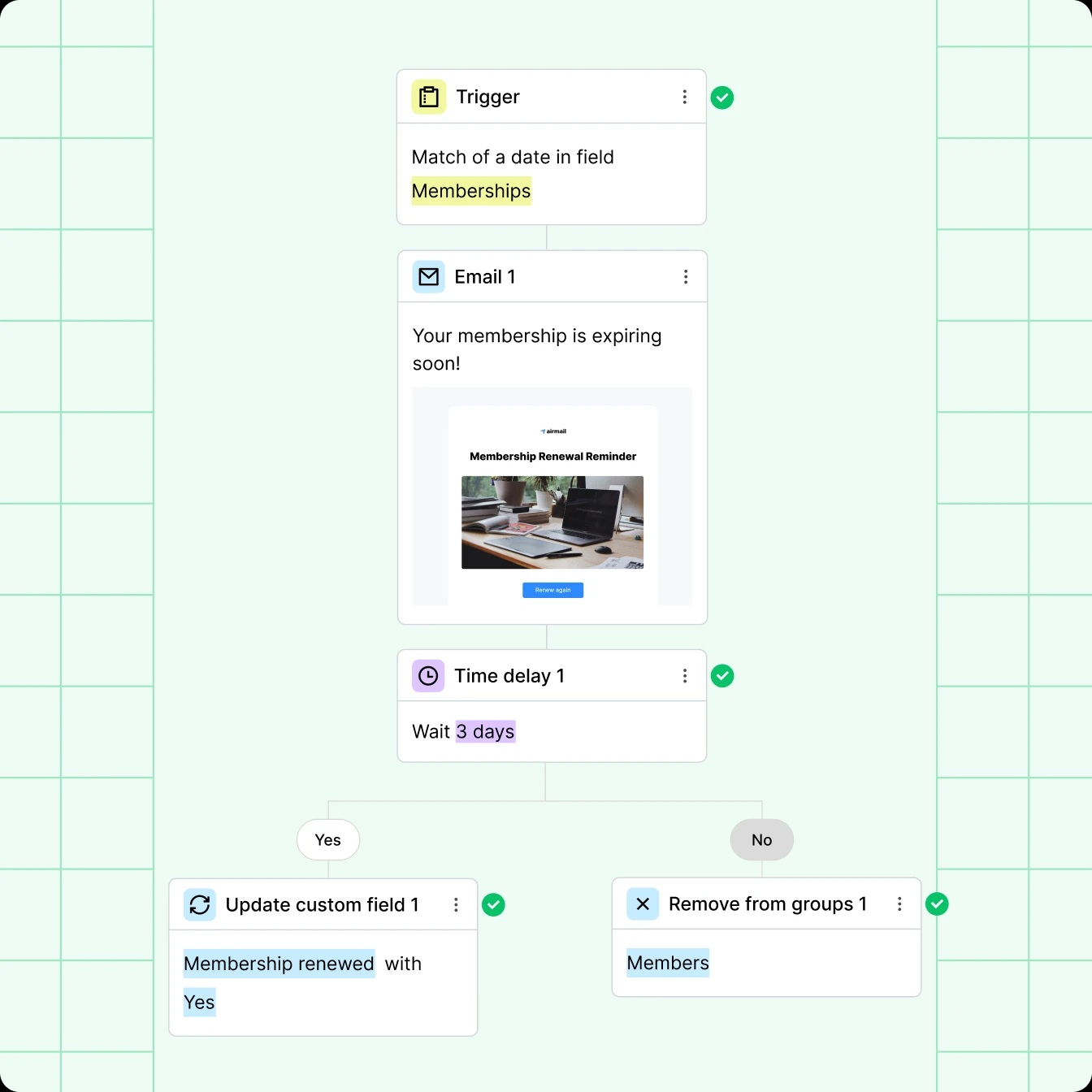
Our review gets MailerLite highest Sprout Score in this email-tool category. We favor ease of use, real-time analytics, event-triggered actions, lead generation, price, and email delivery signals. SMS, refund policy, and plan-expiry communication are concerns noted in our dataset. MailerLite fits straightforward welcome, course, post-purchase, and re-engagement sequences. Complex object data or deep cross-channel orchestration can outgrow it. Compare MailerLite versus Mailchimp and review MailerLite alternatives before committing.
2. Drip: ecommerce automation with revenue context
Drip remains purpose-built around ecommerce behavior. Official material documents visual workflows, goals, split tests, and playbooks for abandoned carts, browse abandonment, and win-back journeys. Current pricing starts at $39 monthly for 1 to 2,500 people with unlimited email sends. That is a material change from earlier plan figures, so use current terms rather than archived price references.
Our hands-on notes favor easy automation, advanced segmentation, personalization, integrations, and strong email delivery signals. We also recorded complexity, cost, limited support, a learning curve, and customization limits. My view: Drip makes sense when store events and revenue reporting matter more than a permanent free plan. A newsletter-only team may pay for depth it does not use. Compare ecommerce requirements with our ecommerce email tool benchmark.
- Visual automation and segmentation
- Ecommerce personalization
- Revenue-oriented analytics
- Learning curve for deeper flows
- No permanent free plan
- Cost for simple newsletters
3. GetResponse: broad campaign suite
GetResponse combines email, landing pages, forms, automation, funnels, webinars, and creator features. Starter costs $19 monthly and includes unlimited monthly sends plus one custom workflow limited to six elements. Marketer begins at $59 monthly and unlocks unlimited workflows, advanced segmentation, ecommerce recovery, and related sales tools. A 14-day premium trial is documented.
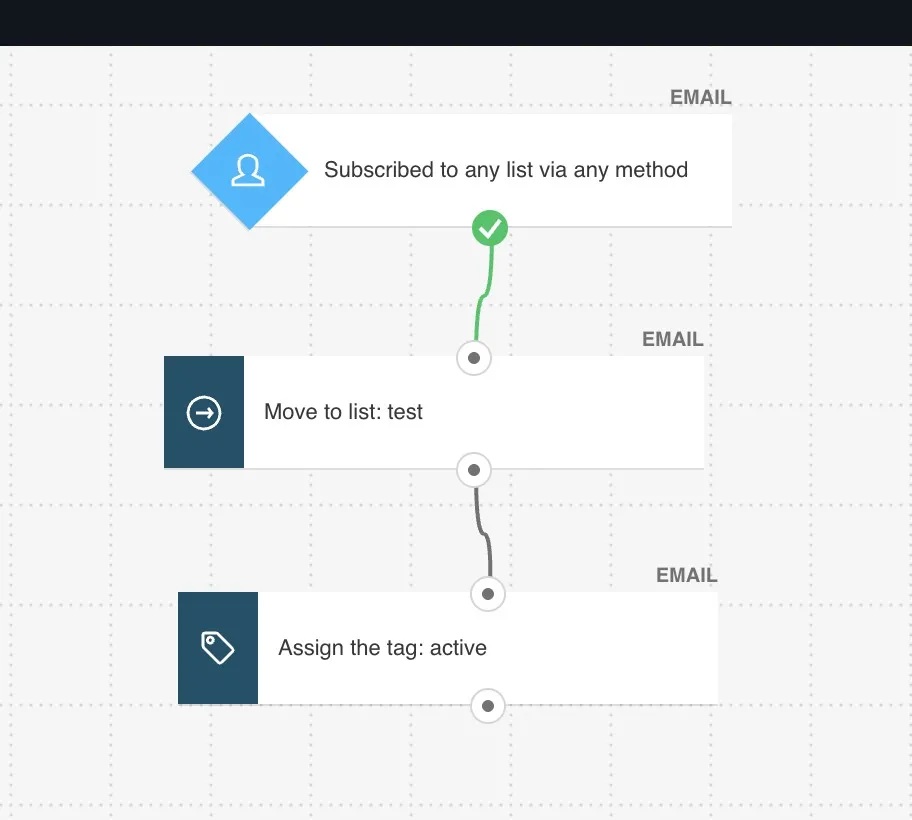
Our own experience highlights an accessible email creator, landing pages, templates, list imports, mobile access, segmentation, and testing. We also noted limited customization, flexibility, reporting depth, support, and a learning curve once teams use its wider suite. I shortlist it when a team wants several acquisition and communication jobs in one account. If automation is central, compare Marketer rather than assuming Starter represents full drip campaign software. Use our email platform selection guide to test suite breadth against actual need.
4. Encharge: SaaS onboarding specialist
Encharge focuses on SaaS lifecycle work. Its Growth plan starts at $99 monthly and includes a flow builder, advanced segmentation, behavior-based email, webhooks, Zapier, Stripe, Chargebee, unlimited flows, and unlimited team members. Premium starts at $159 monthly, adding HubSpot, Salesforce, Segment, ecommerce integrations, transactional email, API events, event-based segmentation, and custom objects. Annual billing lowers displayed monthly equivalents.
Our earlier hands-on coverage emphasized onboarding journeys, behavioral emails, user profiles, and segments built from product or marketing-stack data. Current public facts reinforce that positioning. Encharge is less compelling for a simple timed newsletter sequence; its value appears when trial activation, product events, and CRM or billing signals shape messaging. Budget for Premium when key data routes sit behind that tier. See our marketing automation platform reviews for a broader field.
5. Customer.io: data-driven lifecycle orchestration
Customer.io starts at $100 monthly for 5,000 profiles, one million monthly emails, two object types, a visual workflow builder, and basic data integrations. Premium begins at $1,000 monthly with custom profile and email volume, more object types, onboarding, compliance options, and stronger support. A startup offer may provide twelve months free to qualifying early-stage companies, but that is not a general free plan.
We found advanced personalization, real-time analytics, integrations, and efficient event-driven work to be major strengths. We also noted cost, setup complexity, limited templates, support constraints, and lighter A/B testing than some buyers expect. Official documentation shows SDK, server, mobile, database, and warehouse paths, which explains why technical readiness matters. I choose Customer.io for product-led teams able to supply clean events, not teams seeking a quick autoresponder. Plan data contracts before building journeys; our email platform selection service can help align marketing and engineering.
6. Benchmark Email: approachable campaign building
Benchmark Email offers a free plan for up to 500 contacts. Current official pages show 2,500 monthly sends in one regional pricing view, while a January 2026 knowledge-base page lists 3,500. That inconsistency is a reason to confirm account-specific terms at signup. Free access includes core campaign tools and Automation Lite; Pro starts near $15 monthly and adds broader automation, landing pages, and A/B testing.
Our review favors its drag-and-drop editor, dynamic content, image library, ease of use, and value. We recorded autoresponder constraints, text-formatting friction, and inconsistent sending as concerns. Benchmark works as a low-friction email drip tool for small teams, especially when design speed matters. Do not assume free Automation Lite equals paid workflow depth. Compare current free allowances with our guide to affordable Mailchimp alternatives.
7. Kit: creator sequences and monetization
Kit is built for creators, bloggers, and digital-product sellers. Its free Newsletter plan supports up to 10,000 active unique subscribers, unlimited sends, forms, landing pages, products, tagging, one basic visual automation, and one sequence. A Kit-managed Recommendation slot helps fund free access. Creator starts at $39 monthly for up to 1,000 subscribers, with unlimited visual automations and sequences. Annual billing displays a lower monthly equivalent.
Our hands-on notes praise straightforward automation, segmentation, landing pages, ecommerce connections, and creator-focused support. We found reporting, template variety, design flexibility, and A/B testing less extensive than some alternatives. Kit is my creator pick when audience growth and selling knowledge products matter. Teams needing many event-rich product branches should look elsewhere. For a close pairing, read Kit versus Mailchimp or use our newsletter tool comparison.
8. Sendloop: flexible email and SMS journeys
Sendloop now lists a Free option with unlimited subscriber storage, basic segments, Zapier, and a drag-and-drop builder, but no included email delivery; sends cost $0.01 each. Pro starts at $39 monthly and adds autoresponders, activity segments, targeting, journeys, SMS, webhooks, and sender domains. High Volume begins at $235 monthly and adds a dedicated IP plus delivery consulting.
Our review observed an accessible interface, automation, personalization, integrations, and real-time reporting. Trade-offs included price, learning curve, support, and a less polished feel than leading competitors. I would treat its free tier as storage plus pay-per-send, not a normal free email service. Sendloop may fit teams that want both journeys and SMS without a long contract. Validate total send cost using our email marketing ROI calculator.
9. Vision6: Australian email and SMS operations
Vision6 combines email and SMS with local Australian positioning. From July 2025, new accounts gained a single prepaid plan with all features and unlimited email sends. Pricing begins at AUD $45 monthly for up to 500 contacts, excluding GST. A 30-day trial includes all features, advanced automations, conditional content, and 250 trial sends. Unlimited users are documented.
Our own review noted templates, a drag-and-drop editor, SMS, social publishing, consent-oriented forms, one-click unsubscribe, real-time reports, and click maps. We also found its interface dated and clunky. Official support material distinguishes standard trigger or date automations from advanced flows and warns that editing timing can reset timers. That operational detail deserves a trial test. Vision6 is relevant for Australian teams valuing onshore support, data location, and email plus SMS.
10. ActiveCampaign: deep SMB automation
ActiveCampaign combines email marketing, automation, and sales capabilities. Official pages list packages from $15 monthly for accounts below 1,000 contacts and a 14-day trial capped at 100 contacts and 100 sends. Its visual builder, prebuilt recipes, onboarding, and migration support reduce starting friction, although advanced builds still demand governance.
We reviewed context credits automation, lead and campaign management, pricing, and a useful activity dashboard. Latest support and tracking remain areas to test. ActiveCampaign belongs on a shortlist when conditional logic and CRM-adjacent work exceed a simple autoresponder but Customer.io feels too technical or expensive. Map every trigger and owner before migration. Our ActiveCampaign alternatives guide helps if workflow depth is right but another constraint fails.
11. Brevo: send-based multichannel value
Brevo prices marketing plans mainly by email volume. Free includes 300 daily sends, storage for up to 100,000 contacts, and multichannel automation for up to 2,000 contacts. Starter begins at $9 monthly; Standard begins at $18 and removes automation contact limits while adding A/B testing, send-time optimization, advanced reports, and a landing page. Paid contact storage limits still vary with selected send volume.
Our review notes value, contact management, campaign management, support, and broad channel options. Ecommerce integrations, surveys, speed, and support consistency are trade-offs to verify. Brevo is attractive when send-based pricing and email, SMS, WhatsApp, or transactional needs overlap. A 300-per-day free ceiling makes large same-day broadcasts impractical. Compare it with Mailchimp in our Brevo versus Mailchimp analysis, then model multichannel fit with our omnichannel comparison.
How I would build a drip campaign
- Define one measurable job. Welcome, activate, recover, renew, or re-engage. Avoid one sequence that tries to do all five. Our email marketing guide provides wider campaign context.
- Specify entry and exit rules. Record exactly who enters, who cannot enter, and what removes a person. A purchase should usually stop cart reminders.
- Map minimum data. Use only fields and events required for relevant branching. More data creates more QA and governance work.
- Write for sequence continuity. Each message should advance one idea and set a clear next action. Avoid repeating a generic promotion.
- Control pressure. Coordinate broadcasts, transactional messages, and automated flows. Use our email fatigue checker before raising cadence.
- Test paths, not only emails. Validate every branch, delay, merge field, link, exit, suppression, timezone, and mobile rendering state.
- Measure business and list outcomes. Track conversion and revenue where appropriate, plus bounce, unsubscribe, complaint, and downstream retention signals.
A typical welcome sequence may start with three to five messages, but I would not enforce a universal number. Sales cycle, promise made at signup, existing campaign pressure, and audience response should determine length. The right automatic drip email software makes revision observable and safe; it does not decide strategy for you.
Two graphs for a defensible shortlist
These views answer different questions. Score data reflects achieved Sprout24 context; it is not a live performance leaderboard. Starting price shows entry friction, not cost at your list size. Read them together, then test finalists.
Interpretation: use score as a research signal, then apply fit. MailerLite leads this dataset, and a creator with simple sequences may gain more value from Kit or MailerLite.
| Product | Score |
|---|---|
| MailerLite | 9.1 |
| Customer.io | 7.7 |
| Encharge | 7.7 |
| Drip | 7.6 |
| Sendloop | 7.2 |
| GetResponse | 7.1 |
| ActiveCampaign | 7.0 |
| Kit | 7.0 |
| Benchmark Email | 6.8 |
| Brevo | 6.8 |
| Vision6 | Not published |
Interpretation: price narrows only a first pass. Brevo starts lowest, while Customer.io and Encharge enter near $100 because they target deeper data-driven use cases. Drip, Kit, and Sendloop share a $39 entry point but solve different jobs. Vision6 starts at AUD $45, so direct bar comparison would require a changing exchange rate.
| Product | Starting monthly price | Currency note |
|---|---|---|
| Brevo | $9 | USD |
| MailerLite | $12 | USD |
| ActiveCampaign | $15 | USD |
| Benchmark Email | $15 | USD |
| GetResponse | $19 | USD |
| Drip | $39 | USD |
| Kit | $39 | USD monthly billing |
| Sendloop | $39 | USD |
| Encharge | $99 | USD monthly billing |
| Customer.io | $100 | USD |
| Vision6 | $45 | AUD, excluding GST |
Final verdict: which drip email tool should you choose?
For an early small-business sequence, I would start with MailerLite, Kit, or Brevo and test free constraints before paying. For creators, Kit has a distinctive free allowance and a clear upgrade path into unlimited visual automations. For ecommerce revenue journeys, Drip remains more focused. For SaaS onboarding, Encharge offers product-oriented flows without requiring Customer.io-level data plumbing. For advanced product and lifecycle messaging, Customer.io earns attention when engineering support and budget are available.
GetResponse fits teams that want campaigns, landing pages, funnels, and webinars in one suite. ActiveCampaign is a strong middle path for advanced visual automation and CRM-adjacent work. Sendloop deserves a look when email and SMS journeys fit its pricing model. Vision6 has a clear Australian case around local support, onshore data, and unlimited users. A final choice should survive a representative workflow test, a twelve-month cost model, and a data or deliverability review.
If two options remain close, compare actual triggers, exits, reporting, support, and integration effort rather than adding generic features. Then run a controlled pilot with a clean segment. That is how I would choose the best drip campaign software for a real operating team, not an imaginary average buyer.
Frequently asked questions
What is a drip email campaign?
A drip campaign is a planned series of automated messages triggered by time, a date, a signup, behavior, a purchase, or another event. A simple series follows delays. A nurture journey may branch based on profile or behavior data.
What features matter most in drip campaign software?
Check entry and exit rules, branching, segmentation, personalization, event data, testing, reporting, integrations, consent controls, support, and total cost. Our email marketing resources help frame related decisions.
How many emails should a drip campaign contain?
No fixed number works for every journey. Start with enough messages to complete one job, often three to five for a simple welcome flow, then adjust using engagement, conversion, unsubscribe, complaint, and retention evidence.
Which tools offer free drip campaigns?
Kit, Brevo, MailerLite, and Benchmark Email provide some free automation access, with very different subscriber, send, and workflow limits. Sendloop offers free storage but charges per delivered email. Verify live terms before launch.
Is a drip campaign different from lead nurturing?
A timed drip can send a fixed sequence. Nurturing usually adapts content or timing to stage, attributes, and behavior. Modern platforms can support both, so define workflow logic rather than relying on labels.
Can Mailchimp run a drip campaign?
Mailchimp supports automation, but plan gates and limits change. Compare it with Mailchimp alternatives and model current contact-count rules before choosing.
How do I avoid overwhelming subscribers?
Coordinate automated and scheduled campaigns, suppress irrelevant messages, honor exits, monitor complaints and unsubscribes, and reduce frequency for inactive audiences. Use our email frequency optimization tool for a structured starting point.
Should I choose on price or Sprout Score?
Neither alone. Price is an entry point, while Sprout Score summarizes evaluated criteria. Apply both to your data model, workflow depth, channels, list size, team skill, security, and migration risk.
Research note: Current facts were checked against linked official vendor pricing, product, help, and documentation pages on July 20, 2026. Sprout Scores, pros, cons, and hands-on observations come from local Sprout24 editorial and hub sources. Product-fit statements are editorial inferences. Prices exclude taxes and may vary by volume, billing cycle, region, or add-ons.
- 01 Dec 2025 – Added CAPTCHA and bot prevention tips
- 04 Oct 2025 – Added workflow templates gallery
How do we evaluate email marketing tool?
Manual testing is the process that goes beyond just ticking boxes. Our team start by defining clear testing objectives based on the intended use of email marketing tools and platforms. Each tools undergoes a rigorous user experience analysis, where we simulate real-world scenarios to gauge performance, usability, and reliability.
We pay special attention to the integration capabilities, data security, and compliance standards of the MarTech vendor. This hands-on 25 test-point approach allows us to uncover nuances that automated testing might miss, providing a more holistic understanding of the tools.
How do we evaluate and benchmark email marketing service effectively?
Our evaluation process is data-driven and multi-dimensional. Our team analyze tool performance metrics against industry standards and similar product platforms.
Key performance indicators (KPIs) are meticulously examined, including ease of use, customization options, scalability, customer support effectiveness, and innovation. We also incorporate user feedback to ensure our benchmarks reflect actual user experiences and expectations.
This comprehensive method ensures a fair and effective comparison of the email marketing services.
How accurate are these comparisons and alternative suggestions of the email marketing tools?
We pride ourselves on the accuracy of our comparisons and suggestions. Our team expertise, combined with advanced analytics tools, ensures that our data is both current and relevant. We constantly update our database with the latest market trends and user feedback, which helps us provide accurate and timely recommendations.
However, it’s important to remember that each business has unique needs, and our suggestions are a starting point for their decision-making process.
Why email marketing tool buyers trust Sprout24 reports and analysis?
Our reputation for trustworthiness stems from our commitment to impartiality and depth of research. We do not just skim the surface; we go deep into each email marketing tools and service capabilities and shortcomings.
Our reports are comprehensive, easy to understand, and transparent, explaining not just what we recommend but why. This transparency and thoroughness are why email marketing tool buyers trust our reports.
Our FTC Disclosure explains the sources of funding and revenue of Sprout24 platform; this enables us to curate straightforward and unbiased reviews.
How these reports help in reducing the time to purchase a email marketing platform?
Our reports and guides significantly reduce the time to purchase by providing clear, concise, and comparative information. Email marketing tool buyers don’t have to spend countless hours researching; they can find all the necessary information in one place.
Our Sprout scoring system, user reviews, and feature comparisons simplify the decision-making process, enabling buyers to make informed choices quickly.
How effective is the scoring system and help email marketing service buyers in making fast decision?
Sprout Score Scale of 0–10 rating is crafted to provide a quick, yet detailed view of a platform overall standing in various categories.
This scoring system, backed by in-depth contextual data analysis, allows email marketing service buyers to immediately gauge suitability of the tool / service for their needs. It simplifies complexity and enables fast, informed decisions, which is crucial in the fast-paced world of business.


